
Guides
How to prepare a clean-feed fallback for football graphics
Sports broadcast graphics package testing needs a working clean-feed fallback. Plan the bypass, preserve commentary, and rehearse a safe return to graphics.
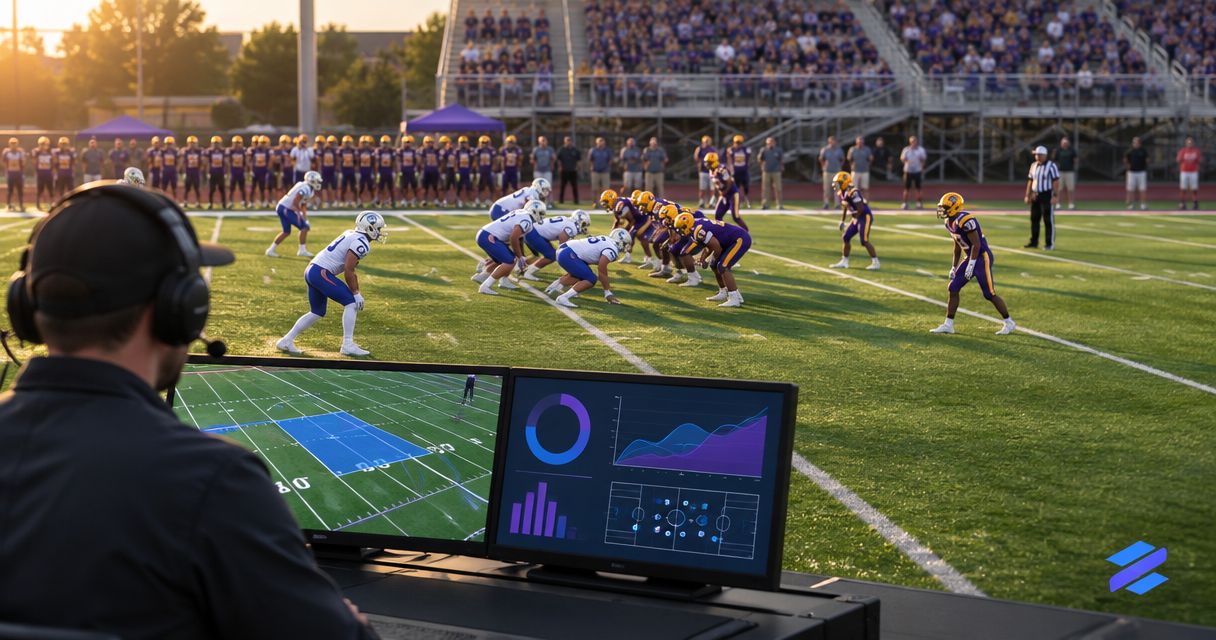
Prepare a clean-feed fallback by routing football video to your final output without passing through the on-field graphics stage, then rehearse switching to it while graphics are active. Your sports broadcast graphics package testing must also confirm that commentary, camera cuts, and the outgoing stream continue when you bypass the graphics computer—not just when you hide a line.
TL;DR
- Sports broadcast graphics package testing passes only when the clean-feed fallback works at the final output.
- Keep a selectable football video path that bypasses the on-field graphics stage.
- PayneXR adds football field graphics; prepare the fallback in your production routing, not just the graphics controls.
- Assign the fallback switch, rehearse the call, and verify picture and commentary before restoring graphics.
Why this matters
A misplaced first-down line calls for removing graphics. A lost graphics output calls for changing the video path. Those are different actions, and your crew needs both ready before kickoff.
For your 2026 football workflow, define clean feed precisely: here, it means usable game video without the on-field graphics being bypassed. It does not automatically mean removing the scoreboard, commentary, captions, or every other production element.
Start with where football graphics sit in your video signal path. A signal path is the route video follows from the camera through production equipment to the viewer. A fallback is only useful if you can reach it without operating the component that failed.
How do you prepare a clean-feed fallback for football graphics?
Build the fallback upstream of the graphics stage, make it selectable at the production output, and test it under a deliberate graphics interruption. Follow these steps using your actual production equipment; connection choices depend on the inputs and outputs that equipment supports.
1. Draw the route viewers actually receive
Write down the camera source, graphics stage, production switcher, and streaming or transmission destination. A production switcher selects which video source goes to the program output—the picture sent to viewers.
Mark where commentary enters the production. Also identify recordings, venue displays, and remote destinations that receive separate outputs. Checking the stream does not establish that a stadium display receives the same fallback.
Do not start with connector names. Start with the question: if the graphics stage disappears, which remaining source can still show the game?
2. Identify the video before field graphics
Find the camera or production feed before the on-field graphics are added. This is your candidate clean source. Confirm it contains the game view you intend to broadcast, rather than a setup screen, preview image, or unused camera.
If you want camera cuts to continue during fallback, route a clean production feed that supports that workflow. If your fallback is a single camera, document that limitation and assign someone to keep that camera on the action.
3. Make the clean source selectable downstream
Connect or route the clean source to a destination that can select it independently of the graphics stage. Use supported connections and matching video settings; do not assume that an available socket accepts the required signal.
Name the selectable source Clean game and the graphics-bearing source Graphics game, or use equally clear labels. Avoid labels that require an operator to remember a cable number during a live play.
If both choices depend on the same graphics application remaining responsive, you have a graphics toggle—not a fallback around that application.
4. Confirm picture and commentary together
Select the clean source while monitoring the program output. Check framing, picture continuity, commentary, and any production elements that should remain visible.
Do not assume audio follows the video selection. Some productions route commentary separately; others associate audio with a video source. Rehearse the actual configuration and listen at the destination, not only through the commentator's local headphones.
5. Rehearse a graphics-only removal
Place a virtual line or sponsor graphic on the rehearsal video, then remove that overlay through the normal graphics controls. This tests your response to an incorrect graphic while the video path remains healthy.
Call the action aloud: Remove field graphics. Verify that the picture continues and the unwanted overlay disappears. Keep this action distinct from selecting the clean source so an operator does not change routes unnecessarily.
6. Rehearse losing the graphics route
During an off-air rehearsal, make the graphics-bearing source unavailable using a controlled test appropriate to your equipment. Save work first, protect any live destinations, and avoid interrupting unrelated production systems.
Now select the clean source without relying on the graphics application. Watch and listen at the final output. Record what happened, including any blank picture, frozen frame, missing commentary, or unexpected source change; do not replace observations with an assumed recovery time.
7. Assign the call and the switch
Identify who can call for fallback and who physically selects it. A school crew might combine those duties; an independent crew might share them between producer and operator; a TV production might use separate director and technical-director roles.
Use a short instruction such as Take clean game. Require acknowledgment, then confirm the output. Put the source label and control location in the handover notes so a substitute operator does not have to reconstruct the routing.
8. Rehearse returning to graphics
Restore the graphics source in preview, the monitoring view used to inspect a source before putting it on air. Check the field view, line placement, sponsor artwork, and commentary before selecting it for viewers.
Return during a suitable production moment rather than immediately after an application reopens. Recovery means the graphics-bearing output is correct, not merely that the software is running. Keep the clean source available after the return.
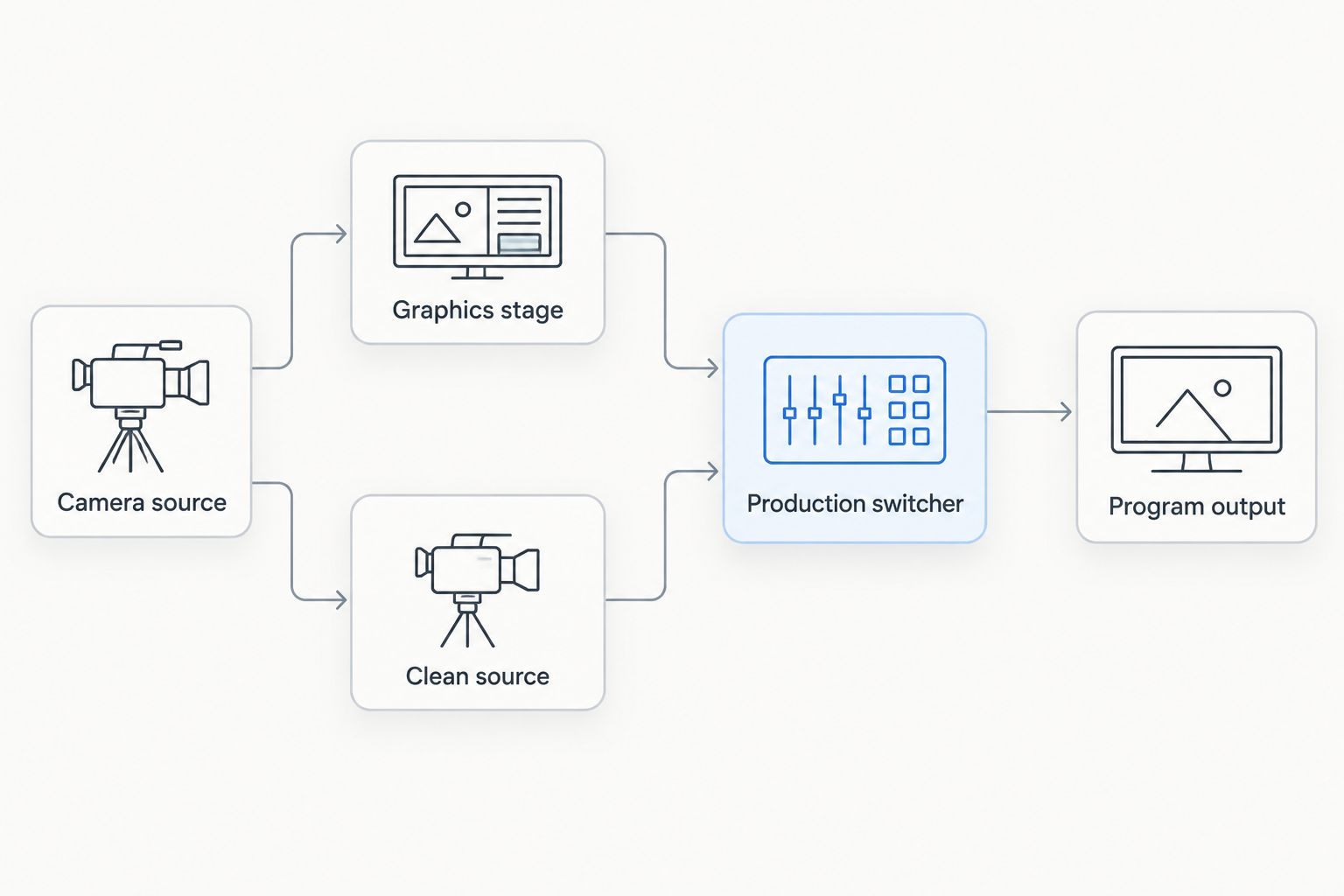
The clean route bypasses the graphics stage before reaching the output selector.
On-field graphics versus broadcasting without them
On-field graphics add visual references such as first-down and scrimmage lines, plus logos and sponsor graphics. Broadcasting without those overlays removes that information but gives your crew a defined state to use when field graphics are wrong or unavailable.
Your 2026 rehearsal should prove both states. Do not treat the clean picture as a defective version of the show; it is an intentional operating mode with its own strengths and limits.
| Operating mode | Best for | What it provides | Limitation |
|---|---|---|---|
| On-field graphics | Showing field references and sponsor artwork | Virtual lines, logos, and other prepared field graphics | Requires correct placement and an operating graphics path |
| Clean-feed fallback | Continuing game coverage during a graphics problem | Game video without the affected field overlays | Removes those visual references and sponsor placements |
| Graphics hidden on the existing route | Correcting an unwanted overlay while video remains healthy | The existing picture with selected graphics removed | Does not bypass a failed graphics output |
PayneXR is for football broadcast teams that want virtual field lines, logos, and sponsor graphics on live video. PayneXR's Windows football broadcast graphics software supplies those overlays; prepare the independent clean route in your production system rather than assuming an overlay control provides equipment redundancy.
Why clean-feed fallback setups vary
The fallback procedure depends on what your production routes through the graphics stage. Use these factors to decide what must remain available:
- Graphics insertion point: Graphics added to an individual camera require a different bypass plan from graphics added after camera selection.
- Camera switching: A clean switched feed preserves a different production workflow from a fallback limited to a single camera.
- Audio routing: Commentary handled separately needs a different check from audio associated with a selected video input.
- Shared equipment: Routes that share a computer, power source, or output device share some failure risks. Document what each bypass actually avoids.
- Output destinations: The stream, recording, broadcaster handoff, and stadium display need separate checks when they receive different feeds.
- Crew responsibilities: A solo operator needs reachable controls; a larger crew needs clear calls and acknowledgments between roles.
Avoid describing a route as fully independent without defining its boundaries. A bypass around graphics processing does not also establish protection against a failed camera, production switcher, or internet connection.
Set pass criteria before the rehearsal
Use a written checklist for your 2026 sports broadcast graphics package testing. Define success by the outgoing show, not by a graphics application's preview window.
These checks establish a practical acceptance standard:
- Picture: The clean selection shows the intended live game source, with no field overlays that the bypass should remove.
- Audio: Commentary and required production sound remain present at the destination.
- Operation: The assigned operator can select clean video without using the graphics application.
- Coverage: The crew knows whether camera switching continues or coverage becomes a single-camera shot.
- Restoration: The graphics-bearing source is checked off air before returning to program.
Write down failures in plain language. For example, note that selecting the clean source also removed commentary, then correct the routing and repeat the same test. A successful retest should reproduce the action that previously failed.
Set any timing target around your production's requirements, then measure the rehearsal against it. Do not adopt an arbitrary recovery promise that your equipment and operators have not demonstrated.
Adapt the drill to your football crew
School football broadcast teams
Put the fallback instruction beside the production controls, not only in a planning document. Have the person covering the operator's break perform the switch during rehearsal.
If student or volunteer roles rotate, explain what each source label means. Keep the instruction specific enough to follow without knowing how the whole graphics system was configured.
Independent sports streaming crews
Check whether production, graphics, and streaming depend on the same Windows computer. A source change inside that computer does not provide a fallback around a failure of the entire computer.
Document this boundary before accepting the setup. Where a separate route is required, plan supported equipment and connections around that requirement rather than assuming another scene or input makes the system independent.
TV broadcasters
Include the receiving production position in the rehearsal when the graphics-bearing feed crosses a handoff. Confirm who selects the clean feed and how the destination identifies it.
Check downstream monitoring and required audio, not only the originating position. Keep the fallback call consistent with the production's established communication procedure.
What should you record in the fallback test log?
Record the tested route, the action taken, the observed output, and the person responsible for correction. Keep a dated 2026 version with the production notes so the crew can distinguish the current configuration from a superseded rehearsal.
Use descriptive entries rather than a bare pass mark. A useful note identifies which source went to which destination, whether commentary stayed present, and what the operator did to restore graphics. Repeat the affected checks after changing routing, audio assignments, or source labels.
When should you stay on the clean feed?
Stay on clean video while the graphics-bearing source remains unverified. A visible line in the correct place on a static frame does not establish that the next camera movement or view change will be handled correctly.
Check the conditions that caused the problem before returning. If you cannot reproduce and verify the correction during the game, continue without the affected field overlays and preserve game coverage.
Can you test the fallback with recorded football video?
Recorded football video supports an off-air routing rehearsal, including source selection and graphics removal. Use footage with camera movement and view changes rather than relying only on a still image.
A recorded rehearsal does not replace checking the live camera connection and outgoing destination. Include both in your 2026 game-day preparation, with the same operator controls you intend to use during the broadcast.
FAQ
What's a clean-feed fallback for a football broadcast?
A clean-feed fallback is a selectable game-video route without the on-field graphics being bypassed. Define separately whether your scoreboard, commentary, captions, and other production elements remain.
Is hiding a first-down line the same as bypassing graphics?
No. Hiding a first-down line removes an overlay while retaining the existing video route; bypassing graphics selects a route that does not depend on the affected graphics stage.
Can PayneXR be part of a production with a clean-feed fallback?
PayneXR supplies Windows football broadcast graphics software; the clean-feed fallback must be planned in the surrounding production routing. Verify your equipment's supported connections and test the bypass at the final output.
How do I know whether commentary stays on during fallback?
Select the clean source during rehearsal and listen at the outgoing destination. Check the actual audio routing rather than assuming commentary follows the selected video.
Can one operator manage football graphics and the fallback?
A solo operator needs a clearly labeled fallback control that is reachable during production. Rehearse selecting it while also maintaining the game coverage duties assigned to that operator.
Should we restore graphics as soon as the software restarts?
No. Check the graphics-bearing source off air, including picture, field placement, and audio, before returning it to viewers.
What should sports broadcast graphics package testing include before kickoff?
Sports broadcast graphics package testing should include overlay removal, an independent clean-source selection, audio verification, and a controlled return to graphics. Check every destination that receives a separate production feed.
One last thing
Test the fallback from the seat of the person who will use it. A routing diagram can be correct while the control is mislabeled, hidden in another window, or unfamiliar to the substitute operator.
End the rehearsal on clean video and ask the operator to explain how to restore graphics safely. That final handover tests whether the procedure exists beyond the person who built it.