
Guides
Where should football graphics sit in your video signal path?
Plan your sports broadcast graphics package setup before encoding. Compare signal paths, handle camera cuts, and build a clean-video bypass for football.
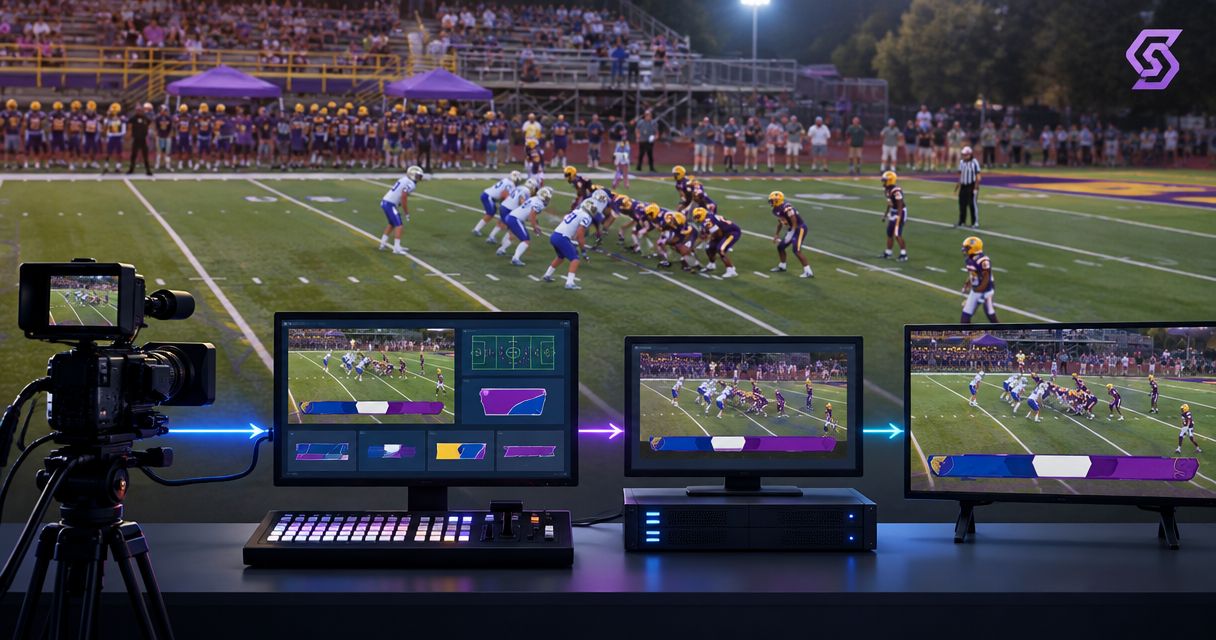
Place football graphics after the video source they must match and before the final stream or recording is encoded. For on-field lines, use a camera-specific path before switching, or process the switched program only when the graphics system supports camera changes; keep a clean-video bypass available if alignment fails.
TL;DR
- A sports broadcast graphics package setup should place on-field graphics before final encoding, with a clean-video bypass.
- Camera-specific processing keeps field alignment tied to its source; program processing requires controlled camera changes.
- Paynexr provides Windows football graphics software; verify its connections against your production equipment before choosing the routing.
- Keep field lines separate from scoreboards and lower thirds when their operating requirements differ.
Why this matters
A first-down line belongs to the field. A scoreboard belongs to the screen. Treating both as interchangeable overlays creates a routing problem: a scoreboard can remain in the same screen position through a camera cut, but a field line must match the camera's view.
Paynexr sells Windows software for virtual first-down lines, scrimmage lines, logos, and sponsor graphics. Paynexr is for football production teams that need Windows software for on-field broadcast graphics. Its place in your chain depends on the supported video connections and camera-handling workflow, not just where an unused input exists.
For your 2026 production plan, draw the entire path before connecting equipment. Include the camera, switcher, graphics processing, audio, encoder, and destination. Mark the point where graphics become part of the video image.
Where should football graphics sit in your video signal path?
Put field graphics where the system can match the active camera, then send the finished picture toward encoding. Encoding compresses video for streaming or recording; graphics intended for that output must already be present before that encoding stage.
A switcher selects which camera or source goes to the audience. Its selected output is the program feed. Compositing combines graphics and video into a finished picture.
| Placement option | Best for | Advantage | Limitation |
|---|---|---|---|
| Camera-specific processing before switching | A designated field camera | Graphics stay associated with that camera's picture | Other cameras need separate handling or remain clean |
| Processing after the program switch | A workflow with supported camera-change handling | Graphics processing receives the selected picture | Cuts, replays, and non-field sources need explicit control |
| A graphics layer at the switcher | Screen-positioned graphics and supported compositing workflows | The director controls the layer alongside other sources | A layer alone does not solve field alignment |
| Broadcasting without on-field graphics | Crews prioritizing a simpler signal path | Removes field-line alignment and operation tasks | Viewers do not receive virtual line references |
These are routing choices, not promises about a particular product's supported inputs or outputs. Confirm whether your software sends a finished picture, a separate graphics layer, or another supported output before assigning its place.
Camera-specific processing: before switching
A camera-specific chain sends a selected camera through graphics processing before that picture reaches the switcher. Cutting away from that source also cuts away from its composited field graphics.
This arrangement makes the relationship between the camera and its graphics explicit. Its limitation is coverage: processing one camera does not automatically provide correctly aligned lines on every other angle.
Program processing: after switching
A program-processing chain sends the switcher's selected output through the graphics stage. This position receives everything selected upstream, including close-ups, replay sources, and non-field pictures.
Use this arrangement only with a defined way to handle those changes. Do not leave a field line visible merely because the graphics stage sits downstream of the switcher. The operator needs a clear remove-and-restore procedure.
Build the route around the picture you receive
Start with the output contract: what leaves each device, what accepts it next, and whether that signal includes graphics. A cable that fits does not establish that the video format or processing method is supported.
Use this sequence for a 2026 setup rehearsal:
- Camera source. Identify the field view that needs lines. Record its connection type, resolution, and frame rate, meaning the number of video frames delivered each second.
- Graphics processing. Confirm how that picture enters the software workflow and how the resulting picture or graphics layer leaves it. Check the actual equipment documentation rather than assuming a connection from a software category.
- Program assembly. Identify where camera selection and other graphics occur. If processing follows the switcher, establish how graphics respond to every source the director selects.
- Final encoding. Send the completed program to the streaming or recording encoder. Inspect that output rather than relying only on a software preview.
- Viewer check. Watch the delivered feed on a separate receiving device. Confirm that the intended graphics appear and that speech matches visible action.
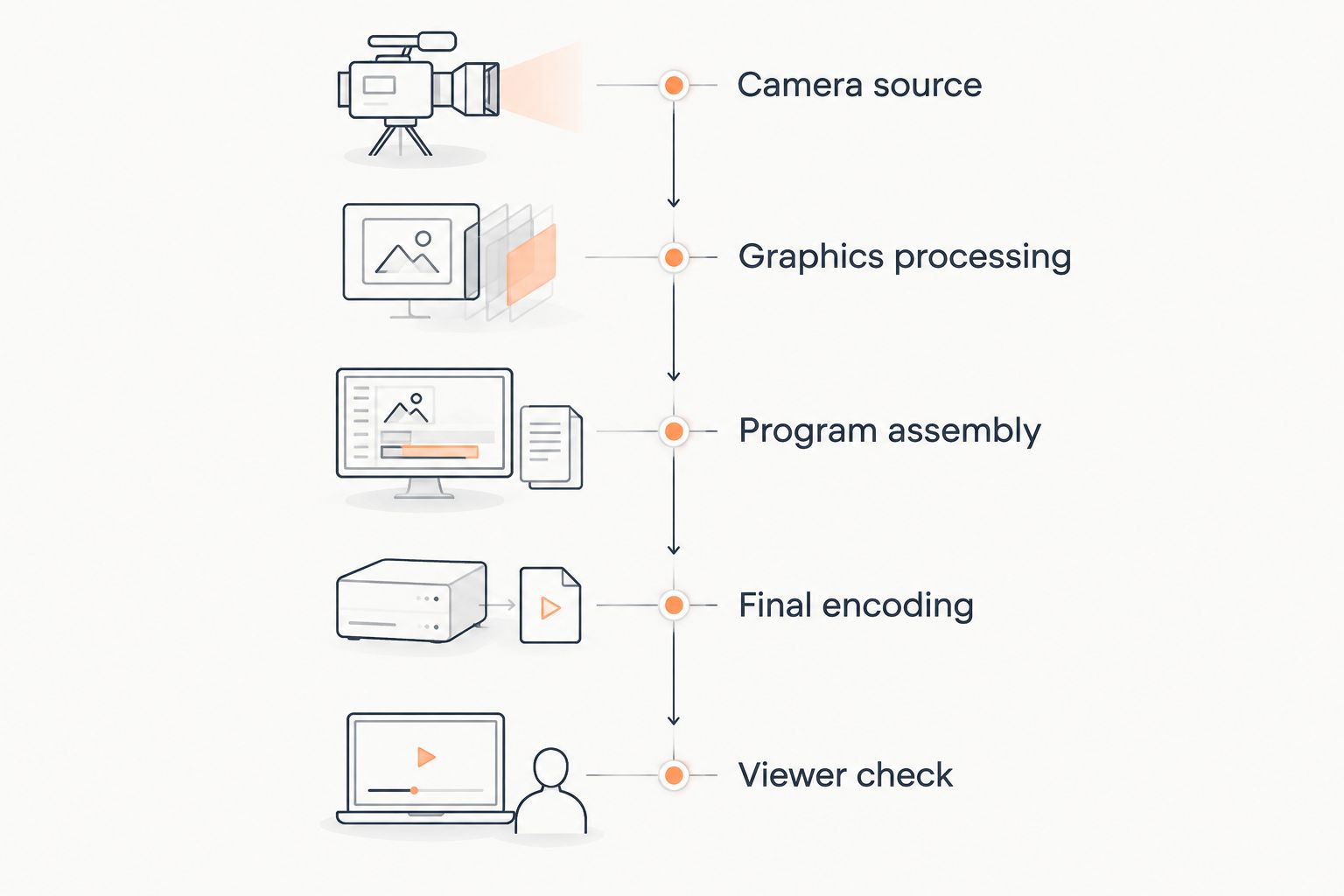
Check the delivered feed, not just the graphics software preview.
The sequence describes a camera-specific route. For program processing, program assembly comes before graphics processing. Make that distinction explicit on your diagram so another operator can trace the path without guessing.
For Windows computer planning, use the guide to computer requirements for football broadcast graphics. Choose hardware against the application's documented requirements and your intended video workflow, not the assumption that any Windows computer will handle live processing.
Why graphics placement varies
The right insertion point follows the production's actual sources and outputs. These factors change the routing decision:
- Camera changes. A wide field shot, a sideline close-up, and a crowd shot do not share the same field perspective. Define which views are eligible for field lines.
- Output type. A finished video picture and a separate graphics layer require different receiving paths. Establish which one the application supplies.
- Replay position. Recording before graphics preserves a clean source; recording afterward includes the graphics already in that picture. Decide which recording your replay operator needs.
- Destination needs. A stream and a stadium display can need different graphic selections. Separate outputs require deliberate routing rather than assuming one program serves both.
- Operator control. Someone must remove graphics during unsuitable shots and restore them when appropriate. Assign that responsibility before the game.
- Failure recovery. A clean bypass needs a route that avoids the graphics stage. Hiding a graphic does not bypass a failed video-processing path.
Freeze these decisions in your 2026 operating notes. Last-minute routing changes affect monitoring, recording, and the crew's recovery procedure, not just the graphics operator.
Adding on-field graphics versus broadcasting without them
Adding lines gives viewers a visual reference for the line of scrimmage and the distance needed for a first down. Broadcasting without those lines removes the need to align and operate them, but leaves viewers relying on the camera picture, commentary, and other game information.
Add on-field graphics when the crew can operate and monitor them; keep the clean broadcast ready throughout the game. A misplaced line communicates the wrong position, so removing it is better than leaving an uncertain reference on screen.
Paynexr's football graphics software covers virtual lines, logos, and sponsor graphics. That creates useful presentation options, but the routing still needs a supported Windows workflow, a graphics operator's attention, and a tested recovery path. Software features do not remove those production responsibilities.
Screen-positioned sponsor graphics also need editorial control. Decide when they appear, which pictures they cover, and whether they belong on every destination. Keep that decision separate from whether a field line is correctly aligned.
Match the setup to your broadcast team
School football teams: best for a designated field-camera workflow
Start with a clearly identified camera and a limited set of approved graphics situations. Give students or rotating operators a written rule for when lines must come off, including cuts to shots that do not show the relevant field area.
The benefit is a procedure that another crew member can follow. The limitation is narrower graphics coverage; do not expand to additional angles until the team has rehearsed how those angles are handled.
Independent streaming crews: best for a compact, documented route
Write down every video handoff, especially when one computer performs several production tasks. Establish which application receives the camera, which assembles the program, and which encodes the outgoing stream.
A compact setup keeps the equipment list manageable, but shared processing also makes troubleshooting less isolated. Rehearse closing or bypassing the graphics stage without losing the audience's picture or audio.
TV broadcasters: best for explicit handoffs and separate feeds
Define clean and graphics-bearing outputs at each production handoff. A clean feed excludes the specified graphics; a graphics-bearing feed includes them. Label exactly which graphics are included rather than relying on those terms alone.
Separate feeds support different production uses, but they also require separate monitoring and recording decisions. Include replay, master-control handoffs, and downstream graphics in the routing discussion before approving the chain.
How do you keep graphics and audio in sync?
Check synchronization on the final delivered program, because video processing can change picture timing relative to audio. A camera monitor upstream of graphics cannot show a timing difference introduced downstream.
During your 2026 rehearsal, use a visible hand clap with matching audio to inspect the result. If the sound and picture separate, trace the audio and video routes and use supported timing controls where available. Do not apply a guessed delay simply because another crew used it.
Also check whether the graphics themselves follow the picture correctly during camera movement. Audio synchronization and field alignment are different tests; passing one does not establish the other.
What happens to football graphics during replays?
Graphics recorded into a finished video picture remain in that recording. A clean recording taken before compositing does not contain those composited graphics, provided they were not added elsewhere upstream.
Decide whether replay should show the original graphic, a newly controlled graphic, or no field graphic. If a replay enters a program feed that receives live graphics downstream, remove the live line unless the workflow explicitly handles that replay correctly.
This is also why your recording diagram needs source labels. Calling every recording a program recording conceals whether it contains field lines, sponsor graphics, or neither.
Can you bypass graphics without stopping the broadcast?
Yes, if you build and test a clean path around the graphics processing stage. Removing an overlay is not the same as restoring video when the application or its output stops working.
Run a rehearsal with graphics operating normally, then make the graphics output unavailable. Confirm that the designated operator can select the clean picture, preserve audio, and continue the broadcast without guessing which source is safe.
Keep the bypass instructions beside the switching controls. Your 2026 crew sheet should identify the fallback source by the same label operators see on the equipment.
FAQ
Should football graphics go before or after the video switcher?
Football graphics can go before or after the switcher, depending on how the system handles camera views. Camera-specific processing ties graphics to one source; processing the switched program requires a supported way to handle cuts and unsuitable shots.
What's the safest sports broadcast graphics package setup for a small crew?
Use a documented route with a designated graphics operator and a tested clean-video bypass. Limit field graphics to views the crew can operate correctly rather than assuming every camera angle is suitable.
Can I add first-down lines after the stream is encoded?
Place first-down lines before the final streaming encode. Adding graphics to an already encoded picture requires further processing and does not alter the stream viewers are already receiving.
Does Paynexr run on Windows?
Paynexr sells Windows football broadcast graphics software for virtual first-down lines, scrimmage lines, logos, and sponsor graphics. Confirm the application's documented computer and video-connection requirements before planning the signal path.
Do I need separate routes for a scoreboard and a first-down line?
A scoreboard and a first-down line have different positioning requirements, but they do not automatically require separate physical routes. Screen-positioned graphics remain fixed in the picture, while a field line must match the camera's field view.
Will my replay recording include the virtual lines?
A recording taken after field graphics are composited includes those graphics. A clean source recorded before that stage excludes them unless graphics were already added earlier in the chain.
Should I test the broadcast output or just the graphics preview?
Test the delivered broadcast output as well as the graphics preview. The delivered output reveals downstream routing, encoding, and audio-timing problems that an upstream preview cannot show.
One last thing
Record the clean source when your equipment and workflow support it. Graphics embedded in a finished recording cannot simply be switched off later; a clean recording preserves a version without those overlays.
Before your next game, label the clean and graphics-bearing recording paths and inspect a sample from each. That small routing check prevents an unpleasant discovery when someone requests footage without the original line or sponsor graphic.