
Guides
How to handle camera changes with on-field football graphics
Use broadcast graphics software for football safely across camera changes. Hide unverified overlays, check placement, and rehearse a clean-feed fallback.
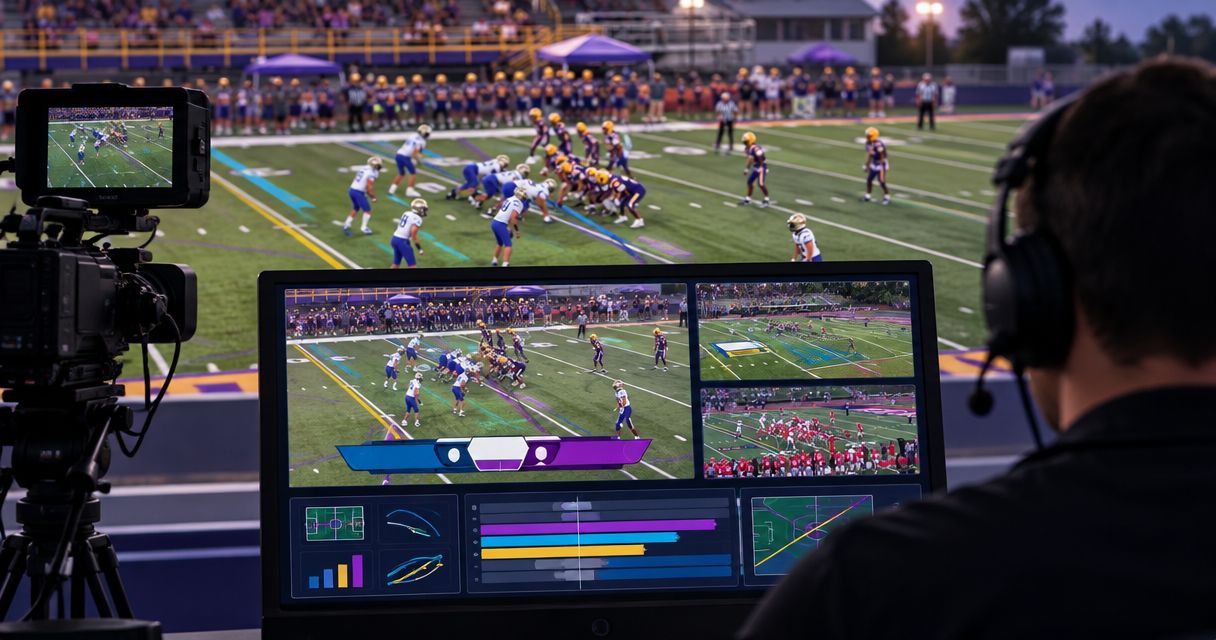
Handle camera changes by hiding on-field graphics before an unverified angle reaches the audience, then restoring them only after placement matches the new shot. Treat every cut, pan, and zoom as a placement check: broadcast graphics software for football should never leave a line on screen simply because it was correct on the previous view.
TL;DR
- With broadcast graphics software for football, hide field overlays during unverified camera changes; restore them after checking placement.
- PayneXR adds virtual first-down lines, scrimmage lines, logos, and sponsor graphics to live football video.
- Keep a graphics-free fallback ready whenever camera movement or a new angle makes field placement uncertain.
- Assign graphics removal to a named operator and rehearse camera changes before the broadcast.
Why this matters
An on-field line represents a location on the turf, not a fixed position on your screen. When the camera changes angle or framing, the screen position representing that location changes too. A correctly placed line on the main wide shot is not proof that the same overlay belongs on a close-up.
Your first production decision is where the graphics enter the video chain. Use the football graphics signal-path guide to plan that handoff before rehearsing cuts. The person switching cameras must know whether the next source already contains graphics or receives them later.
For your 2026 production plan, define success as correct placement plus a dependable way to remove the overlay. Continuous visibility is not the goal. A graphics-free shot is better than a misleading line.
How do you handle camera changes with on-field football graphics?
Use the same sequence whenever you move from a verified view to an unverified one. This is an operating procedure, not a claim that your software automatically recognizes camera cuts or adjusts to every angle.
- Identify the next shot. The director or switcher operator names the intended camera before the transition when production conditions allow. State whether it is a wide field view, a close-up, or another angle.
- Hide field overlays. Remove the first-down line, scrimmage line, field logo, and sponsor artwork before taking an angle whose placement has not been verified. Keep unrelated screen graphics separate where your production system allows.
- Take the camera. Switch to the intended source. Program means the picture currently reaching viewers; preview means the picture being prepared before it goes live.
- Check placement. On the new view, compare the overlay position with visible yard markings and the intended field location. Use an off-air preview when your setup provides one; otherwise, keep graphics hidden until you can verify them safely.
- Restore deliberately. Show the overlay only after the shot and placement are ready. If either remains uncertain, continue without field graphics.
Hide first, verify second, restore last. This rule gives the director and graphics operator a shared decision sequence without depending on an assumed automatic feature.
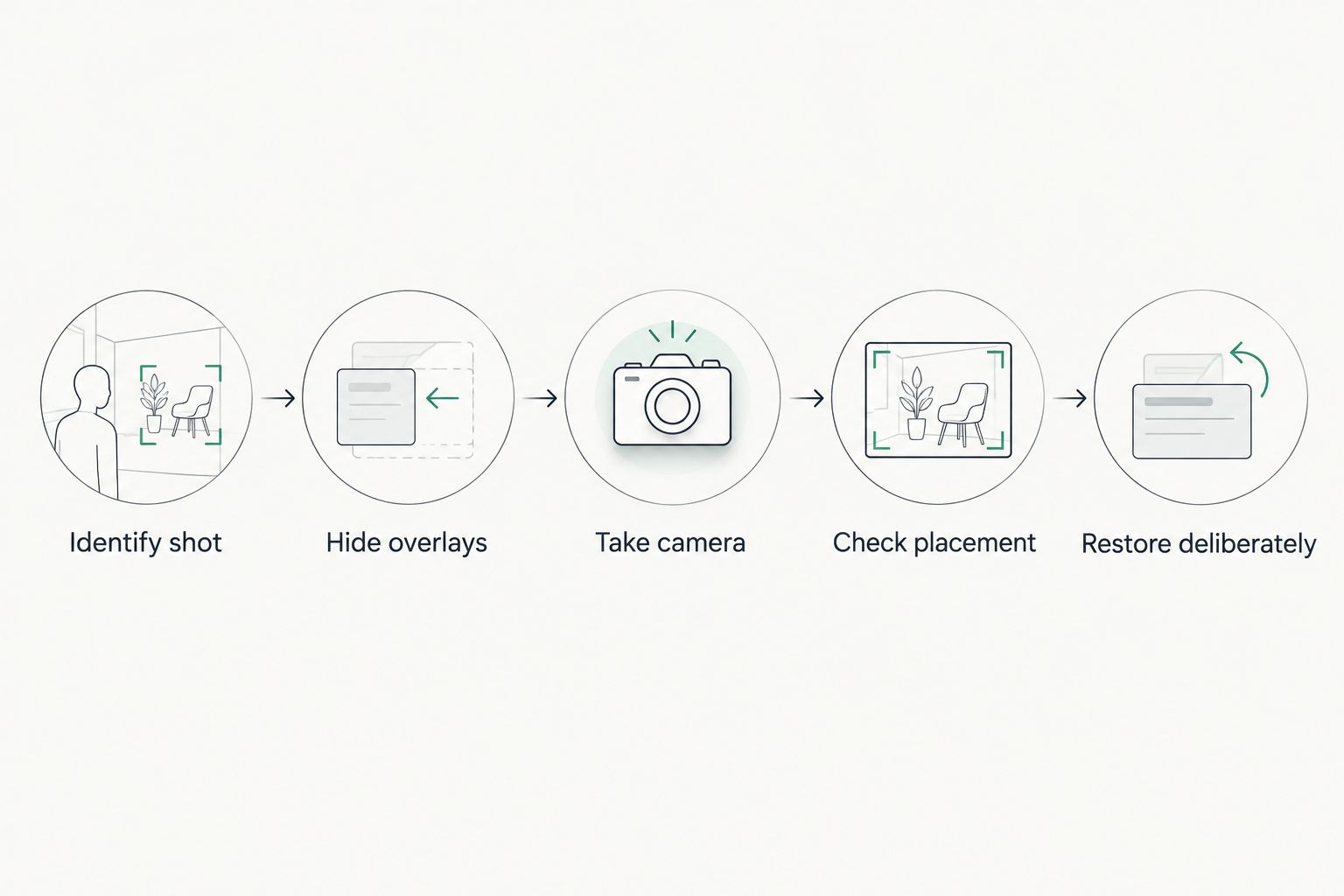
Keep field overlays hidden until placement is verified on the new shot.
Adding on-field graphics versus broadcasting without them
The useful comparison is not which production looks more expensive. It is whether your crew can keep the added information correct while switching shots.
| Approach | Best for | What it adds | Main limitation | Camera-change rule |
|---|---|---|---|---|
| Add on-field graphics | Crews able to check placement and control visibility | A visible first-down target, scrimmage reference, or field-based branding | Creates another element to verify during shot changes | Hide overlays on unverified views |
| Broadcast without on-field graphics | Crews prioritizing camera coverage and a simpler live workflow | Removes field-overlay placement from the switching workload | Does not provide a virtual line or field-based sponsor graphic | Switch shots without an overlay placement check |
PayneXR broadcast graphics software for football is best for production teams that want virtual field lines and on-field branding in live football video. It is Windows software that overlays virtual first-down lines, scrimmage lines, logos, and sponsor graphics. Those capabilities still need a production plan for camera changes; they are not evidence of automatic camera tracking or compatibility with every video setup.
Choose on-field graphics when a named operator can manage them alongside the camera plan. Choose a graphics-free broadcast when that responsibility would compete with essential coverage. Neither approach removes the need for accurate commentary and clear camera work.
What should happen on a wide-to-close-up cut?
Hide field overlays before taking an unverified close-up. A close-up of a player, coach, or sideline often lacks the field references you used to judge line placement on the wide view. Do not keep a field graphic visible merely to avoid an empty moment.
Returning to the wide camera is a new check, not automatic permission to restore the overlay. The operator might have changed the zoom or reframed the shot while that camera was off air. Confirm the current picture rather than relying on the previous one.
Write this transition into your 2026 camera plan: wide shot with verified graphics, close-up without field graphics, return to wide, placement check, then restore. Rehearse it in both directions so the crew practices removal as well as restoration.
What should happen when switching between field angles?
Treat each field angle as a separate placement decision. A sideline view and an end-zone view show the same turf from different perspectives. A line positioned for one view should not be carried into the other without verification.
Before the game, identify which views your crew intends to use with graphics. Leave other views graphics-free unless the production has a tested method for placing overlays on them. This keeps the camera list from becoming an unplanned graphics workload.
For every planned angle, record the camera name, the field references used for checking placement, and who authorizes restoration. A short written note is more useful during a live handoff than an assumption that everyone recognizes the shot.
What should happen during pans and zooms?
A moving camera needs a moving-picture test. A pan turns the camera across the field; a zoom changes the framing and apparent size of the scene. A static placement check does not establish what happens during either movement.
During rehearsal, watch the relationship between the overlay and visible field markings throughout the move. Check the start, the movement itself, and the settled ending. If the line no longer represents the intended location, hide it and reassess before restoring it.
Do not assume that Windows software, a video connection, or a successful stationary demonstration proves camera-motion handling. Test the actual workflow you intend to use. Keep the overlay hidden whenever that workflow has not demonstrated correct placement.
Why camera-change handling varies
The right switching routine depends on the picture and the production arrangement. Use these factors to build your 2026 rehearsal checklist rather than applying the same graphics behavior to every source:
- Shot framing: A wide field view offers different placement references from a tight player shot. Decide which framing supports a reliable check.
- Camera movement: A locked shot, pan, and zoom are different operating conditions. Rehearse each movement your camera crew plans to use.
- Overlay type: A first-down line communicates field position; a sponsor logo communicates branding. Both need valid placement, but their editorial purpose differs.
- Signal-path position: Graphics added before camera switching and graphics added afterward create different handoff points. Map where the overlay becomes part of the outgoing picture.
- Operator responsibility: A dedicated graphics operator and a person also switching cameras have different task loads. Assign an achievable restore procedure.
- Fallback access: A graphics-free picture is useful only if the crew knows how to put it on air. Test the route and the person responsible for selecting it.
These factors are production choices, not reasons to leave an uncertain overlay visible. Keep the removal rule consistent even when the restoration process differs between shots.
How should you connect the workflow and fallback?
Start by drawing your video route in plain language: camera source, graphics stage, switching stage, and outgoing broadcast. Put those stages in the order your actual system uses. Do not copy a diagram that assumes an input, output, or connection your equipment does not provide.
Confirm the supported connection method for each handoff before connecting devices. Then label the source the director should select when field graphics must disappear. A clean feed here means a picture without the on-field overlays being discussed; it does not necessarily mean removing commentary or every other broadcast element.
Build the clean-feed fallback procedure into the switching rehearsal. Check what viewers receive, not just what appears on the graphics operator's screen. Removing an overlay from a local preview is not enough if the outgoing picture still contains it.
Your 2026 run sheet should name the fallback source and the person authorized to select it. Keep that instruction short enough to use during a play.
Who should control graphics during camera changes?
Assign 1 person clear responsibility for hiding and restoring field overlays. Other crew members can request a change, but the responsibility must not disappear between the director, switcher operator, and graphics operator.
School football broadcast teams
Give student or volunteer operators a repeatable instruction: hide on an unverified angle and wait for a placement check before restoring. Start with a limited set of planned graphics shots rather than expecting every camera view to carry field overlays.
During training, ask the operator to explain which picture the audience sees. That simple check separates preview activity from an actual on-air change and exposes confusing controls before kickoff.
Independent sports streaming crews
If the same person switches cameras and manages graphics, reduce simultaneous tasks. Plan graphics-free close-ups and use settled field views for restoration. Do not make the operator correct an uncertain line while also chasing the next camera shot.
PayneXR football graphics belong in that workflow only with a clear hide-and-restore procedure. Confirm the actual video connections and control method before assigning additional live tasks to a small crew.
TV broadcasters
Separate the director's shot call from the graphics operator's placement confirmation. The director requests the view; the graphics operator confirms whether field overlays are ready for it. Specify who removes graphics when a shot changes without advance notice.
Include alternate cameras and replay transitions in the rehearsal. A live overlay should not remain over a replay merely because the production returned to a familiar camera source.
What should you test before kickoff?
Use a 2026 pregame test that follows the actual show, not just a stationary demonstration. Run these 3 checks before treating the workflow as ready:
- Transition check: Cut from a verified wide shot to a close-up, another field angle, and back. Confirm overlays disappear on unverified views.
- Motion check: Pan and zoom through the framing the camera operator expects to use. Watch whether placement remains correct throughout the movement.
- Fallback check: Intentionally call for graphics removal and inspect the outgoing picture. Confirm that the assigned operator can restore the verified view afterward.
Record unresolved problems as restrictions on the show: a particular angle stays graphics-free, a movement requires removal, or restoration waits for a settled shot. Do not turn an unsuccessful test into an on-air experiment.
Can I keep the first-down line visible through every camera cut?
No: keep the first-down line visible only on views where its placement has been verified. A camera cut changes the picture, so the previous view's successful check does not establish correctness on the next one.
Do I need separate graphics for every camera?
You need a verified placement workflow for every camera view that will carry field graphics, not necessarily a separate graphics computer. The number of devices depends on the software's documented capabilities and your actual video routing.
Should sponsor graphics disappear during a camera change too?
Yes, hide on-field sponsor graphics when placement on the incoming shot is unverified. Branding is not a reason to leave artwork attached to the wrong area of the picture.
FAQ
What's the safest way to handle an unexpected camera cut?
Hide on-field graphics and leave them hidden until placement is verified on the new shot. The operator responsible for graphics should know who can request immediate removal.
Can broadcast graphics software for football automatically handle every camera angle?
Do not assume broadcast graphics software for football automatically handles every camera angle. Confirm the software's documented capabilities and test the exact views and movements planned for your production.
Should I remove the first-down line before showing a player close-up?
Remove the first-down line before showing a close-up whose placement has not been verified. Restore it only after returning to a checked field view.
Does PayneXR provide virtual football field graphics?
PayneXR provides Windows software for virtual first-down lines, scrimmage lines, logos, and sponsor graphics on live football video. Plan camera-change checks around the actual production setup rather than assuming unconfirmed tracking features.
Is broadcasting without on-field graphics a sensible choice?
Broadcasting without on-field graphics is a sensible choice when your crew cannot reliably check placement and control visibility. It removes overlay placement from the camera-switching workload but does not provide a virtual field reference.
What should a graphics operator check after a zoom?
After a zoom, check that the overlay still represents the intended field location using visible field markings. Keep it hidden if placement is uncertain.
Who should decide when the field graphics return?
A named graphics operator should restore field graphics after placement is verified, following the production's agreed authority. If that person also switches cameras, keep the restoration procedure simple enough to perform during live coverage.
One last thing
Test removal before you test restoration. A crew that can place a line correctly but cannot remove it promptly has not finished its camera-change rehearsal. Make the graphics-free picture an intentional part of the broadcast, not an emergency improvisation.