
Guides
How to place scrimmage and first-down lines before a play
Sports broadcast graphics package first down line placement: verify the spot, target, and camera view before showing overlays. Get a practical crew checklist.
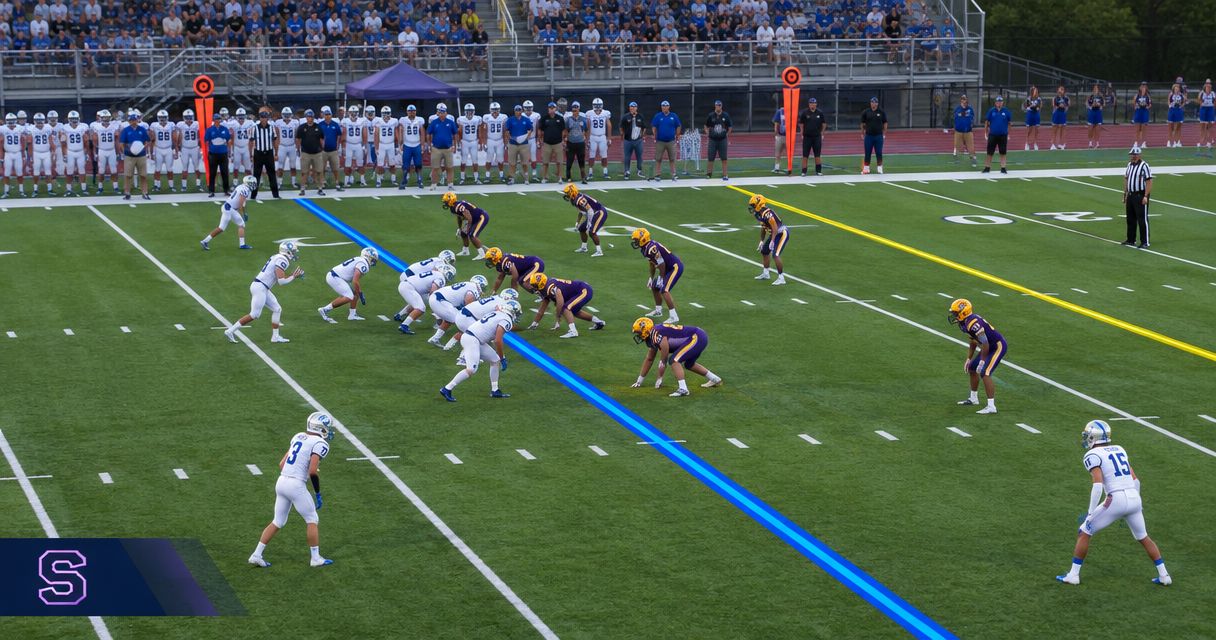
Place the scrimmage line at the officials’ established ball spot, then place the first-down line at the current line to gain in the offense’s direction of travel. Before showing either graphic, confirm possession, check field alignment in the actual broadcast shot, and verify the outgoing picture; keep the lines off whenever the spot or target remains unresolved.
TL;DR
- A sports broadcast graphics package first down line must follow the current line to gain, not a guessed distance.
- Place the scrimmage line only after officials establish the ball spot; verify possession and direction before showing graphics.
- PayneXR provides Windows football broadcast graphics; accurate placement still requires a clear operator procedure.
- Broadcast without on-field lines whenever placement is uncertain; restore them after checking the spot and target.
How do you place scrimmage and first-down lines before a play?
Use a repeatable sequence: confirm the game state, establish the scrimmage line, establish the line to gain, check the camera view, and approve the outgoing picture. Treat these as separate checks rather than one quick placement action.
Your 2026 operating checklist should identify who supplies the ball spot, who updates the graphics, and who approves their appearance. For the broader setup, see how to add a virtual first-down line to a football broadcast.
Confirm possession and direction
Identify the offense and the end zone it is attacking before positioning either line. A change of possession or a change of ends makes the previous direction an unsafe starting assumption.
Say the direction explicitly during the handoff. Instructions such as “offense moving toward the scoreboard end” are clearer than “move it forward,” especially when operators see different monitor layouts.
Establish the ball spot
Wait for the officials to establish the next scrimmage location. Do not use the point where a runner fell, the location of a loose ball, or the previous play’s graphic as the final authority.
Place the scrimmage overlay at that location. If the spot remains under discussion or a penalty is being administered, leave the overlay off rather than repeatedly displaying provisional positions.
Establish the target
Place the first-down overlay at the current line to gain: the field location the offense must reach to earn a new series. The first-down line is a target location, not a fixed offset from the current ball spot.
A new series ordinarily begins with 10 yards to gain, except when the goal line is nearer. After subsequent plays, use the remaining distance and established target rather than adding another 10 yards to the new scrimmage location.
Check the camera
Inspect both lines in the camera view intended for air. Each graphic should follow the field’s perspective, meaning the apparent angle and spacing of markings as the field recedes from the camera.
Check more than one point across the visible width. A line that looks correct near one sideline but misses its intended location near the other needs adjustment before transmission.
Approve the output
Preview means the picture you inspect before putting it on air; program means the picture actually sent to viewers. Check program output, not just the graphics application’s working view.
Confirm that the intended lines appear on the intended shot. If the position, camera alignment, or output is wrong, remove the graphics first and correct them off air.
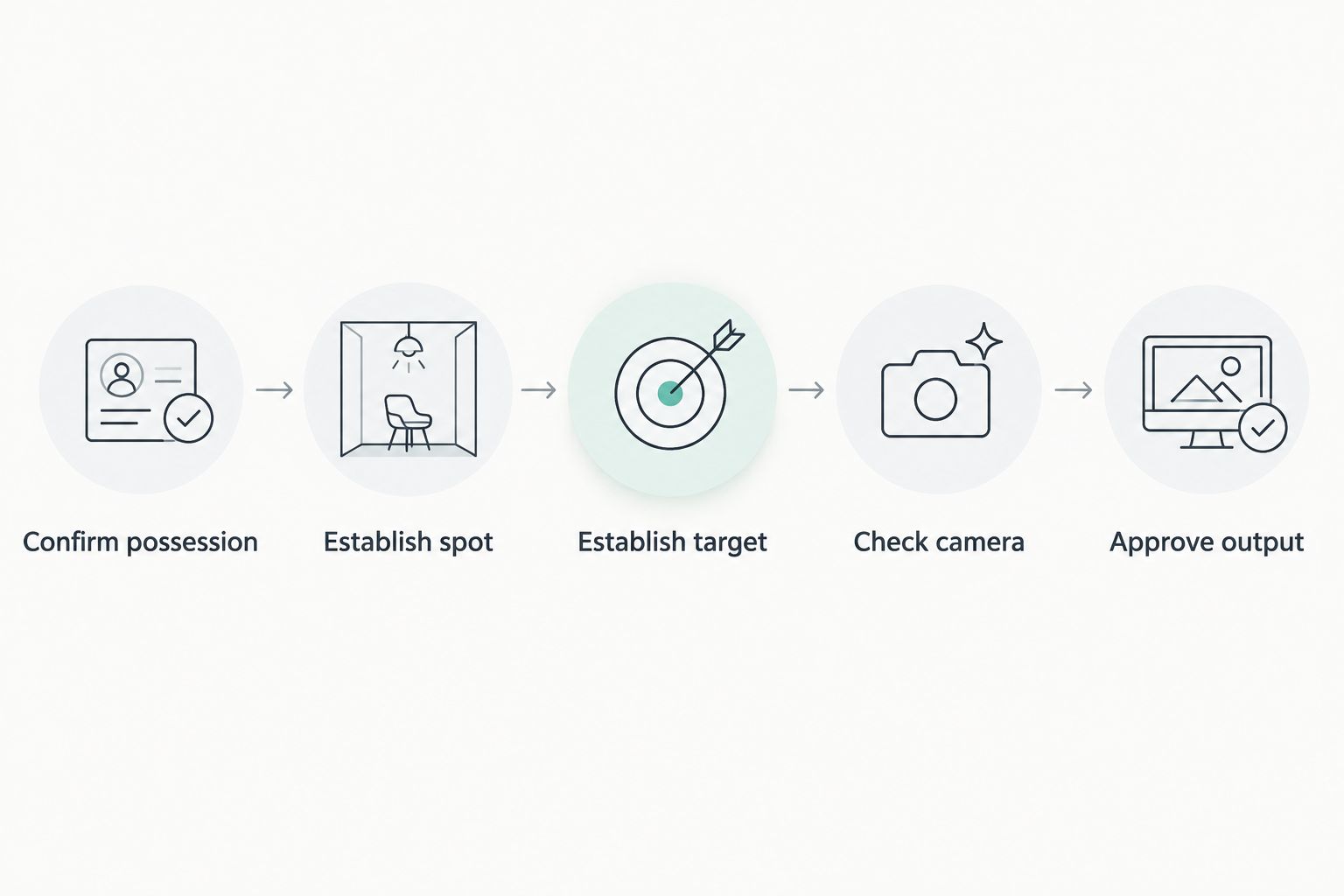
Verify the game state before checking alignment and approving the outgoing picture.
Why this matters
An on-field line makes a precise visual claim. If it sits at the wrong location, viewers receive a misleading reference even when the scoreboard and commentary are correct.
Keep three references separate in your 2026 production plan: the scrimmage location, the line to gain, and the displayed down-and-distance information. They describe related parts of the game, but changing one does not automatically establish the others.
Football fields use 5-yard marking intervals and span 100 yards between goal lines. Those markings help you inspect placement, but perspective makes equal field distances appear unequal on screen; do not position lines by dividing the picture into equal pixel distances.
Adding on-field graphics versus broadcasting without them
On-field graphics add a visible location reference; broadcasting without them removes the task of placing and checking that reference. Choose the approach your crew can operate accurately, not the one with the most screen elements.
| Approach | Best for | Benefit | Limitation |
|---|---|---|---|
| Add scrimmage and first-down overlays | Crews with a reliable spot update and an assigned graphics check | Shows the starting location and target directly on the field picture | Requires game-state updates, alignment checks, and a removal procedure |
| Broadcast without on-field overlays | Crews that cannot reliably verify placement during live action | Avoids displaying an incorrectly positioned field graphic | Viewers must interpret the situation from field markings, commentary, and other graphics |
PayneXR is for football production teams that need Windows software for virtual scrimmage lines, first-down lines, logos, and sponsor graphics. PayneXR supplies those overlay functions; your production procedure must still establish the correct field locations and confirm the outgoing picture.
The benefit is a direct on-field reference alongside other broadcast graphics. The operational limitation is equally clear: adding software does not remove the need for someone to verify what goes on air.
Why first-down line placement varies
A first-down line cannot stay tied to a single screen position or a permanent distance from the ball. These factors determine what the operator must check:
- Current ball spot: The scrimmage line follows the newly established location, not the previous snap.
- Current line to gain: The target remains distinct from the changing scrimmage location during a series.
- Possession and direction: A turnover requires a fresh check of which end zone the offense is attacking.
- Penalty administration: Wait for the officials to establish the resulting spot and down-and-distance situation.
- Goal-to-go status: Do not draw an ordinary first-down target beyond the goal line.
- Camera framing: A different shot, pan, or zoom requires confirmation that the overlay still matches the field.
Use these factors as check triggers. Do not turn them into automatic corrections unless your actual setup documents and demonstrates that behavior.
Build the checks into your broadcast setup
Separate the video path from the game-information path. The video path carries pictures through your production system; the information path tells the graphics operator where the ball and target belong.
For your 2026 setup sheet, draw the camera feed, graphics processing stage, production switcher or streaming application, and outgoing program feed. Identify where graphics enter the picture and where the operator can inspect the result. Confirm the connections supported by your actual equipment rather than assuming every Windows application uses the same input or output method.
Then write down the communication path. Name the person who reports the spot, the person who places the lines, and the person who can call for their removal. One person can hold multiple roles, but each responsibility needs an owner.
School football broadcast teams
Give student and volunteer operators a short, visible checklist. Keep field-location updates in plain language and have the graphics operator repeat back the ball spot, target, and direction before showing the lines.
If the crew cannot resolve a discrepancy before the snap, stay with the camera picture without field overlays. Do not make a developing student operator choose between guessing and delaying a production call.
Independent sports streaming crews
For a small crew, assign the graphics check around the other live tasks rather than assuming somebody will notice an error. A person switching cameras or monitoring stream health needs a clear cue when a line requires attention.
Rehearse the graphics-off action until it is easy to find under pressure. Keep that action separate from changes that affect the underlying camera picture, so removing an uncertain line does not interrupt coverage.
TV broadcasters
Define who has editorial authority over the displayed spot and target. Agree on the call that removes field graphics when the director changes shots or the game situation remains unsettled.
Check the actual program output and the camera transitions used during live coverage. A correct line on one preview shot is not approval for every angle in the production.
Rehearse changing situations before kickoff
Use your 2026 rehearsal to test decisions, not just whether a graphic appears. A successful demonstration includes recognizing when a line should remain hidden.
Run these situations through the same communication and approval process you will use during the game:
- A short gain: Move the scrimmage line to the new spot while preserving the established target.
- A new series: Confirm the new target rather than carrying over the previous series’ line.
- A possession change: Reconfirm offense, direction, spot, and target before displaying either line.
- A penalty: Hold the overlays until the resulting situation is established.
- A camera change: Check alignment in the new view before allowing field graphics to remain visible.
- An uncertain spot: Remove the lines and continue coverage while the crew resolves the location.
Record the corrective action for each failed check. “Looks wrong” is not an operating instruction; “remove lines, confirm the target, inspect program, restore” gives the operator a usable sequence.
Should the first-down line always be 10 yards ahead?
10 yards is the ordinary distance for a new series, not the required gap between the overlays before every snap. During a series, the scrimmage location changes while the established line to gain remains the reference, subject to the resulting game situation.
Do not reset the target by adding the original distance to every new ball spot. Confirm the current line to gain independently.
What should you show when the spot is uncertain?
Show the camera picture without the uncertain field overlays. Keep the scrimmage and first-down lines hidden until the officials’ placement and the current target are established.
Commentary can explain that a spot or penalty is being resolved. A precisely drawn guess is still a guess.
Does a correctly placed line work on every camera angle?
No. Correct placement in one view does not establish correct alignment in another view with different framing or perspective.
Treat each intended on-air view as a check point. Verify any documented alignment or tracking behavior in your actual setup rather than assuming the software handles every change automatically.
FAQ
Where do I put the line of scrimmage graphic before the snap?
Put the scrimmage graphic at the officials’ established ball spot for the next play. Check its alignment in the intended camera view before showing it on program output.
How do I use a sports broadcast graphics package first down line correctly?
Position the first-down line at the current line to gain, then verify possession, direction, and alignment. Do not treat it as a fixed distance from the ball before every snap.
Is the first-down line always 10 yards from the scrimmage line?
10 yards is the ordinary distance at the start of a new series, except when the goal line is nearer. The remaining distance changes as the ball moves during the series.
Can a small school crew operate football field graphics?
A school crew should assign responsibility for the spot update, graphic placement, and outgoing-picture check before using field overlays. Rehearse removing uncertain lines as carefully as showing correct ones.
What should an independent streaming crew check before showing lines?
An independent streaming crew should confirm the spot, target, direction, camera alignment, and outgoing picture. Keep the lines off when other live tasks prevent those checks.
What does PayneXR provide for football broadcasts?
PayneXR provides Windows software that overlays virtual first-down lines, scrimmage lines, logos, and sponsor graphics onto live football video. Confirm the connections and operating procedure required by your own production setup.
Should I leave the lines on while officials discuss a penalty?
Keep uncertain lines off while officials establish the resulting spot and game situation. Restore the overlays after verifying their positions and checking the outgoing picture.
One last thing
Rehearse removing a wrong line before rehearsing a polished reveal. Your 2026 runbook should make the recovery action unmistakable: remove, verify, preview, restore.
That sequence gives school teams, independent crews, and TV production staff the same useful fallback. You can continue showing the game without asking viewers to trust a graphic the crew has not confirmed.