Guides
Can you use football broadcast graphics on turf vs grass fields?
Can you use football broadcast graphics on turf vs grass fields? Yes. Check alignment, camera movement, and visibility before putting overlays live.
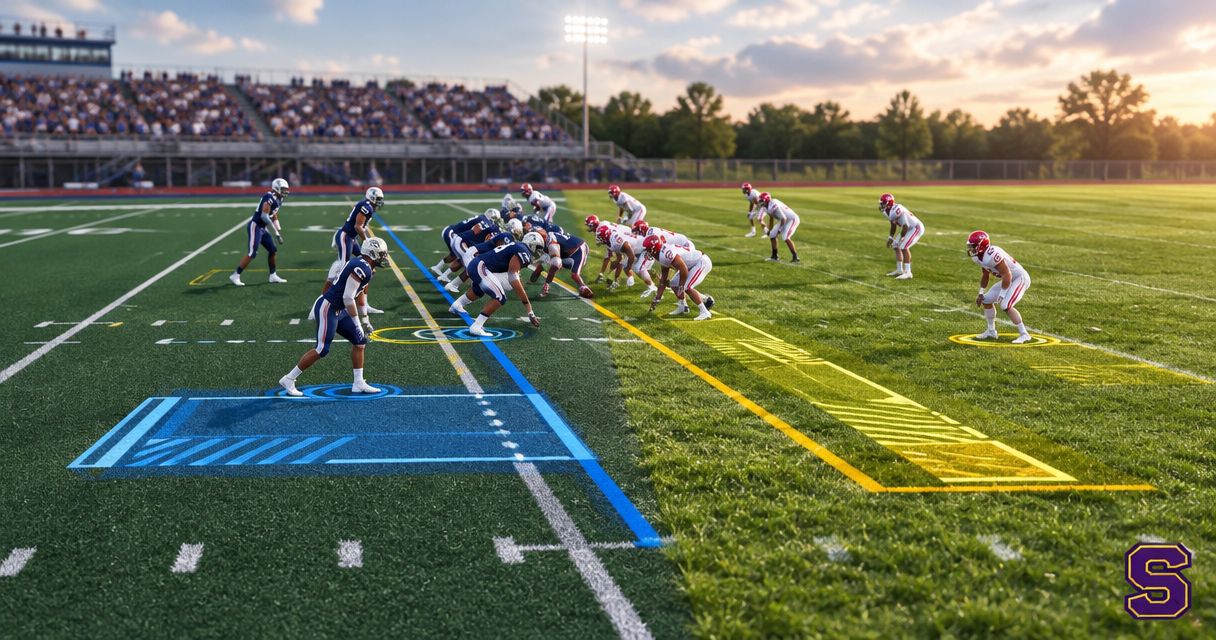
Yes, you can use football broadcast graphics on both artificial turf and natural grass; the surface does not determine whether an overlay can be added to live video. For your 2026 production, judge the result by field alignment, visibility, and how the graphics behave during camera movement—not by whether the field is synthetic or natural.
TL;DR
- Can you use football broadcast graphics on turf vs grass fields? Yes—test alignment and visibility on either surface.
- Paynexr sells Windows football broadcast graphics software for crews adding virtual first-down lines, scrimmage lines, and sponsor graphics.
- Add on-field graphics when your crew can verify placement; broadcast without them when accuracy is uncertain.
- Test the actual camera view, including pans, zooms, players, painted markings, and changing light.
Can you use football broadcast graphics on turf vs grass fields?
Yes. Virtual football graphics are added to the video image, not physically applied to the playing surface. Turf and grass both provide a background for those graphics, but neither surface guarantees a convincing result.
For a 2026 setup, separate the surface question from the production decision. Your real choice is whether you can add accurate, readable on-field graphics without making the broadcast harder to operate. Use the guide to choosing football broadcast graphics software to assess the broader workflow.
| Production approach | Best for | Benefit | Limitation |
|---|---|---|---|
| Add on-field graphics | Crews that can check and update placement | Shows the line of scrimmage, distance target, or sponsor artwork within the field view | Adds placement checks and another element to monitor |
| Broadcast without on-field graphics | Crews prioritizing reliable coverage with limited operator attention | Keeps the video workflow simpler | Viewers must use field markings, commentary, and other graphics for context |
Neither choice depends exclusively on turf or grass. An accurate broadcast without a virtual line is better than a broadcast with a misleading line.
Why this matters
A virtual first-down line gives viewers a visual target within the play. That benefit disappears when the line is misplaced, remains over an unsuitable camera shot, or makes players harder to see.
The same principle applies to sponsor graphics: adding artwork is not enough. You need to check whether its position, scale, and timing suit the live picture. Treat surface type as part of your picture check, not as a substitute for it.
Artificial turf: check paint, texture, and contrast
Artificial turf does not remove the need to inspect the camera image. Painted end zones, midfield artwork, and contrasting field markings create different backgrounds for an overlay.
Start with the normal game camera position. Check the virtual line against visible yard lines near the middle and edges of the picture, then repeat with the camera aimed toward each end of the field.
Use these checks before approving the shot:
- Field alignment: Does the virtual line follow the same field perspective as the painted yard lines?
- Contrast: Can you distinguish the graphic from the turf and painted areas?
- Player visibility: Does the overlay obscure a player crossing its position?
- Camera movement: Does the line stay associated with the intended field location during the movements you plan to use?
Do not assume an apparently uniform surface will solve alignment problems. A clear background makes a line easier to inspect, but it does not establish that the line is correctly positioned.
Natural grass: check the actual picture, not the surface label
Natural grass is also suitable as a background for virtual football graphics. Inspect the visible field, including worn areas, shadows, painted markings, and changes in grass color.
Those features matter because your audience sees the finished picture rather than an isolated graphic. A line that reads clearly over one part of the field still needs checking over another.
Use painted yard lines as reference points where they are visible. On a standard American football field, the playing area between the goal lines is 100 yards; familiar field markings help you assess whether the overlay follows the field's perspective.
Do not use an overlay to conceal uncertainty about field position. If the camera view does not let your operator verify placement, remove the graphic until the position is clear.
Why on-field graphics results vary
The useful distinction is not “turf works, grass does not.” It is whether the complete camera-and-graphics workflow produces a readable, correctly placed image.
Your 2026 rehearsal should examine these factors:
- Visible markings: Painted lines provide reference points for checking position and perspective. Inspect more than one part of the picture.
- Lighting and shadows: Judge contrast in the conditions your cameras actually capture, including shaded and brightly lit areas.
- Camera position: A change in height, angle, or location changes the field's appearance in the image. Recheck placement after moving a camera.
- Pans and zooms: A graphic that looks right on a stationary wide shot still needs checking during movement and tighter framing.
- Graphic treatment: Line thickness, color, and sponsor artwork affect readability. Evaluate the finished video rather than the artwork alone.
- Operator attention: Someone must confirm placement and remove graphics when the picture is unsuitable. Assign that responsibility explicitly.
These are acceptance checks, not claims that every software package handles every condition automatically.
How do you test football graphics on either surface?
Test the entire route from camera to viewer-facing output. A preview inside a graphics application is useful, but it does not replace inspecting the video your production sends onward.
For your 2026 rehearsal, follow this sequence:
- Camera view: Set the camera at its intended game position and frame the field as you will during coverage.
- Video input: Confirm how the camera picture reaches the graphics stage. Check the documented connections and supported video formats for your equipment.
- Graphics placement: Add a scrimmage line or first-down line and compare its position with visible field markings.
- Movement check: Pan and zoom through the shots you expect to use. Watch the graphic throughout the movement, not only at the stopping point.
- Program check: Inspect program output—the finished picture selected for viewers—and rehearse removing the graphic.
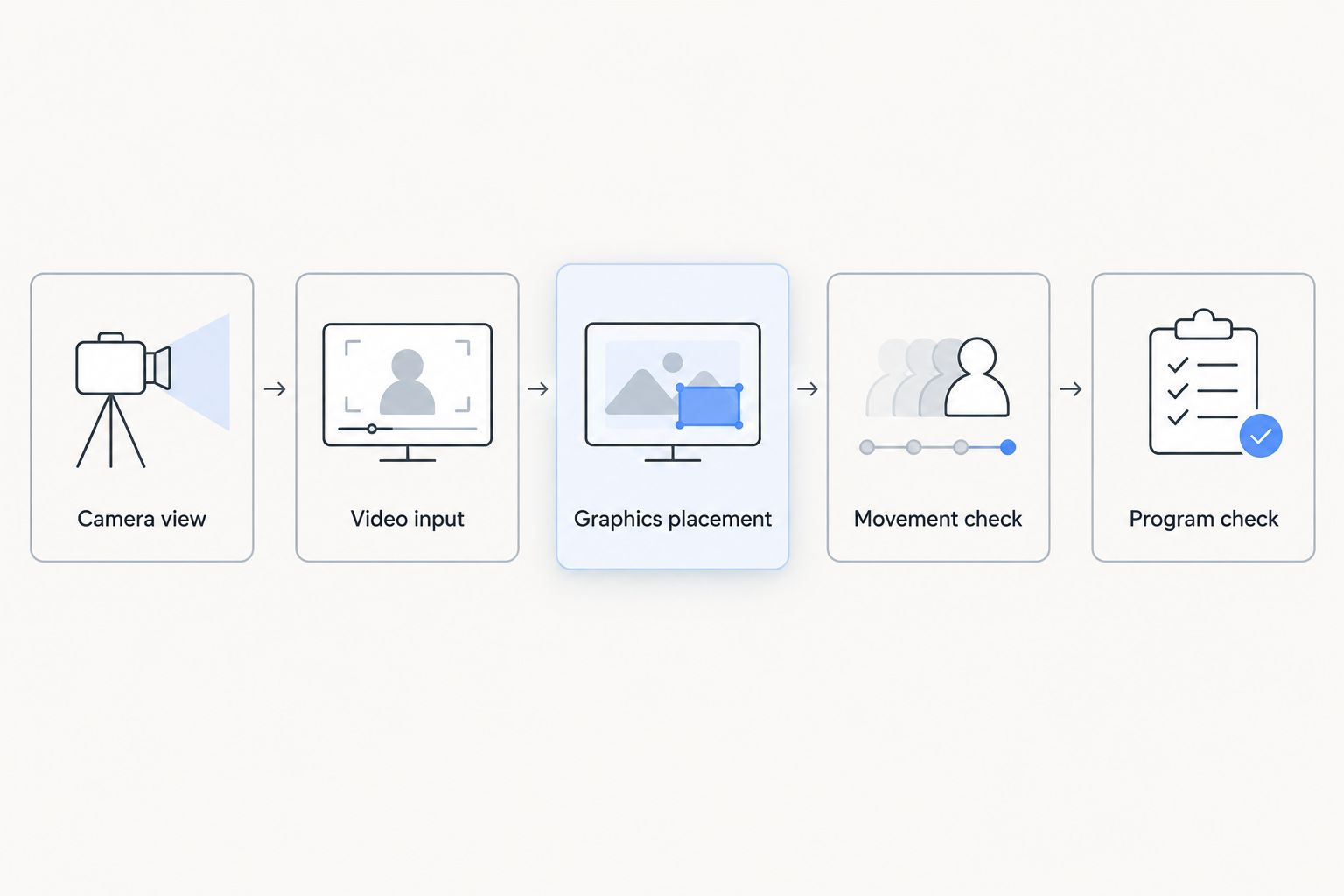
Approve graphics on the finished program picture, not only in the graphics application's preview.
Use a visible 10-yard interval to check whether the virtual distance target lands where you intend. Then inspect alignment against the painted 5-yard lines across the frame; a correct-looking center position does not prove the edges are aligned.
Repeat the check with a person walking through the graphic's location. If your chosen system offers masking—keeping selected parts of the video visible above a graphic—inspect that behavior directly rather than assuming players will always appear in front of the line.
Finally, rehearse a clean feed: video without the on-field overlay. The clean-feed fallback guide covers the production decision that matters when a graphic needs to leave the air.
What should each type of broadcast crew prioritize?
The field surface does not assign production responsibilities. Your crew structure does, so establish who places graphics, who checks them, and who can remove them before kickoff.
School football broadcast teams
Best for school teams: a repeatable setup with a clearly assigned graphics operator. Keep the first rehearsal focused on accurate lines and a dependable removal procedure before adding more artwork.
Write down the camera position and the checks the next operator must repeat. Do not treat a successful rehearsal as permanent approval after a camera has been moved.
Independent sports streaming crews
Best for independent crews: a workflow that survives a venue change without guesswork. Confirm the actual camera view and video connections at each location, even when the previous venue used the same surface type.
If the same person manages graphics and other production tasks, decide when on-field graphics will stay off. A narrower, reliable use case is preferable to leaving an unchecked overlay on every shot.
TV broadcasters
Best for TV crews: explicit rules for camera eligibility and graphic removal. Identify which shots are approved for on-field graphics, and communicate what happens when the director selects another source.
Include replay and alternate angles in the rehearsal. A virtual line belongs to a verified field view, not automatically to every picture in the production.
Where does Paynexr fit in the workflow?
Paynexr is for football production teams seeking Windows software to add virtual field lines and sponsor graphics to live video. Its stated graphics include first-down lines, scrimmage lines, logos, and sponsor graphics.
That makes Paynexr relevant to the decision to add on-field graphics, rather than continue with an unaltered field picture. The benefit is the added visual information; the trade-off is the placement and monitoring work that on-field graphics introduce.
For your 2026 production, assess the Windows workflow against your actual equipment and operating plan. Confirm connections and required behavior before committing the live broadcast to them; the surface name alone cannot answer those questions.
Review the football graphics software
See the Windows software for virtual field lines, logos, and sponsor graphics.
Do you need different software for turf and grass?
Turf versus grass is not, by itself, a reason to select different software. Select a workflow that supports your production requirements, then test the actual field image.
Do not confuse general suitability with automatic adjustment. Verify any behavior you need—such as retaining alignment during camera movement—using the chosen system and your intended setup.
Should you leave the graphics off when conditions change?
Remove the graphic whenever you cannot verify its placement or readability. Resume only after checking the current camera view and output.
That rule applies after a camera move, an unexpected shot change, or a visible problem in the finished picture. Keeping an inaccurate line on screen adds confusion rather than information.
FAQ
Can you use football broadcast graphics on artificial turf?
Yes, virtual football graphics can be added to video of an artificial-turf field. Check alignment, painted areas, player visibility, and camera movement before using the overlay live.
Can you add a virtual first-down line to a natural-grass field?
Yes, a natural-grass field can serve as the background for a virtual first-down line. Verify the line against visible field markings and inspect readability across worn, shaded, and painted areas.
Is turf better than grass for football broadcast graphics?
Surface type alone does not establish which field will produce better graphics. The usable result depends on the camera image, accurate placement, readable graphics, and the crew's operating workflow.
Will a virtual line automatically stay behind the players?
Do not assume a virtual line will automatically stay behind players. Check the selected system's masking behavior and test people crossing the line's position in the finished output.
Can Paynexr add sponsor graphics as well as field lines?
Paynexr sells Windows football broadcast graphics software that overlays sponsor graphics and logos as well as virtual first-down and scrimmage lines onto live football video. Inspect artwork placement and readability in the actual camera view.
Should a football stream run without graphics if the line looks wrong?
Yes, remove an incorrectly placed virtual line and continue with video without the on-field overlay. Restore the graphic only after verifying the field position and finished picture.
One last thing
Test the moment a graphic should disappear, not just the moment it appears. Ask the operator to remove the line during a camera change, then confirm the finished output is clear.
For your 2026 game-day checklist, make that a required rehearsal step. Surface compatibility is useful; a crew that knows when to take an overlay off air is essential.