Guides
Is PayneXR worth it in 2026?
Is PayneXR worth it? Yes, if your football crew can manage on-field graphics. Compare the benefits, operating demands, and checks before game day.

PayneXR is worth evaluating in 2026 if your football broadcast needs virtual first-down lines, scrimmage lines, logos, or sponsor graphics and your crew can manage the added production work. Broadcasting without on-field graphics is the better choice when reliable pictures, clear audio, and accurate game information already consume your available crew capacity.
TL;DR
- Is PayneXR worth it? Yes for crews that need on-field football graphics and can operate them reliably.
- PayneXR is Windows broadcast graphics software, not a substitute for reliable video, audio, or game information.
- Compare adding virtual first-down lines against your current broadcast, not against an imagined network production.
- Keep a clean video fallback and assign responsibility for showing, updating, and removing graphics.
Why this matters
A first-down line gives viewers a visual reference for the line to gain. An incorrectly positioned line gives them the wrong reference. The value comes from accurate, controlled graphics—not simply from having graphics on screen.
PayneXR overlays virtual football lines, logos, and sponsor graphics onto live video using Windows software. That makes the decision practical: do those additions solve a real need in your production, and can your crew deliver them without weakening the broadcast?
For your 2026 production plan, judge the complete workflow. Include the person operating graphics, the video connections, the monitoring arrangement, and the way you return to pictures without overlays.
Is PayneXR worth it in 2026?
PayneXR is best for football production teams that need on-field graphics and can assign responsibility for their operation. That includes school broadcast teams, independent streaming crews, and TV broadcasters; the deciding factor is production readiness, not the size of the organization.
The software's stated functions cover virtual first-down lines, scrimmage lines, logos, and sponsor graphics. Those functions establish what you can evaluate. They do not establish your hardware compatibility, staffing requirement, or financial return.
Use this comparison to decide whether adding on-field graphics addresses your actual needs.
| Decision point | Add on-field graphics | Broadcast without on-field graphics |
|---|---|---|
| Best for | Crews needing field-position references or on-field branding | Crews prioritizing a simpler production |
| Viewer benefit | Shows the line to gain and scrimmage reference on the field | Keeps the field picture free of virtual overlays |
| Operator responsibility | Requires someone to control graphic accuracy and timing | Removes the on-field graphics task |
| Sponsor presentation | Adds a place for sponsor artwork within the field picture | Leaves sponsor presentation to other production elements |
| Main limitation | Adds setup, monitoring, and correction work | Does not provide virtual field-position references |
| Readiness test | Confirm placement, routing, removal, and fallback | Confirm viewers still receive clear game context |
Neither approach fixes weak camera coverage or unclear commentary. If viewers cannot follow the action, address that problem before adding another visual layer.
School football teams: prioritize a repeatable handoff
Best for: school crews with a named graphics operator and a repeatable setup. A school broadcast needs instructions that work when the person who built the setup is absent. Write down the signal route, startup sequence, graphic controls, and responsibility for checking the ball position.
The advantage of on-field graphics is straightforward: viewers can see a reference for where the offense needs to reach. Logos and sponsor graphics also give the production another presentation option. Neither benefit removes the need for accurate game information.
The disadvantage is another live task for your crew. If the same person is directing, updating the score, managing audio, and solving streaming problems, adding line placement increases that person's responsibilities.
Before including graphics in your 2026 season workflow, rehearse the handoff. Have another operator follow the written instructions without verbal prompts, then note where the instructions fail. Judge readiness by whether the setup can be repeated—not by whether its original operator understands it.
Independent streaming crews: protect portability and attention
Best for: independent crews that can reproduce their graphics workflow at different venues. Start with the production arrangement you actually transport, including the Windows computer, video connections, monitoring, and the equipment delivering the stream.
On-field graphics give an independent production field-position references and another way to present sponsor artwork. The trade-off is additional setup and a task that must remain under control throughout the game.
Do not treat a successful desk demonstration as proof of a successful venue setup. Rehearse with the camera position, video format, and production equipment you intend to use. Confirm the complete route rather than assuming that separate working components will work together.
For a small crew, the decisive question is attention. If a problem occurs while a play develops, who removes the graphic, and who continues directing the broadcast? Give those actions explicit owners before committing to the added layer.
TV broadcasters: evaluate operational control
Best for: TV crews that need on-field graphics within a documented production workflow. A broadcaster should evaluate how the graphics operation fits the director's calls, camera selection, monitoring, and recovery procedures.
The benefit is another controlled presentation layer for football coverage. The limitation is that every additional layer needs rules about when it appears and when it disappears. A polished graphic is not a reason to leave it visible on an unsuitable shot.
Include production and engineering staff in the evaluation. The operator needs usable controls; the director needs predictable responses; engineering needs a verified signal route. Agreement on one of those points does not settle the others.
For a 2026 deployment, document what happens during camera changes and replay transitions. Test the behavior you need rather than assuming automatic tracking, replay handling, or a particular equipment connection.
What should you test before making the decision?
Use these 5 checks as an acceptance sequence, not as a claim about installation time. The aim is to establish whether your complete broadcast can carry the graphics safely.
- Video route. Identify where the camera picture enters the graphics workflow and where the resulting picture goes next. A signal path is simply the route video takes through your equipment. Confirm the supported connections for your actual setup before connecting devices.
- Line placement. Rehearse placing the scrimmage and first-down references against the game information available to the operator. Check the result on the picture viewers will receive, not just on an operating screen.
- Camera changes. Test pans, zooms, shot changes, and any other camera behavior planned for the broadcast. Decide when the graphics must be removed, and verify the operator can perform that action.
- Operator handoff. Have a second person follow the setup instructions and explain the show, update, and remove actions. Resolve ambiguous instructions before the workflow reaches a live game.
- Clean fallback. Verify a route to video without the on-field overlays. A clean feed means video without those graphics; returning to it must be a deliberate, rehearsed action.
Keep 2 feeds conceptually separate in your plan: the graphics-bearing picture and the clean picture. That distinction describes the fallback you need to verify, not a promise that the software supplies a particular routing feature.
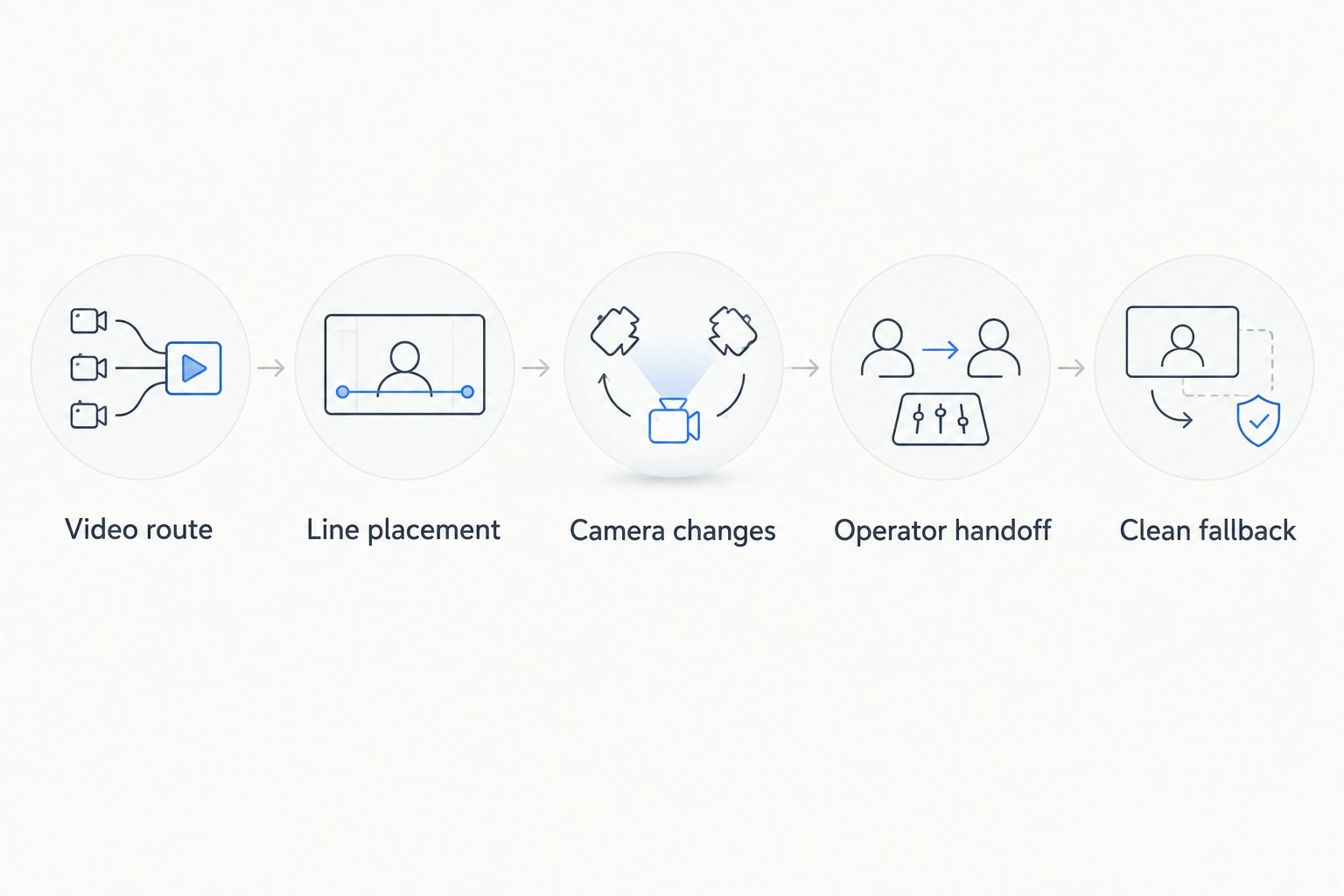
Evaluate the full production workflow before adding on-field graphics to a live game.
Do not accept a workflow that only works when nothing changes. Your rehearsal should include an incorrect line, an unsuitable shot, and a request to remove the overlay. Successful recovery matters as much as successful display.
Why the value varies between productions
The same graphics capability addresses different needs across the 3 production contexts above. Judge the fit against these factors:
- Viewer need: Determine whether field-position references address a specific weakness in your current coverage.
- Operator capacity: Assign the graphics task without leaving another essential production responsibility unattended.
- Windows workflow: Verify the computer and video connections against the requirements for your intended setup.
- Camera coverage: Establish rules for graphics during the shots and movements your production uses.
- Sponsor requirements: Decide whether on-field artwork is an actual deliverable rather than an unused capability.
- Recovery procedure: Confirm that the crew can remove a wrong graphic and continue with clean video.
These factors explain practical value without inventing a return figure. For your 2026 decision, record what the added graphics accomplish and what additional work they require. Compare those observations with a rehearsal of the same production without overlays.
Do sponsor graphics justify adding the software?
Sponsor graphics justify consideration when on-field branding is part of the presentation you intend to deliver. They do not establish additional revenue by themselves. Separate the ability to show artwork from any commercial agreement about exposure.
Prepare artwork for the way it will appear in the football picture. Assess legibility against the field, keep the play readable, and agree on when the graphic is shown or removed. The operator should not be deciding sponsor priorities while also trying to follow the next snap.
Motion design is a separate production decision: animated video production companies create material for a different task than live field placement, so specify whether a sponsor needs an animated segment or an on-field logo before commissioning artwork. Do not assume that a finished animation is suitable for the live graphics workflow.
Define the sponsor deliverable before building it. Record the intended appearance, the approved artwork, and the cue for taking it off screen. Then verify the result in the complete broadcast picture rather than approving the artwork in isolation.
When is broadcasting without on-field graphics enough?
Broadcasting without on-field graphics is enough when your existing coverage clearly communicates the game and your crew cannot yet support the added task. A clean field picture is a valid production choice, not an unfinished broadcast.
Keep that choice available even after adopting overlays. The clean-feed fallback procedure belongs in the operating plan because removing a questionable graphic protects the accuracy of the picture.
For your 2026 coverage, distinguish optional presentation from essential coverage. Viewers need to see and understand the play; an on-field line is an addition to that job.
Can a small crew manage on-field football graphics?
A small crew can evaluate the workflow by assigning responsibility and rehearsing the complete production. Crew size alone does not establish readiness; a clearly assigned task matters more than an assumed spare pair of hands.
If graphics operation interferes with camera direction, audio checks, or game-information updates, simplify the production. Add the layer only when the rehearsal shows that essential tasks remain covered.
FAQ
Is PayneXR worth it for a school football broadcast?
PayneXR is worth evaluating for a school football broadcast that needs virtual field lines and has someone responsible for operating them. Test the setup and operator handoff before making it part of live coverage.
Do I need on-field graphics to stream football?
No, on-field graphics are not required to stream football. Clear pictures, understandable audio, and accurate game information remain the core production priorities.
What does this football graphics software actually add?
The Windows software overlays virtual first-down lines, scrimmage lines, logos, and sponsor graphics onto live football video. Evaluate those functions against the presentation your production needs.
Does adding sponsor graphics guarantee more revenue?
No, the ability to display sponsor graphics does not establish revenue. Define the sponsor agreement and presentation requirements separately from the software decision.
Can I assume it works with my current production equipment?
No, verify compatibility with your actual computer, video connections, and production equipment. Test the complete video route before relying on it during a game.
What should happen when a first-down line is wrong?
Remove an incorrect first-down line and restore it only after checking its position. Rehearse that action and the clean-video fallback before live coverage.
Should on-field graphics stay visible during every shot?
No, set rules for when on-field graphics belong in the picture. Test camera changes and replay transitions, then remove overlays on shots where their placement has not been verified.
One last thing
Your most revealing test is removal, not display. Ask the operator to take the graphics off during a rehearsal while the rest of the crew continues the production.
If that action creates confusion, resolve the responsibility and routing before game day. A controlled clean picture is better than a field graphic your crew cannot confidently correct.