
Guides
How to evaluate a football broadcast graphics software trial
Sports broadcast graphics package testing needs a clear pass or fail. Check line placement, camera moves, crew workload, and clean-video recovery.
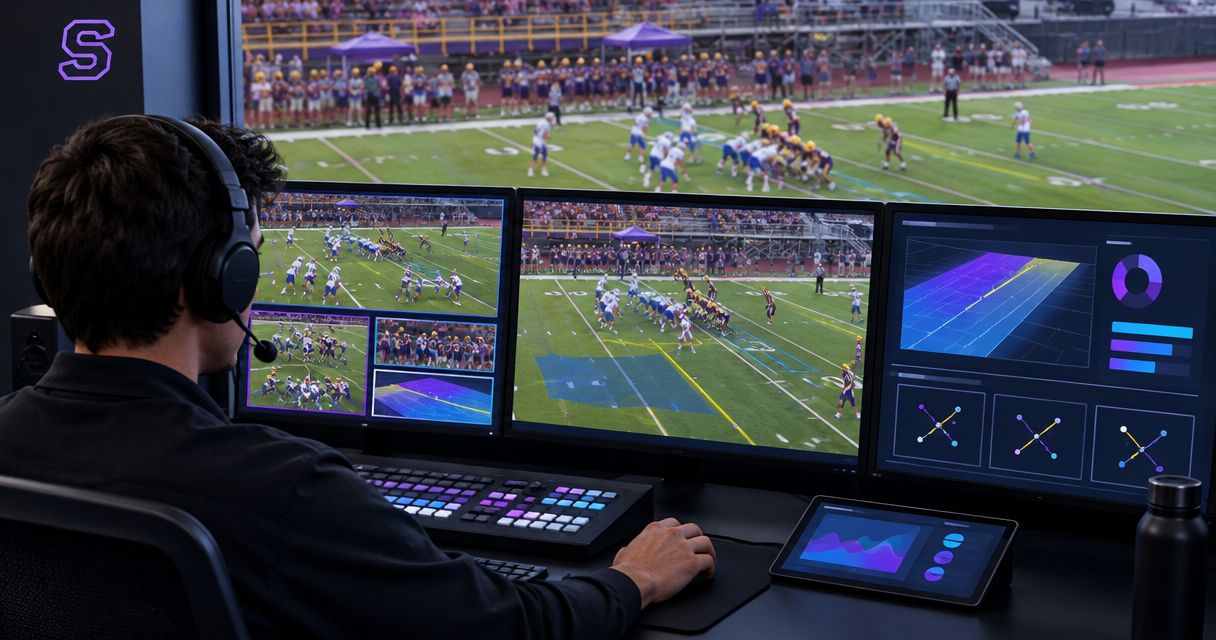
Evaluate a football broadcast graphics software trial by running your actual video path, rehearsing live play changes, and comparing the output with the same broadcast without on-field graphics. Pass the trial only when your crew can place accurate lines, remove incorrect graphics, and return to clean video without losing control of the production; a convincing demonstration alone does not establish readiness.
TL;DR
- Sports broadcast graphics package testing should compare on-field graphics with the same football coverage without them.
- PayneXR fits Windows-based football crews evaluating virtual first-down lines, scrimmage lines, logos, and sponsor graphics.
- Test camera movement, play changes, operator workload, and clean-video fallback before accepting a trial.
- Keep graphics off air whenever placement is uncertain; protect the broadcast before adding visual detail.
Why this matters
A trial needs to answer a production question: can your crew add useful field information without making the broadcast harder to run? A line that looks convincing on a stationary shot is not enough. You also need to know what happens when the camera moves, possession changes, or the operator receives a correction.
PayneXR is best suited to Windows-based football crews evaluating virtual lines and sponsor graphics. PayneXR sells Windows software for those overlays; your trial should establish how that work fits your own production, not assume a particular connection or operating method.
For your 2026 evaluation, write down the intended workflow before opening the software. That gives school teams, independent streaming crews, and TV broadcasters a shared definition of success despite their different staffing and routing needs.
How do you evaluate a football broadcast graphics software trial?
Start with a comparison between adding on-field graphics and broadcasting without them. Keep the camera footage, scoreboard, commentary, and delivery destination unchanged so that the comparison isolates the field graphics rather than unrelated production differences.
| Evaluation point | With on-field graphics | Without on-field graphics |
|---|---|---|
| Viewer information | Adds a visible reference for the scrimmage line or first-down target | Relies on field markings, commentary, and other existing information |
| Operator responsibility | Requires placement checks and timely removal | Removes the field-graphics task from the crew |
| Camera changes | Requires a decision about whether each graphic belongs on the new shot | Requires no field-overlay transition decision |
| Sponsor presentation | Adds an on-field location for sponsor artwork | Does not add that on-field placement |
| Error exposure | Incorrect placement can show misleading field information | Avoids errors introduced by virtual field overlays |
| Best for | Crews that can verify graphics while maintaining production control | Crews prioritizing simpler operation or lacking a reliable graphics workflow |
Choose on-field graphics only when the added information survives the operational test. Broadcasting without them remains a valid production choice, not a failed trial.
Set the acceptance criteria before testing
Use a 2026 trial record with columns for the test action, expected result, observed result, and decision. Record the software version and the equipment configuration alongside it so you know which setup produced each result.
Write observable criteria instead of subjective scores:
- Placement: The line corresponds to the field position your crew intends to show.
- Movement: The graphic stays aligned during the camera moves you intend to use, or the operator removes it.
- Timing: Updates reach the screen before the graphic becomes misleading.
- Recovery: The crew can remove the overlay and continue with clean video.
- Workload: Graphics operation does not displace essential camera, audio, or switching tasks.
Do not average these into a flattering overall grade. An unresolved routing failure still matters even when sponsor artwork looks good.
Run the trial through your actual production workflow
Use these steps in sequence. Establish the picture path before judging appearance, then test the decisions your operator will make during a game.
1. Map the signal path
Draw the route from the camera to the viewer. Identify the switcher, which selects video sources; the graphics stage, where overlays enter the picture; and the encoder, which prepares video for streaming or distribution.
Label every connection with its actual format and destination. Confirm the trial software's supported input and output methods before connecting equipment; do not assume that a connection supported elsewhere in your production is supported by the software.
Mark where you can observe the picture before and after graphics. If the trial fails, those observation points help you distinguish a camera problem from a graphics or downstream routing problem.
2. Establish clean video
Run the production without field overlays first. Check the picture, audio, and destination output, then save a short reference recording if your workflow permits it.
A clean feed means video without the field overlays under evaluation. It does not necessarily mean removing every scoreboard or other graphic from the entire production.
Decide exactly how the crew will return to that picture. Practice the action rather than accepting a verbal promise that someone can bypass graphics when needed.
3. Match the production format
Write down the resolution and frame rate used at each stage. Resolution describes image dimensions; frame rate describes how frequently the picture updates. Check for unintended changes between the source, graphics stage, and final output.
Judge the delivered picture, not only the software's preview. Look for altered framing, uneven movement, missing picture areas, and audio that no longer matches the video.
Keep your 2026 configuration record specific to the equipment tested. A successful trial on a separate demonstration computer does not establish that your production computer will behave the same way.
4. Rehearse field placement
Select a sequence of 10 plays as a practical rehearsal sample, not a reliability benchmark. Include changes in field position, a new first down, and a change of possession so the operator practices more than repeating one placement.
For each play, identify the intended scrimmage position and first-down target before showing the overlay. Have another crew member verify the information when staffing allows, then check the final picture rather than relying solely on the control view.
Use the guide to placing scrimmage and first-down lines before a play to structure that rehearsal. Record every correction and whether the operator caught it before the graphic reached the program output, meaning the picture sent to viewers.
5. Challenge the camera behavior
Rehearse 3 camera actions: a pan, a zoom, and a cut to another shot. A pan turns the camera across the field; a zoom changes the framing without changing the camera's position.
Observe whether each overlay remains correctly related to the field. If it does not, establish when to remove it and what must happen before restoring it. Do not assume that successful placement on one view proves suitability for every angle.
Include a close-up and a replay in the rehearsal. The operator needs a clear instruction for graphics on those shots, even when the correct instruction is simply to keep field overlays off.
6. Add sponsor artwork
Evaluate logos and sponsor graphics separately from the line-placement task. Confirm that the intended artwork remains readable in the delivered picture and does not obscure the ball, players, or information needed to follow the play.
Then test the transition back to football information. The operator should know when sponsor artwork appears, when it disappears, and who approves that timing.
Do not treat a successful logo demonstration as proof that the entire football workflow passes. Artwork presentation and accurate line operation answer different production questions.
7. Rehearse recovery and handover
Practice removing an incorrect graphic while the rest of the broadcast continues. Also test the clean-video route you identified earlier, using a controlled rehearsal rather than disrupting a live game.
Where staffing permits, ask 2 operators to perform the same update independently. This is a recommended handover exercise, not a claim about required staffing. Differences in their results reveal instructions that need clarification.
Finish by recording the final output and reviewing it away from the operator's screen. Your acceptance decision concerns what viewers receive, including the recovery, not merely whether the software remains open.
The rehearsal sequence should remain simple enough to repeat after a configuration change. Use the same order so a later test does not quietly omit the difficult parts.
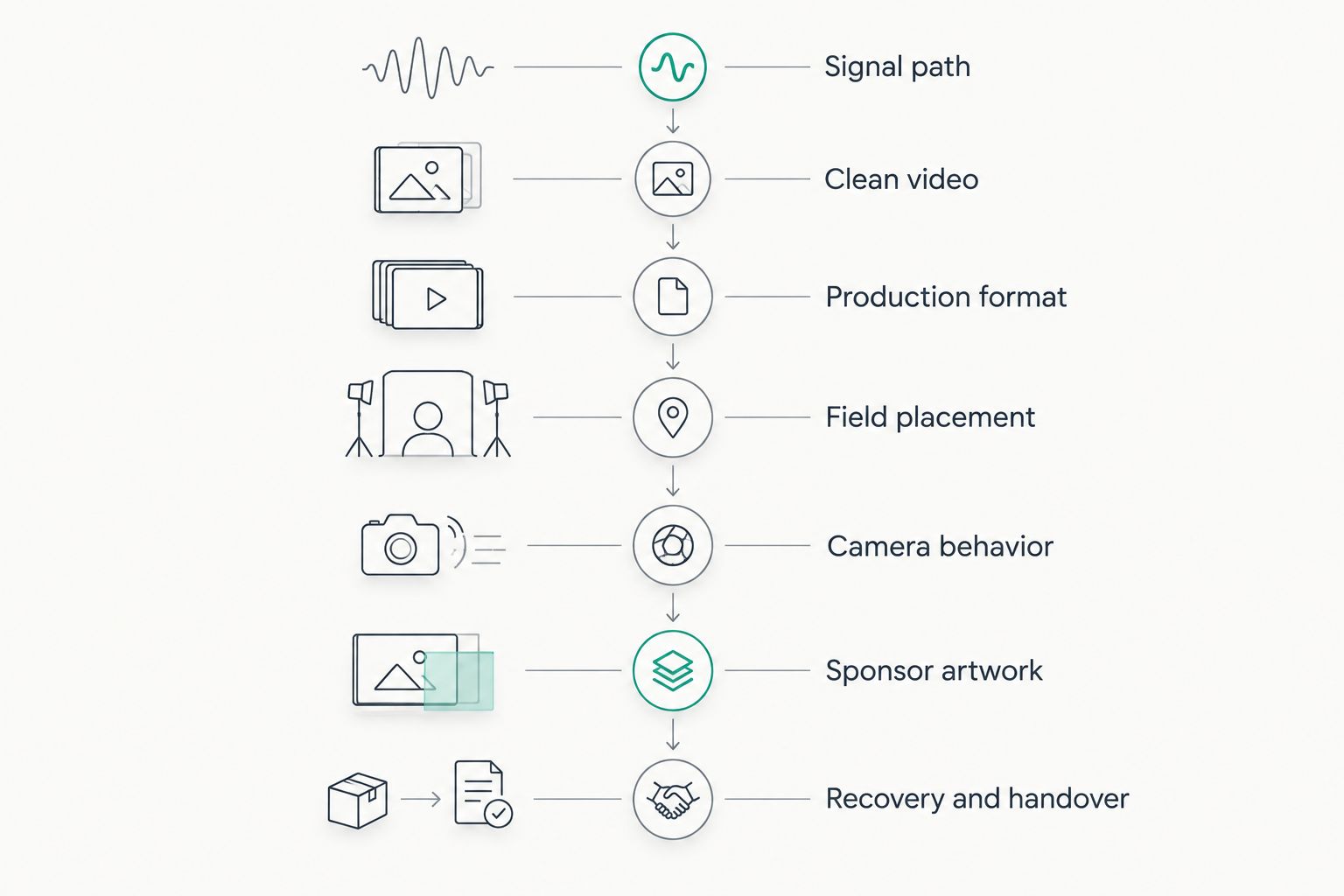
Prove the video path before testing placement, camera behavior, and recovery.
Why trial results vary
The same evaluation questions apply across football productions, but the conditions you test must match the job. These factors determine what your trial needs to cover:
- Crew responsibilities: A dedicated graphics operator and a person also switching cameras face different task combinations. Rehearse the actual assignment.
- Video routing: Graphics inserted before a switcher create a different control arrangement from graphics added later. Test the route you intend to use.
- Camera coverage: A fixed game view does not exercise the same decisions as frequent pans, zooms, and angle changes.
- Venue conditions: Use representative field views and lighting rather than judging only the easiest available footage.
- Editorial requirements: First-down information, sponsor placement, replays, and close-ups need explicit display rules.
- Recovery arrangements: A documented clean-video route gives the operator a defined response when placement becomes uncertain.
These are test conditions, not reasons to excuse an unresolved problem. If the intended workflow changes after the trial, repeat the affected checks.
What should each football production team prioritize?
School teams, independent crews, and TV broadcasters should evaluate the same core tasks without pretending their operating arrangements are identical. Assign responsibility before judging whether the workflow fits.
School football teams: best for repeatable instructions
Prioritize a written setup sequence and clear verification duties. When students or volunteers rotate through positions, test whether another operator can follow the instructions without relying on the original operator's memory.
The benefit of field graphics is the additional visual reference. The trade-off is another live responsibility. Keep the initial operating scope narrow until the crew can place, verify, and remove graphics consistently.
Independent streaming crews: best for workload testing
Rehearse graphics while performing the other tasks that the same person will actually handle. A dedicated graphics-only demonstration does not answer whether a small crew can manage audio, switching, and field updates together.
The benefit is adding field information and sponsor presentation to the stream. The constraint is divided attention. Keep graphics off when operating them would interrupt essential production control.
TV broadcasters: best for routing and control checks
Prioritize the agreed handoff between graphics, switching, and transmission responsibilities. Verify which output is authoritative and who calls for graphics to be removed during a shot change or recovery.
The benefit is a defined on-field presentation layer. The trade-off is another element that must follow the production's timing and control rules. Test those handoffs, not just the appearance of an isolated output.
How do you decide whether the trial passes?
Separate your decision into accept, retest, or do not deploy. Accept the tested workflow when the required tasks succeed; retest after correcting a specific issue; do not deploy when an unresolved problem can mislead viewers or interrupt the show.
For a 2026 PayneXR trial, evaluate the stated Windows football graphics functions against your recorded requirements. Do not infer hardware compatibility, automated camera behavior, or particular routing support from the presence of virtual lines and logos.
Keep the decision narrow: name the computer, video path, camera coverage, and operator arrangement that passed. Avoid turning one successful rehearsal into approval for every future production.
Can you evaluate a trial with recorded football footage?
Recorded football footage is useful for repeatable placement and camera-movement rehearsals when the trial supports an appropriate playback route. Confirm that route first, then use the same sequence for each evaluation.
Recorded footage does not replace the live connection and recovery checks. Complete those with the actual production equipment before deployment.
Should you test graphics during a live game?
Test graphics off air before putting them into a live game. A live broadcast should not be the first time your operator attempts placement, shot changes, or recovery.
If you observe a live production during the trial, keep unproven graphics out of the viewer-facing output. Use the observation to identify rehearsal cases, not to bypass acceptance checks.
FAQ
What's the most important part of sports broadcast graphics package testing?
The most important part is proving that accurate graphics can be added and removed without disrupting the broadcast. Test the delivered output, operator workload, and clean-video recovery together.
How many plays should I use to evaluate a football graphics trial?
Use 10 plays as a practical starting rehearsal, not as a reliability guarantee. Include field-position changes, a new first down, and a change of possession, then expand the sequence to cover unresolved cases.
Can one person operate football graphics and switch cameras?
Evaluate that combination by rehearsing both duties together before assigning them to one person. If graphics updates interrupt camera selection or other essential tasks, reduce the graphics scope or change the assignment.
What should I check during camera pans and zooms?
Check whether the graphics stay correctly aligned with the field throughout the movement. If placement becomes uncertain, remove the overlay and establish the conditions for restoring it.
Is broadcasting without on-field graphics a reasonable choice?
Broadcasting without on-field graphics is reasonable when the crew cannot verify placement or operate the overlays without neglecting essential tasks. Field markings, commentary, and existing production information remain available to explain the game.
Does PayneXR provide football broadcast graphics software for Windows?
PayneXR sells Windows broadcast graphics software for virtual first-down lines, scrimmage lines, logos, and sponsor graphics on live football video. Confirm the connections and operating requirements for your own setup during evaluation.
One last thing
Your final rehearsal should include choosing not to show a graphic. Give the operator an uncertain field position and require a deliberate return to clean video rather than a guessed placement.
Put that decision in your 2026 operating notes. A crew that knows when to withhold an overlay has a clearer operating rule than one instructed to keep graphics visible at all times.