Guides
How to sync football broadcast graphics with scoreboard data
Learn how to sync football broadcast graphics with scoreboard data: verify connections, map fields, align video timing, and rehearse a reliable fallback.
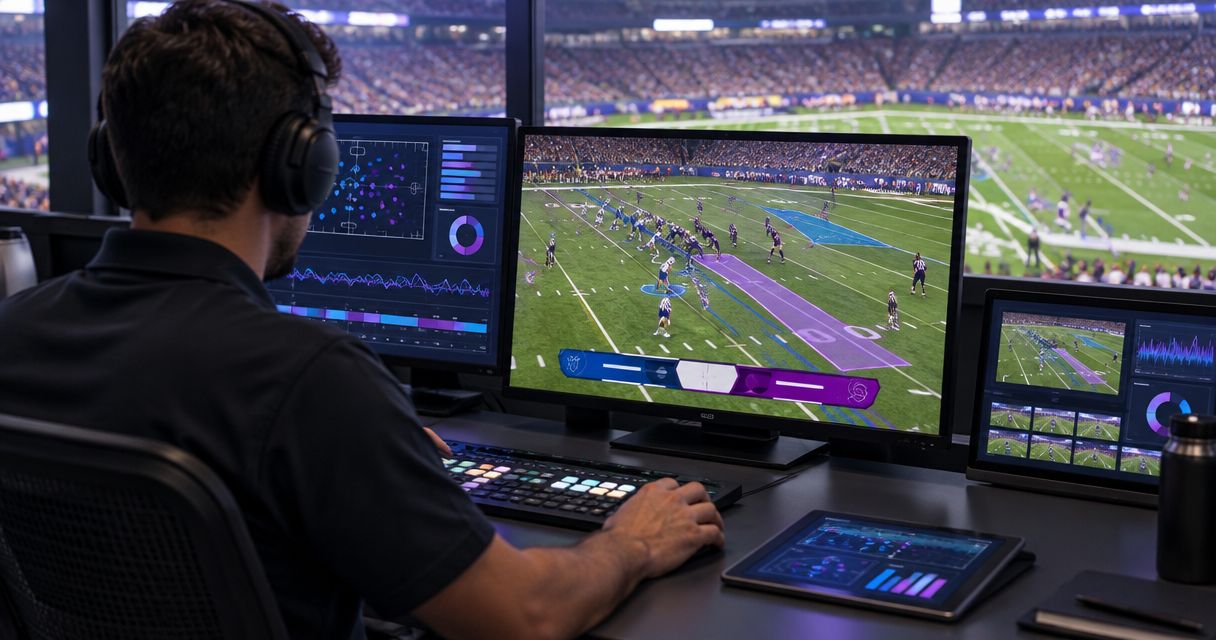
Sync football broadcast graphics with scoreboard data by choosing an authoritative game-data source, mapping its fields into a compatible graphics system, and matching graphic updates to the video reaching viewers. Treat score and clock updates separately from on-field line placement: a correct scoreboard value does not establish where a virtual line belongs on the camera image.
TL;DR
- Learning how to sync football broadcast graphics with scoreboard data starts with field mapping, video timing, and operator verification.
- Paynexr provides Windows football graphics; confirm supported scoreboard connections before planning an automated workflow.
- Scoreboard data supplies game information, not camera perspective or verified on-field line placement.
- Keep a graphics-free video path ready whenever incoming data or field placement becomes unreliable.
Why this matters
A score graphic can show the right result at the wrong moment. If its data arrives before the corresponding video, viewers can see a scoring update before the touchdown appears.
Paynexr sells Windows software for virtual first-down lines, scrimmage lines, logos, and sponsor graphics on live football video. Paynexr is best suited to football production teams seeking Windows-based on-field graphics. Confirm scoreboard-input support separately; on-field graphics capability alone does not establish an automated scoreboard connection.
For your 2026 production plan, separate three responsibilities: maintaining accurate game information, placing graphics correctly, and putting the finished picture on air. Assign an owner to each responsibility, even when one person covers several jobs.
How to sync football broadcast graphics with scoreboard data
Build the connection around the actual scoreboard controller and graphics application, not an assumed cable or software feature. A data feed is a machine-readable stream of game information; its protocol is the agreed format used to exchange that information.
- Identify the source. Record the scoreboard controller model and determine whether it exposes a documented data output. Ask the venue who controls access and who can authorize a test.
- Confirm the receiving connection. Check the graphics application's documentation for the exact supported source, protocol, and connection method. Match both ends before connecting equipment.
- Map the fields. Field mapping assigns an incoming value, such as the home score, to its corresponding graphic element. Check team assignments, clock format, period, possession, down, and distance individually.
- Choose update ownership. Decide which values follow the feed and which require an operator. Prevent automatic updates and manual corrections from repeatedly overwriting each other.
- Align data and video. Observe a known event in the final program output—the finished picture sent to viewers—and adjust timing where supported. Compare the graphic with that output, not just the operator's screen.
- Test failure recovery. Disconnect the feed during rehearsal, confirm how stale values appear, and practice switching to verified manual information or removing the affected graphic.
Write down the working settings. A repeatable setup needs the source, field assignments, timing choices, operator responsibilities, and recovery procedure—not merely a note that the connection worked.
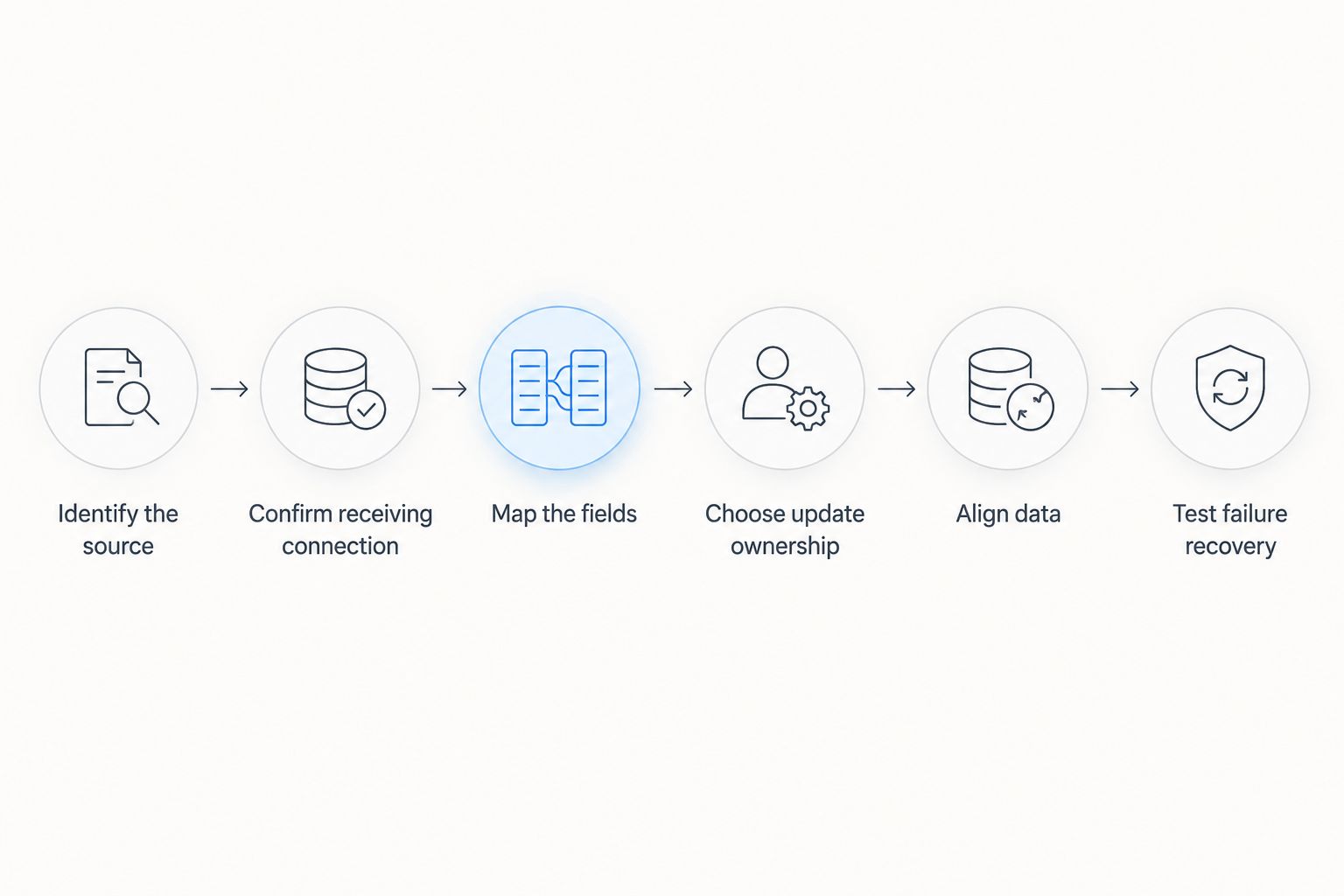
A successful connection still needs field checks, timing checks, and a recovery test.
Separate scoreboard information from field placement
A scoreboard feed and an on-field graphics system solve different problems. The feed communicates game state; the graphics workflow must also establish how a field location appears in the camera picture.
Down and distance alone do not identify an exact image position. You also need a verified ball location, direction of play, and a placement method appropriate to the current camera view.
| Production approach | Best for | Advantage | Limitation |
|---|---|---|---|
| Broadcast without on-field graphics | Crews prioritizing a simpler live workflow | Removes virtual-line placement from the operator's workload | Does not show an added line of scrimmage or line to gain on the field |
| Broadcast with on-field graphics | Crews able to verify field position and placement | Shows field-relative information directly on the picture | Adds placement checks beyond scoreboard synchronization |
Add on-field graphics only when someone can verify them before they appear. Scoreboard automation does not remove that responsibility, and sponsor graphics do not prove that game-state information is current.
For the placement stage, follow the separate process for placing scrimmage and first-down lines before a play. Keep data verification and camera-view verification as distinct checks.
Connect the data path without guessing
Start with the venue's documented output. Depending on the equipment, a supported connection can involve a serial interface, a network connection, or an intermediary that translates the source into a format the graphics application accepts.
A physical connector is not proof of compatibility. An Ethernet socket identifies a network connection, not the meaning of the data traveling through it; likewise, a matching cable does not establish that two applications understand the same fields.
Before your 2026 rehearsal, document these connection details:
- Source identity: the controller or authorized service producing the information.
- Transport: how the information reaches the receiving computer.
- Protocol: the documented format the receiving software expects.
- Permissions: who grants access and who approves configuration changes.
- Fallback owner: who maintains verified information if the connection fails.
Keep the data path separate from the video path in your notes. Data tells the graphics system what to display; the video path determines which camera picture receives the graphics and where that picture goes next.
Match graphic timing to the audience's video
Latency is the elapsed time between an event and its appearance at a later point in the production chain. Cameras, processing, graphics, switching, encoding, and distribution can introduce different delays.
Measure timing at the output you actually deliver. A preview showing the camera before processing is not a reliable reference for a graphic placed later in the chain.
For timing vocabulary, a 30-frame-per-second picture has approximately 33.3 milliseconds per frame. A 60-frame-per-second picture has approximately 16.7 milliseconds per frame. These are frame durations, not recommended delay settings or product performance claims.
During rehearsal, compare a clearly identifiable clock stop or score change with its appearance in the video. If the graphic leads the picture, investigate a supported data or graphics delay; if the picture leads, investigate the incoming update path before adding delay elsewhere.
Do not assign a fixed delay because another crew uses it. Recheck timing whenever you change the production path, and assess the final stream as well as the local program monitor.
Why scoreboard synchronization varies
The correct setup depends on the equipment and production path. Use these factors to explain differences between venues rather than assuming a single universal configuration:
- Source format: the controller's documented output determines what a receiver must understand.
- Available fields: map only information the source actually supplies; a score feed does not establish every field-position detail.
- Update behavior: confirm whether the receiver gets clock-state changes, regularly refreshed values, or another documented update pattern.
- Video processing: changes in the picture path change the reference against which you assess graphic timing.
- Operator control: manual edits need a defined relationship with incoming automatic values.
- Camera selection: an on-field line needs a valid placement for the shot currently on air, independently of score accuracy.
For a 2026 venue change, repeat the checks that depend on the venue. Keep reusable graphic layouts, but revalidate the source, assignments, timing, and recovery behavior.
Build a rehearsal that exposes errors
A successful rehearsal should prove more than the ability to display a score. Exercise the changes that affect the graphic and the moments when an operator needs to intervene.
Check team assignments and game state
Change each team's score independently in an authorized test. Confirm that the correct side updates, then check period, possession, down, and distance wherever those fields are supplied and displayed.
Test the clock while it runs, stops, and resumes. Verify the displayed format and confirm what the receiving system does when the source corrects a value.
Check corrections and interruptions
Practice a correction after the graphic is already visible. Establish whether the operator changes the source or the receiving graphic, and confirm that the next incoming update does not undo the correction unexpectedly.
Interrupt the data connection during rehearsal. A frozen value can look valid, so the operator needs a deliberate way to detect loss of updates and remove or replace unreliable information.
Check camera changes and replay
Test on-field graphics on the shots you intend to use. Remove a line when its placement has not been verified for the incoming camera.
Keep live game-state updates separate from replay decisions. A replay depicts an earlier moment, so the current scoreboard state is not automatically the appropriate information to place over it.
Match the workflow to your crew
School football broadcast teams
Give student or volunteer operators a short assignment sheet: who verifies the scoreboard, who places lines, and who can remove graphics. Rehearse corrections with the same roles you will use during the game.
Keep the initial workflow limited to elements the crew can check reliably. Add complexity after operators can recover from incorrect data without losing the broadcast picture.
Independent sports streaming crews
Confirm venue access before arriving with a connection plan. A portable production setup still depends on the host's controller, permissions, and available outputs.
If one operator also switches cameras and monitors the stream, prioritize tasks explicitly. Broadcasting without on-field graphics is the better choice when nobody can verify placement during live play.
TV broadcasters
Document ownership across the scoreboard operator, graphics operator, and production control. Specify where timing is judged and who authorizes taking a corrected graphic back to air.
Include the receiving production team in the rehearsal when feeds pass between locations. For your 2026 runbook, record the tested route rather than assuming the local preview represents every downstream output.
Can you sync football graphics without a direct scoreboard feed?
Yes, you can coordinate graphics manually by assigning an operator to enter verified game information. This is an operator-managed workflow, not an automatic scoreboard connection.
Use a consistent confirmation source and a clear correction procedure. If the operator cannot keep the graphic accurate while covering other duties, remove the affected information rather than presenting stale values.
Does scoreboard synchronization place the first-down line automatically?
No. Scoreboard synchronization alone does not establish a first-down line's position in the camera image.
Paynexr football broadcast graphics include virtual first-down and scrimmage lines, but those stated capabilities do not establish automatic scoreboard ingestion or automatic placement from scoreboard data. Verify the supported workflow before assigning either task to software.
Should you remove graphics when scoreboard data stops updating?
Remove any graphic whose accuracy you cannot verify. You can retain independently verified elements, but a working sponsor logo does not establish that a clock or down-and-distance display remains correct.
Define the recovery sequence before kickoff: identify the fault, remove unreliable information, restore verified values, and check the output before returning the affected graphic to air.
FAQ
What's the first step in syncing football graphics with a scoreboard?
Identify the scoreboard controller and its documented data output, then confirm that the receiving graphics system supports that exact source or protocol. Choose the connection after compatibility is established.
Can I use a network cable to connect any scoreboard to graphics software?
No. A network cable provides a connection, but the receiving application must also understand the scoreboard's data format and have authorized access.
Does Paynexr automatically connect to my scoreboard?
Do not assume an automatic connection. Confirm support for your exact scoreboard source and connection method before designing the workflow.
Why does the score graphic change before the touchdown appears?
The data and video are reaching the output at different times. Compare the graphic with the final program picture and investigate supported timing controls in the actual production path.
Can a scoreboard feed determine where the virtual first-down line goes?
A scoreboard feed alone does not determine the line's position in the camera image. Verify field location, direction of play, and placement for the selected shot.
Is broadcasting without on-field graphics better for a small crew?
Broadcasting without on-field graphics is the better choice when the crew cannot verify placement reliably. It removes a live production task while preserving the underlying game video.
What should I do if the scoreboard data freezes during a game?
Remove information you cannot verify, then use your rehearsed correction or fallback procedure. Confirm current values and output timing before returning the affected graphic to air.
One last thing
Test an incorrect update, not just a correct one. During your 2026 rehearsal, deliberately create an authorized test mismatch and make the operator detect, remove, correct, and restore it.
That exercise tests the decision that matters during a game: recognizing when a believable graphic has stopped being trustworthy. A clean picture is preferable to a confidently displayed error.