
Guides
How to put sponsor logos on a live football field
Add sports broadcast graphics package sponsor logos to live football video. Plan the signal path, test field placement, and keep a clean-feed fallback.
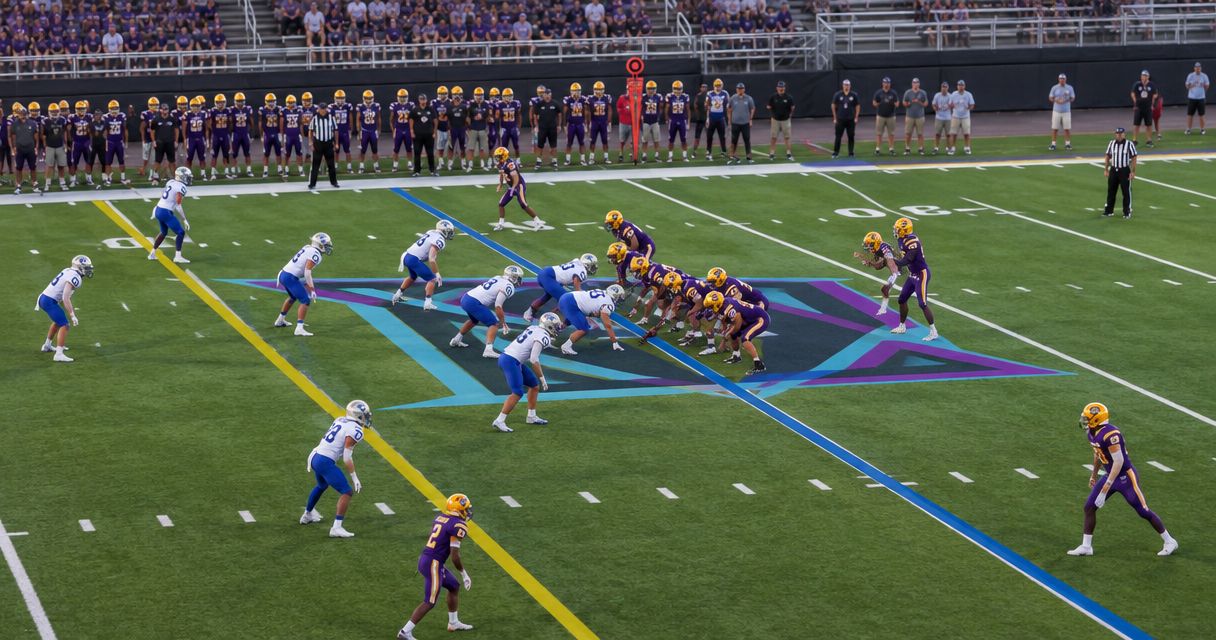
To put sponsor logos on a live football field, add them to the camera video through a graphics workflow, check their placement against the field, and send the finished picture to your broadcast output. A virtual logo appears in the viewer’s video, not on the physical turf; keeping it aligned during camera movement requires more than placing a static image over the screen.
TL;DR
- For sports broadcast graphics package sponsor logos, test field alignment before sending the finished picture live.
- Paynexr provides Windows football broadcast graphics software for virtual lines, logos, and sponsor graphics.
- On-field graphics add field-level branding; broadcasting without them removes that placement and its operating tasks.
- Keep a clean camera feed available so you can remove graphics without losing the game.
Why this matters
A sponsor logo can look correct while the camera holds still and slide across the field when the operator pans. The placement decision and the video-routing decision belong in the same production plan.
Paynexr is best for football production teams seeking Windows software for virtual lines and sponsor graphics. Its stated scope includes first-down lines, scrimmage lines, logos, and sponsor graphics over live football video. Start with Paynexr when that matches your requirements, then confirm the connections and placement behavior your production needs.
For your 2026 production brief, separate the visual goal from the technical requirements. “Put the sponsor on the field” describes the result, not the equipment, camera workflow, or operator responsibilities needed to deliver it.
How do you put sponsor logos on a live football field?
Build the workflow around the camera picture, the graphics stage, and the destination that receives the finished video. The following steps describe production tasks, not a particular software interface.
1. Choose field placement or screen placement
Decide whether the logo must appear attached to the turf or simply remain visible over the picture. A screen-positioned logo stays in a fixed part of the frame; a field-positioned logo needs its apparent position, scale, and perspective to agree with the playing surface.
Write that distinction into the sponsor brief. A corner logo and a midfield virtual placement are different deliverables, even when they use the same artwork.
2. Prepare the sponsor artwork
Request a logo file with a transparent background when the design calls for an isolated mark. Transparency lets the surrounding video remain visible instead of showing a rectangular background around the artwork.
Confirm the file types and artwork requirements accepted by your chosen software. Check lettering, proportions, and background treatment before loading the asset; repairing artwork during the game creates an avoidable operating task.
3. Map the video connections
Identify how the camera picture reaches the graphics computer and how the resulting video reaches the switcher or streaming system. A switcher selects the video source viewers see. An encoder converts the selected video into the stream delivered to your audience.
Do not assume that a camera socket connects directly to a Windows application. Confirm the capture device, connection type, supported video format, and output method for the actual system you plan to use.
4. Establish the placement workflow
Confirm how the selected software positions a logo relative to the field. If the production requires the logo to remain attached to the turf during pans, tilts, or zooms, test that exact behavior before promising it.
Field alignment and player overlap are separate checks. A logo can follow the field correctly yet still draw over a player unless the workflow handles that overlap appropriately. Do not infer either capability from the phrase “virtual graphics.”
5. Test the finished picture
Watch the output that viewers will receive, not only the application preview. Move the camera through the shots planned for the broadcast and check whether the logo shifts, stretches, obscures useful action, or becomes unreadable.
Run 2 test passes: one with graphics visible and one using the clean feed. A clean feed is the camera picture without the added graphics. Both routes need to work before the opening kickoff.
6. Assign control and a removal cue
Name the person responsible for displaying, changing, and clearing sponsor graphics. Give that operator an unambiguous removal cue and confirm who can take the clean feed if the graphics output fails.
The successful test is not just displaying a logo. It is displaying the right logo, on the intended shot, and removing it without interrupting coverage.
The connection plan below is conceptual. Your confirmed hardware and software support determine the actual cables, devices, and routing.
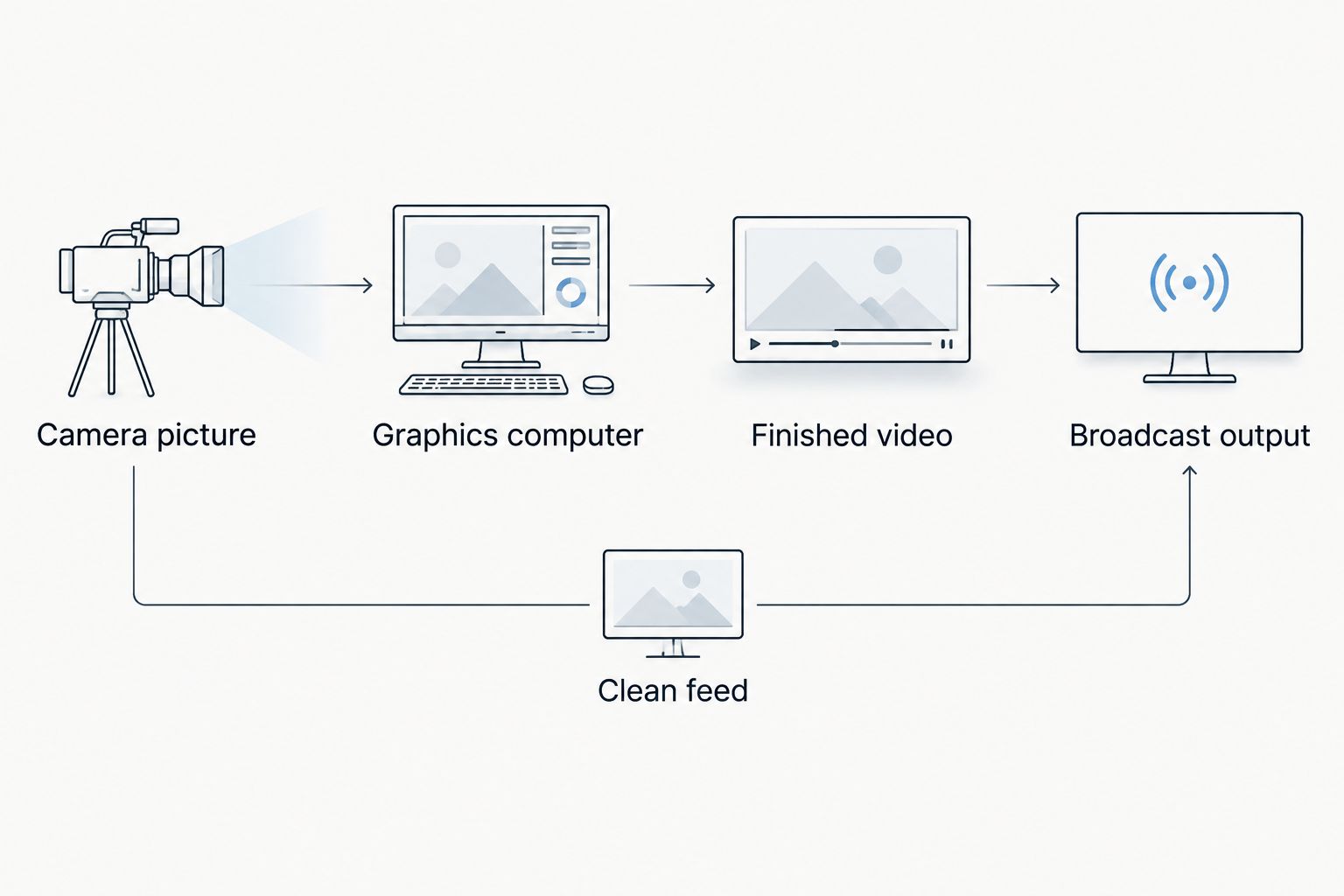
Confirm both the graphics route and the clean-feed route before the broadcast.
On-field sponsor graphics versus broadcasting without them
Adding field graphics creates another place for sponsor branding within the game picture. Broadcasting without on-field graphics avoids that added placement workflow, but it does not provide the same field-level presentation.
Use this comparison for a 2026 production decision. Neither approach replaces the need to check the final program picture.
| Approach | Best for | Practical advantage | Practical limitation |
|---|---|---|---|
| On-field sponsor graphics | Crews whose brief requires branding positioned on the playing surface | Places the sponsor within the field view | Requires placement checks, operating control, and a removal plan |
| No on-field sponsor graphics | Crews whose brief does not require virtual field branding | Removes the field-placement task from the production | Does not deliver a virtual sponsor placement on the turf |
Choose on-field graphics when the field placement is part of the deliverable, not simply because a logo file is available. If the crew cannot verify alignment or manage removal during live play, keep that placement out of the program until the workflow passes rehearsal.
Paynexr’s Windows football broadcast graphics software fits the on-field graphics brief through its stated support for virtual lines, logos, and sponsor graphics. That scope does not establish your complete system requirements or every connection your production uses; confirm those separately.
Why sponsor-logo results vary
A logo asset is only one part of the result. These factors determine what you need to test:
- Camera movement: Panning, tilting, and zooming change the field’s position and apparent scale within the image. Test the movements your camera operator will actually use.
- Placement method: A screen overlay and a field-aligned graphic behave differently. Verify which result the workflow produces.
- Artwork design: Fine lettering and intricate shapes need scrutiny at the viewer’s display size. Judge the sponsor mark in the broadcast picture, not as a full-screen file.
- Player overlap: Decide whether players must appear in front of the graphic. Check that behavior independently from field alignment.
- Video routing: The graphics preview is not the broadcast output. Confirm the complete route through the devices that send the picture to viewers.
- Operator workload: A placement that needs attention adds another live responsibility. Assign that responsibility before the crew starts covering the game.
What each football production team should prioritize
School football teams: make the procedure repeatable
For a school broadcast, document the tasks so the next operator can repeat them. Include the approved artwork, the intended shot, the display cue, and the removal cue without relying on someone remembering last week’s setup.
Best for school crews: a rehearsed placement with a written operating procedure. The benefit is a defined task that can be handed over; the limitation is that a written procedure still needs testing against the equipment in use.
Keep the 2026 game-day checklist short enough to use at the production position. Put the clean-feed instruction beside the display instruction, rather than burying it in a separate document.
Independent streaming crews: check the complete output
An independent crew needs to establish where graphics enter the streaming chain. Confirm whether the intended destination receives a finished video picture or requires another graphics-compositing stage. Compositing means combining graphics and video into the picture viewers see.
Best for independent crews: a confirmed route from camera input to stream output. A single diagram makes the connections easier to check, but it does not prove compatibility. Verify every device and application in that route.
TV broadcasters: agree on the production handoff
A TV production needs a clear agreement about what arrives at the receiving position. Specify whether the handoff contains the completed picture or separate elements that still need to be combined.
Best for TV broadcasters: an agreed handoff with a tested bypass. This defines responsibility at the boundary between systems; it does not remove the need to check timing, picture format, and the actual program output.
Across all three audiences, the decision is the same: the crew needs a verified way to put graphics on air and a verified way to take them off.
How do you stop a sponsor logo from covering players?
Player overlap requires its own check; correct field placement alone does not establish that players will appear in front of the logo. Ask how the selected workflow handles foreground subjects, then inspect footage with players crossing the placement.
If that behavior does not meet your production brief, change the placement or remove it during those shots. Do not describe a logo as integrated with the field until the live picture supports that description.
Can you add a sponsor logo without camera tracking?
A fixed screen logo does not need to follow the field, but it is not the same as a logo attached to the turf. For a field-aligned placement without camera trackers, confirm the software’s documented method and test it with the intended camera movements.
Do not turn “no external tracker” into an assumption that placement requires no setup or operating attention. The acceptance test remains the finished picture.
How do you check whether the sponsor logo is readable?
Check the logo at 2 viewing sizes: the production monitor and a phone-sized view. This is a practical review procedure, not a guaranteed minimum specification for artwork.
Judge the name, shape, and contrast within the normal game picture. If the sponsor identity disappears at the smaller size, revise the artwork or placement rather than assuming viewers will enlarge the stream.
A final rehearsal before the logo goes live
Use 3 production checkpoints: artwork, placement, and recovery. Artwork checks the approved mark; placement checks its appearance during the intended shots; recovery checks that the crew can remove it while continuing coverage.
For the 2026 rehearsal, follow the same order the crew will use during the game:
- Load the approved asset and compare it with the sponsor brief.
- Display the logo on the intended camera shot.
- Exercise the planned camera movements.
- Inspect player overlap and readability.
- Clear the graphic on the agreed cue.
- Take the clean feed and confirm that game coverage continues.
Paynexr belongs on the shortlist when you need Windows software for football lines and sponsor graphics. Make the rehearsal—not an assumed capability—the basis for your production approval.
FAQ
How do I put a sponsor logo on a live football field?
Add the logo through a graphics workflow that combines it with live camera video, then send the finished picture to your broadcast output. Confirm field placement, camera-movement behavior, and removal before going live.
Does a virtual sponsor logo appear on the actual turf?
No. A virtual sponsor logo appears in the video picture, not on the physical playing surface.
Can I use a corner logo instead of an on-field logo?
Yes, if a fixed screen placement meets the sponsor brief. A corner logo stays positioned within the frame rather than appearing attached to the field.
Does Paynexr offer football sponsor graphics?
Paynexr sells Windows broadcast graphics software that overlays logos and sponsor graphics onto live football video. Its stated scope also includes virtual first-down lines and scrimmage lines.
What computer connections do I need for football graphics?
The required connections depend on the software, capture hardware, and broadcast destination you select. Confirm the camera input and graphics output methods before buying or connecting equipment.
Will a virtual field logo automatically stay behind players?
Do not assume that it will. Confirm how the selected workflow handles player overlap and test players crossing the graphic before approving the placement.
What should I do if the sponsor graphic looks wrong during the game?
Clear the graphic or take the tested clean feed while continuing game coverage. Assign that action to a named operator before the broadcast.
One last thing
Rehearse removing the logo before rehearsing a complicated sponsor sequence. An attractive placement is not ready for live use until the operator can clear it on cue and the crew can continue showing the game.
Add that removal test to every 2026 production handoff. It gives school teams, independent crews, and TV broadcasters the same concrete acceptance standard: the graphics must never prevent the crew from showing the football.