
Guides
How to cancel or downgrade a broadcast graphics subscription
Learn how to cancel or downgrade a broadcast graphics subscription: confirm access dates, preserve files, and test your next football broadcast.
To cancel or downgrade a broadcast graphics subscription, identify who controls billing, check the agreement’s renewal and access terms, submit the change through the provider’s documented process, and save written confirmation. Before changing access, preserve your production files and test how the next football broadcast will run without the graphics you are removing.
TL;DR
- How to cancel or downgrade a broadcast graphics subscription: verify terms, preserve files, submit the change, and confirm access dates.
- Cancel when you no longer need on-field graphics; consider a downgrade only when its retained features meet your production needs.
- PayneXR provides Windows football broadcast graphics; evaluate your need for virtual first-down lines before removing that production capability.
- Test a clean video feed before the subscription change takes effect.
Why this matters: Ending billing and preparing a working broadcast are separate jobs. A school crew, independent streamer, or TV broadcaster needs a usable video path after the subscription changes—not just a confirmation email. Start with a clean-feed fallback for football graphics, meaning a video feed without the on-field overlays you are removing.
How to cancel or downgrade a broadcast graphics subscription
Treat the change as a production handoff, not just an account task. Use this sequence for your 2026 subscription review; the provider’s current agreement determines the actual cancellation process and timing.
- Identify the subscription owner. Find the organization, account email, and person authorized to change the agreement. Distinguish the graphics operator from the billing administrator; they are not necessarily the same person.
- Check the current terms. Locate the renewal date, notice requirements, cancellation instructions, and access end date. Check any written terms covering refunds, stored files, and continued use of exported material.
- Inventory what the broadcast uses. List the on-field lines, logos, sponsor graphics, and other functions your production actually uses. Separate essential functions from graphics that are no longer part of the show.
- Preserve permitted production assets. Copy source artwork and document settings you are entitled to retain. Use documented export or backup functions where provided; do not assume a copied project will work without an active license.
- Choose cancellation or a documented downgrade. Compare the proposed result with the next scheduled production. A smaller subscription is useful only if the provider offers it and its retained functions fit that show.
- Submit the change and verify it. Follow the provider’s instructions, save the confirmation, and check the recorded effective date. Rehearse the next broadcast using the access and graphics configuration that will remain.
A support request is not the same as a confirmed account change. Keep the request and the response together so the producer and billing owner work from the same record.
Should you cancel, downgrade, or keep on-field graphics?
Choose based on the next broadcast’s requirements, not the last broadcast’s unused features. Compare adding on-field graphics with operating without them before deciding which subscription action fits.
| Option | Best for | What it preserves | Trade-off to resolve |
|---|---|---|---|
| Cancel the subscription | Crews that no longer need the subscribed graphics | A production plan without that subscription | Replace or remove every show element dependent on that access |
| Request a downgrade, if offered | Crews whose essential functions fit a smaller documented offering | The functions explicitly retained under the revised agreement | Check feature, operator, and venue limits before accepting |
| Keep the current subscription | Crews whose upcoming shows still require its functions | The existing licensed production scope | Confirm that the crew uses and can operate the retained graphics |
| Broadcast without on-field graphics | Crews prioritizing a simpler video path | Live game pictures without virtual field overlays | Viewers lose the on-field visual references and sponsor placements you remove |
Broadcasting without on-field graphics does not mean removing every graphic. Your scoreboard, captions, or other overlays need their own dependency check: identify which system generates each element instead of assuming all graphics share one subscription.
For school football teams, assign ownership before a student or volunteer operator leaves. Independent streaming crews should check each client’s agreed deliverables. TV broadcasters should route the change through the people responsible for production, engineering, purchasing, and rights approvals as applicable.
What should you save before changing access?
Keep a production handoff folder for the 2026 season. Its purpose is to preserve the information your crew needs, not to bypass software licensing or retain material outside your rights.
Preserve source assets and permissions
Save original team artwork, sponsor artwork, and other source files your organization is authorized to hold. Keep the usage instructions with those files, including any restrictions supplied by the rights owner.
Separate source artwork from graphics already embedded in a recording. An editable sponsor logo and a finished game recording serve different purposes; neither establishes permission for future use by itself.
Document the working setup
Record the Windows computer used for graphics, the software version shown in the application, and the relevant input and output settings. Note how the video reaches the graphics stage and how the resulting picture reaches the production system.
Write down the operator’s routine in plain language. Include how the crew selects the game camera, places field graphics, removes an incorrect overlay, and returns to a picture without those overlays.
Check projects and recordings separately
Ask whether project files remain readable after the subscription changes and whether reopening or rendering them requires active access. Check recorded-video usage against the agreement rather than assuming cancellation either revokes or preserves every right.
Keep a copy of the governing agreement alongside the production notes. A screenshot of a project folder does not establish your right to reopen or reuse its contents.
How do you keep the broadcast working after cancellation?
Map the picture’s route before disconnecting anything. The camera feed is the incoming game picture; the program output is the finished picture sent to your audience. A switcher selects among video sources, while an encoder prepares video for streaming.
Use the following sequence to test your actual setup. These are production checks, not a claim that every graphics application uses the same connections.
- Map the feed. Identify the camera source, any graphics processing stage, and the destination receiving the finished picture. Label the physical connections and selected software sources.
- Prepare the bypass. Establish a permitted route that does not depend on the graphics access you are ending. Depending on your equipment, that means selecting an existing clean source or reconnecting the camera feed to the production input.
- Check the picture. Confirm that the receiving system accepts the feed’s resolution and frame rate. Check framing, motion, and any audio carried with the video.
- Rehearse the show. Practice camera changes, replays, and removal of unwanted overlays. Include the operator who will run the next event.
- Confirm the output. Inspect the actual streaming or broadcast destination, not only the local preview. Record the working source selections in the handoff notes.
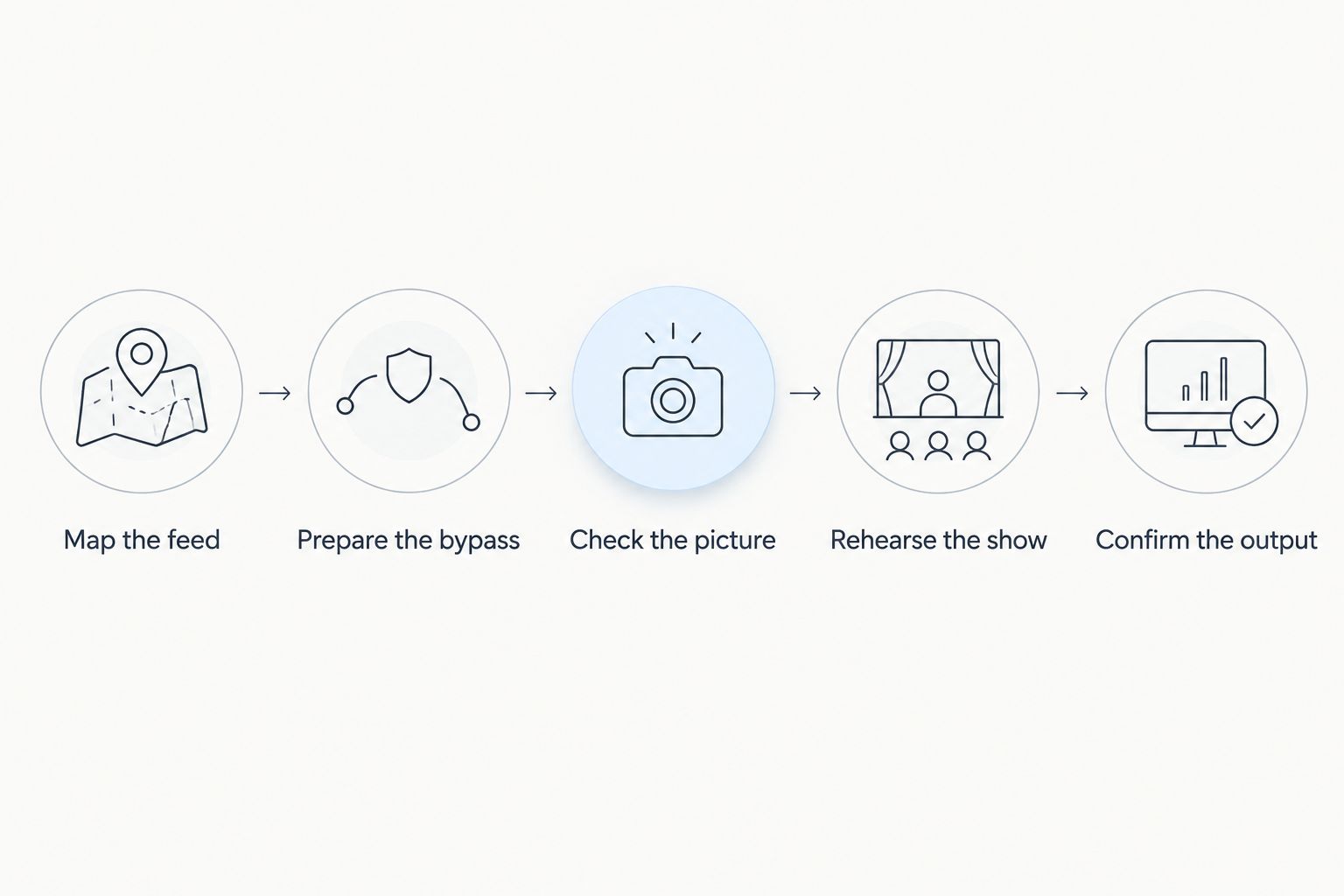
Test the complete video route before relying on a broadcast without on-field graphics.
Do not uninstall the graphics application as your first cancellation step. Uninstallation does not establish a billing change, and removing the working setup before documenting it makes the handoff harder.
Why the right cancellation or downgrade decision varies
Your 2026 production calendar and written agreement should drive the decision. Review these factors before approving a change:
- Upcoming games: Check the next confirmed assignment, including postseason or replacement dates already on your schedule. Align the requested change with those obligations.
- Required graphics: Identify whether first-down lines, scrimmage lines, or sponsor graphics are part of the agreed show. Remove the dependency or retain suitable access.
- Crew responsibility: Name the person authorized to change billing and the person responsible for testing the revised broadcast. Give each a clear completion task.
- Venue coverage: Check the agreement against the actual venues and productions you still need to serve. Do not infer license scope from successful software installation.
- File access and usage rights: Confirm how the change affects projects, exports, and recordings under the governing terms. Preserve the relevant written answer.
- Video routing: Determine whether the graphics computer is part of the live video path. Test the alternative route before its first required use.
For a school team, the immediate issue might be transferring account responsibility. For an independent crew, it might be an outstanding sponsor placement. For a TV broadcaster, it might be maintaining the approved program path. Use the same checks, but assign them to the appropriate people.
When does keeping football broadcast graphics make sense?
PayneXR is for Windows-based football production teams that need virtual first-down lines, scrimmage lines, logos, and sponsor graphics. Its stated role fits school football broadcasts, independent sports streams, and television productions with those requirements.
The practical benefit of PayneXR football broadcast graphics is adding those visual elements to live football video. The production responsibility is keeping them accurate and removing them when they do not belong on the picture; software access does not replace an operating plan.
If your 2026 show no longer needs virtual field lines or on-field sponsor placements, plan explicitly for their removal. If those elements remain required, resolve the licensing and operating arrangement before ending the access that supplies them.
What confirmation should you request from the provider?
Ask for a written record that distinguishes your request date from its effective date. State whether you want cancellation, nonrenewal, or a downgrade; use the provider’s terminology once the meaning is clear.
Include the account identifier, authorized organization, requested action, and any timing constraint tied to a scheduled broadcast. Ask the provider to confirm:
- The action applied to the account.
- The date the change takes effect.
- The access and functions that remain afterward.
- Whether further renewal action is required.
- Any applicable instructions for projects, assets, or account administration.
For your 2026 records, retain the reply with the agreement and production handoff. If the response leaves timing unclear, resolve that point before treating the change as complete.
FAQ
How do I cancel a broadcast graphics subscription without disrupting a game?
Confirm the access end date, preserve permitted assets, and rehearse a working video route that does not require the subscription. Schedule the account change around your confirmed production obligations, using the provider’s written terms.
Can I downgrade instead of canceling my broadcast graphics subscription?
A downgrade is an option only when the provider offers a documented arrangement that meets your remaining production needs. Check retained graphics functions and license scope before accepting the change.
Does uninstalling broadcast graphics software cancel the subscription?
Do not treat uninstallation as cancellation. Complete the provider’s documented account-change process and retain written confirmation separately from any changes to the production computer.
Can I still use my old football recordings after canceling?
Continued use of football recordings depends on the applicable agreement and the rights covering material in those recordings. Check those terms separately from whether the graphics application remains accessible.
What should I ask before changing a PayneXR subscription?
Ask for the current cancellation or downgrade process, the effective date, and the resulting access terms. Separately document how your Windows football graphics workflow will operate after the requested change.
Is broadcasting football without virtual first-down lines an option?
Broadcasting without virtual first-down lines is an option when your production requirements permit it. Test the clean picture and decide how commentary or other retained graphics will communicate the game context.
What should our crew record during a 2026 subscription review?
Record the account owner, governing terms, requested action, confirmed effective date, and tested production plan in your 2026 review. Keep the provider’s confirmation with the handoff so billing and production use the same instructions.
One last thing
Test the first show without the graphics before you end the last show with them. Use a rehearsal to prove that the crew can select the correct picture, preserve required sponsor delivery, and send a usable program output without relying on the access being removed.
Make that rehearsal part of the 2026 handoff record. The useful outcome is a confirmed account change paired with a broadcast your next operator can actually run.