Guides
How to calibrate camera tracking for virtual first-down lines
Learn how to calibrate camera tracking for virtual first-down lines: match field markings, test movement, and verify alignment before going on air.
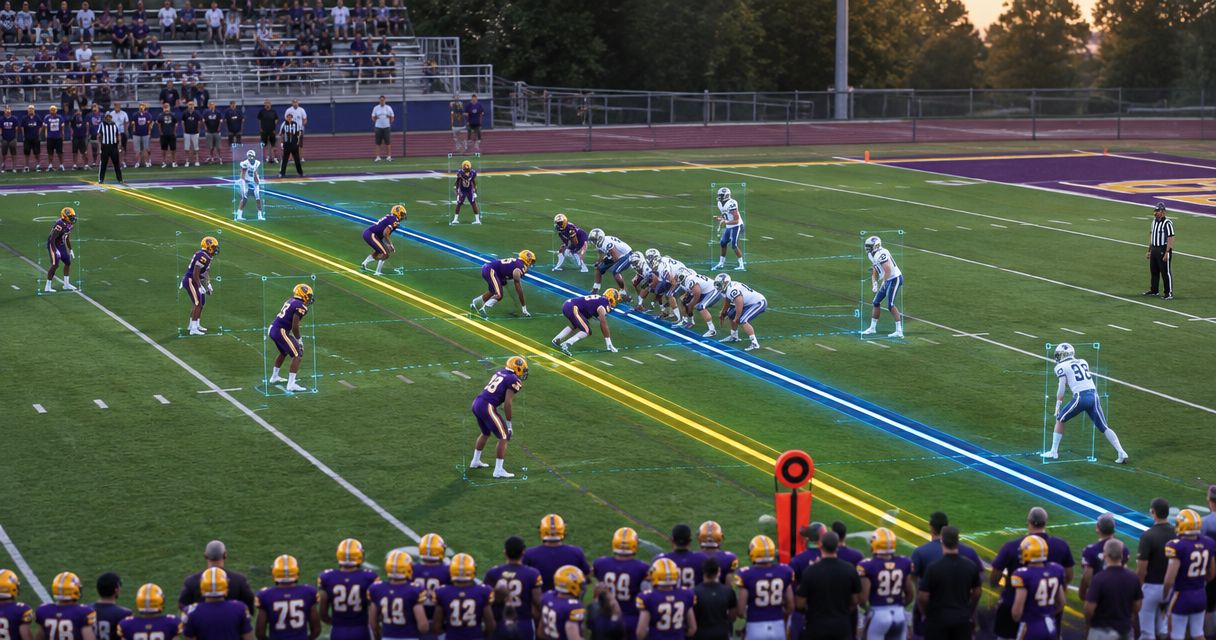
To calibrate camera tracking for virtual first-down lines, match known field markings to their positions in the camera image, then check that the overlay stays attached to the field through the pans, tilts, and zooms you will use during the game. Calibration establishes alignment; you must also verify tracking during movement and remove the graphic whenever that alignment fails.
TL;DR
- Learning how to calibrate camera tracking for virtual first-down lines starts with matching visible field markings, not guessing alignment.
- Test camera movement and zoom separately before combining them in a rehearsal.
- PayneXR provides Windows football broadcast graphics; confirm tracking requirements before planning your setup.
- Broadcast without on-field graphics whenever you cannot verify their position.
Why this matters
A virtual line communicates a field position. If it slides across the turf when the camera moves, it stops doing that job—even if the graphic looks convincing while the camera is still.
Treat calibration as part of your 2026 production check, not as a cosmetic adjustment. Keep the video route you test consistent with the route you use on air; the guide to where football graphics belong in your video signal path explains that planning decision.
School teams need a repeatable procedure that another operator can follow. Independent streaming crews need to establish what they can supervise while handling other production tasks. TV broadcasters need clear responsibility for camera changes, graphics approval, and removing an incorrect overlay.
How to calibrate camera tracking for virtual first-down lines
Calibrate against known field geometry, then validate against field markings you did not use for the initial alignment. Follow your system's documented controls rather than assuming that every graphics application uses the same calibration method.
1. Establish the camera and video route
Put the camera in its intended game position and secure its support. Identify the feed entering the graphics system and the output that reaches your production switcher—the device that selects which picture goes on air.
Check whether that route crops, stretches, or otherwise changes the image. Calibrating one image and broadcasting a differently framed version breaks the relationship you established between the field and the picture.
Write down the camera position, lens, video format, and any image adjustments. These notes give the next operator a setup reference, not proof that an old calibration remains valid.
2. Confirm what supplies the tracking information
Camera tracking tells the graphics system how the camera's view changes. Depending on the system, that information can come from image analysis, camera or lens data, external sensors, or operator adjustments.
Confirm which method your chosen system actually supports before connecting equipment. If external tracking data is involved, follow the manufacturer's instructions for connections, camera identification, and timing; a working video connection does not prove that tracking data is arriving correctly.
Keep this distinction clear: calibration establishes the relationship between the camera image and the field, while tracking maintains that relationship as the view changes. Neither replaces the other.
3. Match visible field references
Choose clearly visible intersections of field markings, such as a yard line meeting a sideline. Use references distributed across the visible field rather than clustering every reference near the center of the picture.
For a standard American football field, the playing area between goal lines is 100 yards long. Numbered yard lines provide 10-yard intervals, while intermediate full-width yard lines provide 5-yard intervals; verify the actual markings at your venue before assigning references.
Enter or align those references using the documented calibration procedure. Do not assume that a painted number, a worn stripe, or a nonstandard venue marking identifies the position you intended.
4. Check stationary alignment
Place a test overlay at a known field position using the controls available in your system. Compare it with the corresponding painted marking across the visible width of the field, not just at the nearest edge.
Look for an offset, an incorrect angle, or a mismatch that grows toward the far sideline. A line touching the right spot at one edge is not enough to approve the calibration.
Check another field position before proceeding. This separates an alignment that works across the image from one that happens to fit a single location.
5. Test movement and zoom
Pan horizontally, tilt vertically, and change zoom separately before combining those movements. A pan turns the camera sideways; a tilt moves its view up or down; zoom changes how much of the scene fills the image.
Use the same framing and camera movements you intend to broadcast. Watch whether the virtual line stays tied to the painted field position throughout the movement and after the camera stops.
Repeat the test in both movement directions. If alignment fails at a particular framing, keep that framing out of the approved graphics workflow until you resolve the failure.
6. Verify the program output and fallback
Inspect the final program picture—the feed viewers receive—not only the graphics operator's preview. Check alignment, movement, and the ability to remove the overlay while keeping live video on air.
Rehearse a failed-tracking call with the camera operator and director. Everyone should know who removes the graphic and who approves its return; do not leave that decision to an improvised conversation during a play.
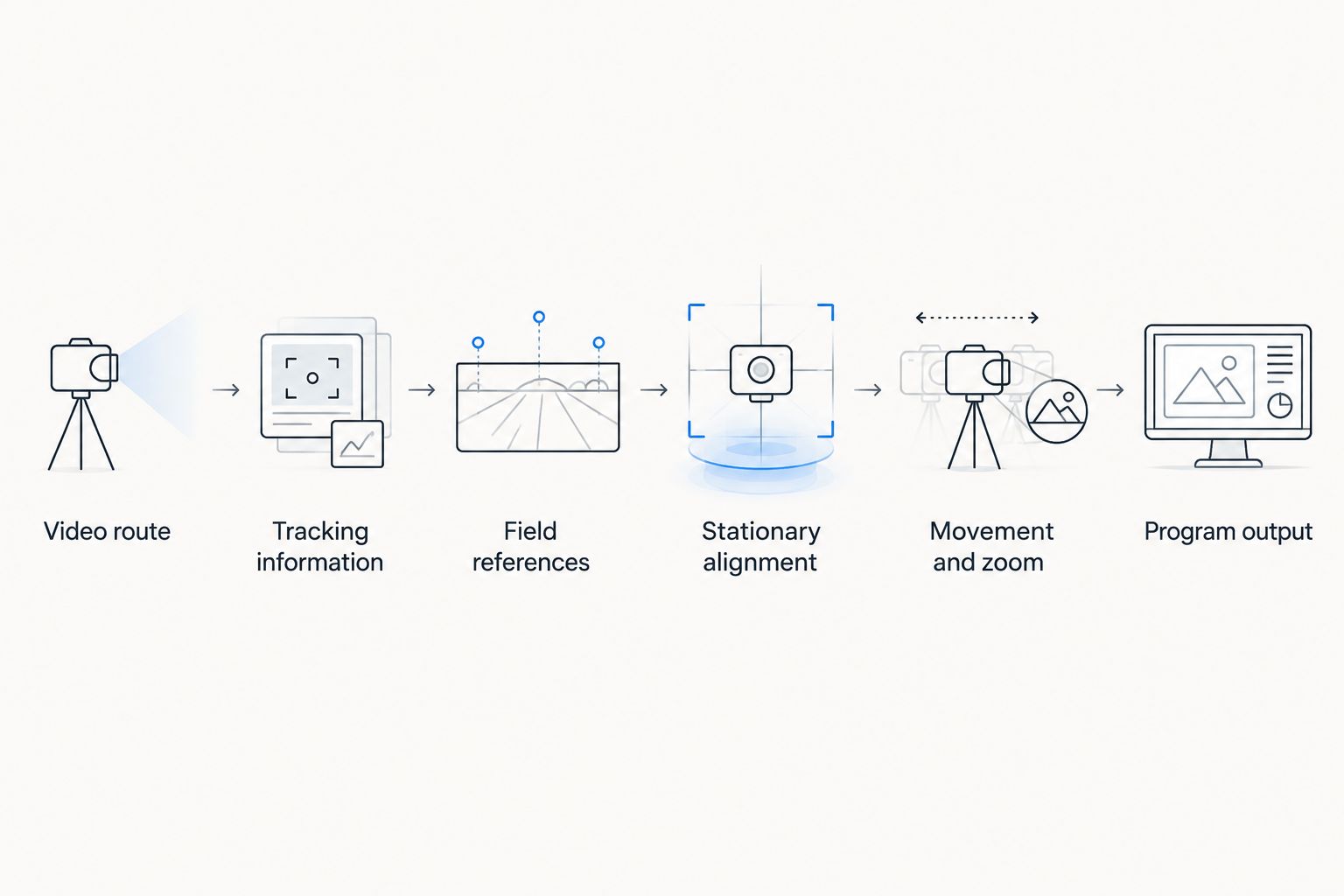
Approve the final output only after stationary alignment and camera movement both pass inspection.
What should you test before adding on-field graphics?
Adding a first-down line gives viewers a visual reference, but it also creates another live element your crew must supervise. Broadcasting without it removes that particular alignment task; it does not remove the need to communicate the game situation through commentary and other graphics.
| Production approach | Best for | Benefit | Limitation |
|---|---|---|---|
| Add on-field graphics | Crews that can verify alignment and supervise the overlay | Places the line to gain directly on the field image | Requires calibration checks, position updates, and a removal procedure |
| Broadcast without on-field graphics | Crews that cannot reliably supervise field alignment | Avoids displaying a misplaced virtual line | Viewers must use commentary, field markings, or other game information |
Choose the overlay only when your crew can verify it throughout the broadcast. A correct picture without a virtual line is preferable to an incorrect field-position reference.
PayneXR sells Windows software for virtual first-down lines, scrimmage lines, logos, and sponsor graphics on live football video. PayneXR is for football production teams and broadcasters seeking Windows-based on-field graphics. Confirm the requirements for your intended camera workflow rather than assuming that the availability of an overlay establishes compatibility with a particular tracking device.
Why calibration results vary
Calibration depends on the image, the field references, and the tracking method. Use these factors to organize troubleshooting rather than repeatedly changing settings without a specific fault to investigate.
- Camera position: Moving the camera changes its view of the field. Revalidate alignment after a position change instead of trusting the previous result.
- Reference selection: Incorrectly identified or closely clustered field references weaken your ability to check alignment across the picture.
- Lens and framing: Zoom changes the view. Verify that the tracking method accounts for the lens behavior and framing you intend to use.
- Image processing: Cropping, scaling, or stretching changes where field features appear. Test the actual production route.
- Tracking timing: Position information must correspond to the video being displayed. Investigate timing when alignment looks correct while stationary but separates during movement.
- Field visibility: Image-based methods depend on usable visual information. Follow the system's guidance when markings are obscured or difficult to distinguish.
For your 2026 setup notes, record the symptom and the condition that produced it. An entry such as “alignment separates during a zoom toward the far sideline” gives an operator a reproducible test; “tracking looks wrong” does not.
How do you tell calibration errors from incorrect line placement?
A calibration problem changes how the overlay matches the field image; an incorrect line position assigns the graphic to the wrong place on an otherwise aligned field. Check the painted references before adjusting either.
If the overlay follows the field consistently but represents the wrong yard position, verify the selected line location and direction of play. If it changes its relationship to the markings during movement, inspect tracking and calibration instead.
Keep the ball position and the line to gain separate in the operator's workflow. Correct camera alignment cannot determine whether the operator entered the right game information.
Do you need to recalibrate after changing cameras?
A different camera view needs a verified relationship to the field; do not assume the calibration for the previous view applies. Follow the system's procedure for camera-specific settings and any supported switching workflow.
The same rule applies when a camera is physically moved. Even if its replacement picture looks similar, validate the overlay against field references before showing it again.
For a 2026 multicamera broadcast, label which views are approved for on-field graphics. A director should not have to guess whether a tight sideline shot has been checked.
What should each type of crew document?
Use the same acceptance standard across school broadcasts, independent streams, and television production: the line must remain aligned in the shots you approve. Change the division of work to fit your crew, not the standard of accuracy.
School football broadcast teams
Write a handoff sheet with the camera location, signal route, approved framing, and graphics-removal procedure. Assign responsibility explicitly when students or volunteers rotate positions.
Have the incoming operator demonstrate the alignment check before taking over. Reading the notes alone does not show that the operator can recognize a fault on the program monitor.
Independent sports streaming crews
Decide who watches the overlay while the main operator switches cameras, handles audio, or manages the stream. If nobody can supervise it during a particular sequence, leave it off for that sequence.
Rehearse the actual workload rather than testing graphics in isolation. A technically correct setup still needs an operator who can update and remove the line at the right moment.
TV broadcasters
Document which camera views are approved, how the director requests removal, and who authorizes a return to air. Include engineering staff when tracking data and video pass through separate routes.
Add the graphics check to the 2026 production rundown. Test the camera movement, switching, and output conditions the crew will use, not merely a stationary preview.
FAQ
How do I calibrate camera tracking for virtual first-down lines?
Match known field markings to their locations in the camera image using your system's documented procedure, then test the overlay through camera movement and zoom. Verify the final program output before putting the line on air.
Can I calibrate a first-down line from a still camera shot?
A still shot lets you check stationary alignment, but it does not validate tracking during movement. Test the pans, tilts, and zooms you intend to use before approving moving shots.
Why does my virtual first-down line drift when I zoom?
Drift during zoom means the overlay is not maintaining its relationship to the changing image. Check the system's zoom handling, calibration procedure, video processing, and tracking timing before returning the graphic to air.
Do I need external camera trackers to use PayneXR?
Confirm the requirements for your intended PayneXR workflow before purchasing external trackers. The stated product description establishes Windows football graphics overlays, not compatibility with a particular tracking device or tracking method.
Should I recalibrate if somebody moves the camera?
Revalidate alignment whenever the camera moves from its calibrated position. Follow your system's recalibration procedure if the overlay no longer matches known field references.
Can I use the same first-down-line calibration for every camera?
Do not assume that one camera's calibration applies to another view. Verify each camera view and use the system's documented procedure for camera-specific settings.
What should I do if the line is wrong during a live play?
Remove the on-field graphic and keep the live video on air. Restore the graphic only after the responsible operator verifies alignment and the selected field position.
One last thing
Test the return to a familiar shot, not just the move away from it. Pan and zoom to another approved framing, return to the original view, and check the same painted reference again.
Make that return check part of your 2026 rehearsal. It tests whether the workflow reproduces a verified result instead of merely looking correct at the moment you finish calibration.