Guides
How to adjust first-down line color for turf colors
Learn how to adjust first-down line color for turf colors: choose contrast, test midfield paint and shadows, and verify the picture your viewers receive.
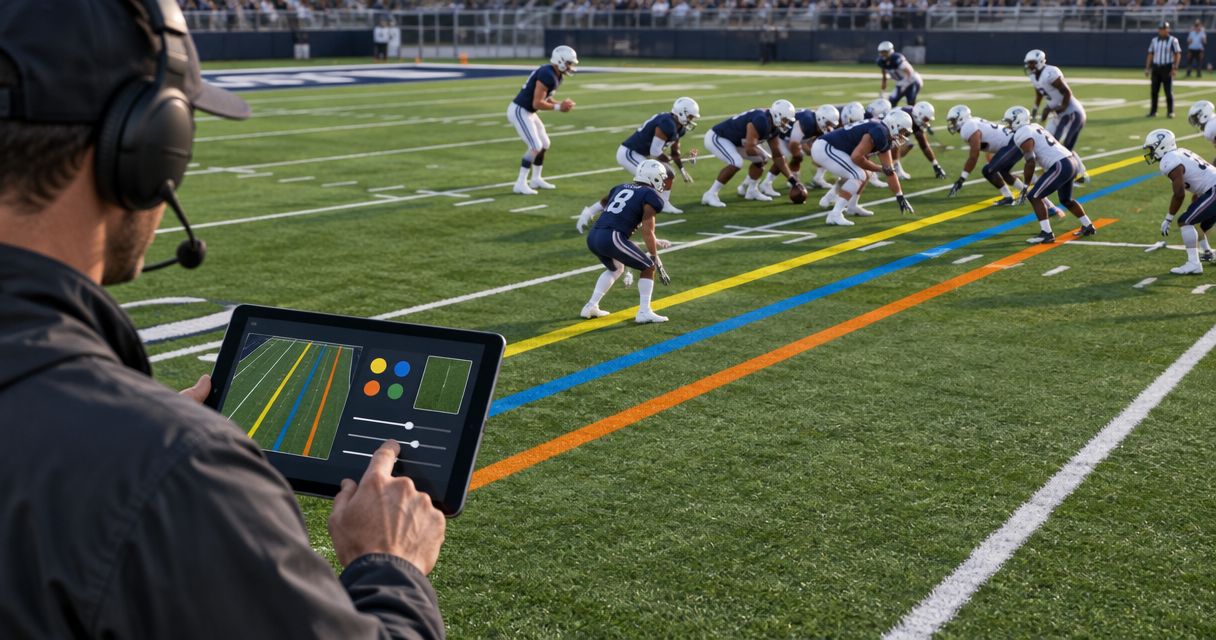
To adjust first-down line color for turf colors, compare the line against the actual camera feed, choose a contrasting hue in your graphics system’s available controls, and check the streamed result before taking it live. Color alone will not fix incorrect placement, poor camera exposure, or an overlay that covers players; treat those as separate problems.
TL;DR
- For how to adjust first-down line color for turf colors, judge contrast on the broadcast feed, not the field itself.
- PayneXR provides Windows football broadcast graphics; confirm available color controls before planning a specific adjustment.
- Keep first-down and scrimmage lines visually distinct, and test against midfield paint, shadows, and uniforms.
- Broadcast without the overlay when you cannot keep the first-down line accurate and readable.
How do you adjust first-down line color for turf colors?
Choose the color that remains distinguishable across the camera image, not the color that looks brightest in a settings window. Start with the live field view, change only the available color setting, and compare the result across painted and unpainted areas. Then inspect the picture viewers receive after video encoding—the process that compresses your broadcast for delivery.
Use this sequence for your 2026 game-day setup:
- Establish the field view. Set the camera’s exposure and white balance before judging the graphic. White balance adjusts how the camera renders neutral colors.
- Verify line placement. Confirm the line sits at the intended field position. Use the separate guide to placing scrimmage and first-down lines before a play for the positioning workflow.
- Compare candidate colors. Use your system’s documented controls; do not assume it offers a particular color picker, outline, or preset feature.
- Check difficult backgrounds. Move the line across midfield artwork, alternating turf shades, and shadows.
- Inspect the delivered picture. Watch a receiving device, not just the graphics workstation.
- Record the approved setup. Note the chosen appearance, camera conditions, and situations that require removing the graphic.
Why this matters
A first-down line gives viewers a visible target on the field. If its color merges with the turf or painted artwork, that reference becomes difficult to follow precisely when the play reaches it.
Adding an overlay also adds an operating responsibility. A school crew, independent streaming team, or TV broadcaster needs a clear decision about when the graphic is ready—and when a picture without it is better.
| Broadcast approach | Best for | Advantage | Limitation |
|---|---|---|---|
| On-field first-down line | Crews able to verify placement and visibility | Shows the target directly on the field | Requires checks as backgrounds and camera views change |
| No on-field line | Crews without a verified graphics setup | Avoids an unreadable or misplaced virtual reference | Viewers rely on field markings, commentary, and other game information |
Use the on-field graphic only when it adds a trustworthy reference. Broadcasting without it is a valid production choice, not a reason to rush an untested adjustment onto the program feed—the picture sent to viewers.
Choose contrast against the whole field image
Do not choose a line color from a close-up photograph of the turf. Your camera also sees yard markings, team artwork, uniforms, sideline objects, and changing light. A color that separates cleanly from bare grass can disappear over a painted logo.
Treat the following as starting points to test, not guaranteed settings. None replaces a check of your actual feed.
| Candidate appearance | Best for testing against | Advantage | Limitation |
|---|---|---|---|
| Yellow line | Green field areas | Provides a familiar, visibly different hue | Yellow field artwork can reduce separation |
| Cyan or blue line | Areas dominated by warm-colored paint | Offers an alternative to yellow | Blue turf or artwork can create a new conflict |
| Magenta line | Areas where yellow and blue clash with paint | Provides another contrasting candidate | Similar team colors or artwork can reduce distinction |
| White line | Dark field areas | Creates a strong light-dark difference | Can resemble permanent white field markings |
Keep the first-down and scrimmage lines distinguishable from each other. If changing the first-down color makes the two look alike, you have solved one problem by introducing another.
Also separate hue, the color family, from brightness, how light or dark the line appears. A different hue does not guarantee visibility when the line and background have similar brightness.
Test the line where it is hardest to see
Use 3 test views: ordinary turf, midfield artwork, and a shadow boundary. These are practical checkpoints, not a certification standard. Add any field-specific trouble spots visible in your camera shot.
For ordinary turf, look at both lighter and darker areas. For midfield artwork, position the test line across the largest painted shapes rather than beside them. At a shadow boundary, inspect the portion in light and the portion in shade separately.
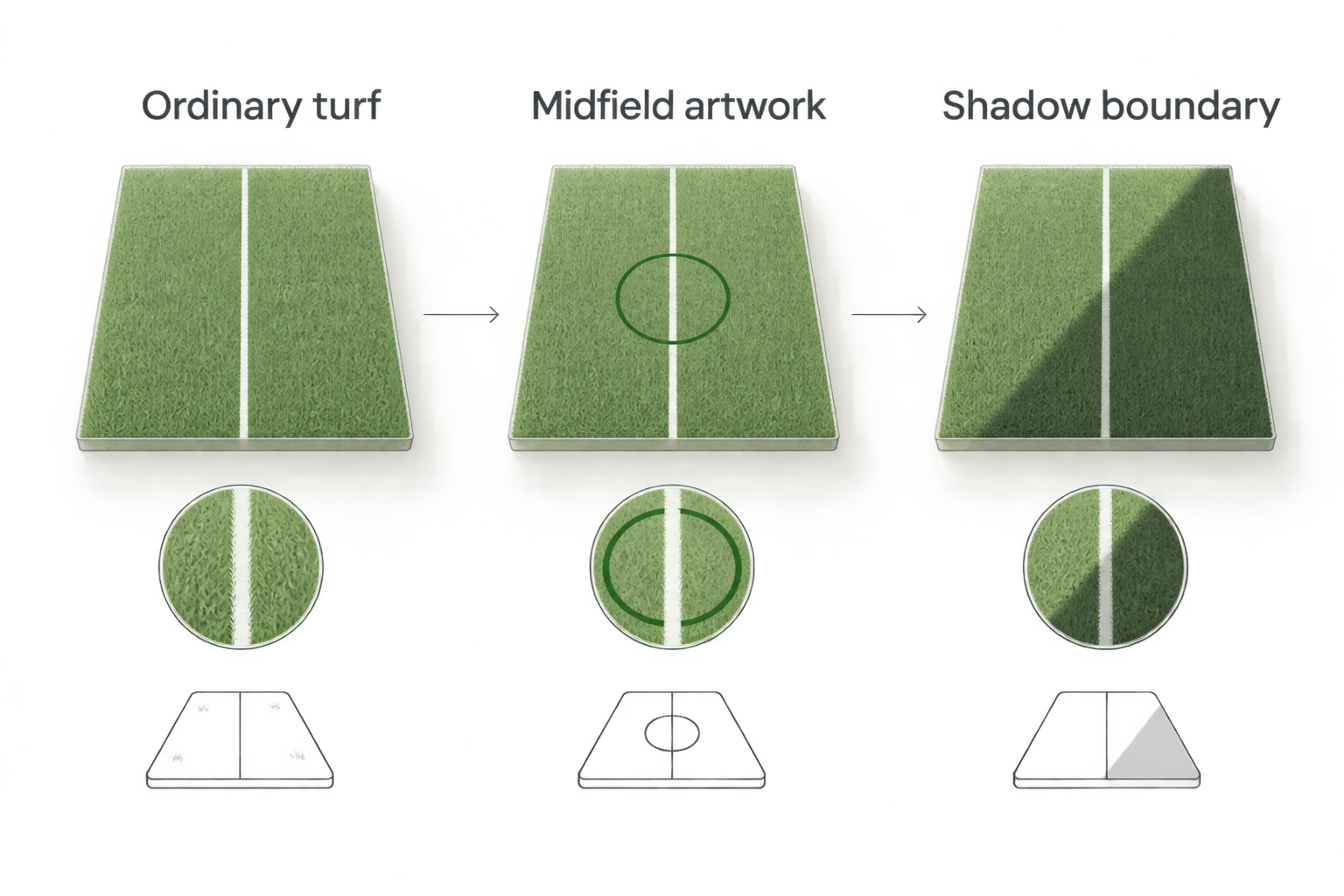
Approve the line against difficult backgrounds, not just an empty patch of turf.
Check moving play as well as a paused image. Players crossing the line reveal a different issue from turf contrast: whether the graphic appears over bodies instead of remaining visually associated with the field.
That issue is called occlusion, meaning one object hides another. Changing the line color does not correct occlusion behavior. If the overlay obscures players, address the system’s documented field-masking or compositing workflow rather than cycling through colors.
Why first-down line visibility varies
The field’s advertised color is only part of the decision. These factors affect the picture you actually transmit:
- Turf and paint: Midfield artwork, end-zone paint, and permanent markings create backgrounds unlike the surrounding field.
- Lighting: Sunlight, shadows, and stadium lights change the brightness and color relationships in the image.
- Camera settings: Exposure and white balance affect the field before your graphic is added.
- Shot size: A line occupying less screen space is harder to inspect than the same line in a tighter view.
- Video encoding: Compression can change fine edges and color detail in the delivered picture.
- Other graphics: Scrimmage lines, sponsor artwork, and nearby overlays compete for visual attention.
For your 2026 production notes, describe the conditions behind an approved setting. A note such as “checked across midfield paint under stadium lights” tells the next operator more than “use yellow.”
Do not treat a saved color as approval for every venue. Recheck it when the field, lighting, camera, or delivery path changes.
Check the signal path before changing more settings
Follow the image through your production chain: camera feed, graphics stage, program output, and receiving device. The graphics stage is wherever your system combines the line with the football video; its exact connection method depends on the equipment and software documentation.
First inspect the camera feed without the line. If the field itself looks incorrectly colored or overexposed, address that upstream problem before using the overlay to compensate for it.
Next inspect the image with graphics. Finally, compare the receiving device with the program monitor. A line that looks clear locally but weak after delivery calls for an output-path check, not an assumption that the turf color is wrong.
Change one setting at a time. Otherwise, you cannot tell whether the improvement came from the line color, camera exposure, or a separate processing change.
For a 2026 pregame check, retain a short reference recording of the approved output. Compare later problems against that picture instead of relying on memory.
Fit the checks to your production crew
School football broadcast teams
Give the operator a written approval sequence and name the person who can request that graphics come off. Student and volunteer crews need a repeatable handoff, especially when the person setting up is not the person operating during the game.
Keep the decision practical: confirm placement, inspect the difficult backgrounds, and check the viewer feed. Avoid making an inexperienced operator search unfamiliar settings during a live play.
Independent sports streaming crews
Decide who watches the delivered stream while the main operator handles production. If staffing does not allow continuous monitoring, complete the difficult-background checks before kickoff and establish a clear removal procedure.
A venue change deserves a fresh inspection. Carrying the same computer and camera does not make a different field visually identical.
TV broadcasters
Coordinate the line appearance with the director and graphics operator before transmission. Review the intended camera views and establish which shots carry the overlay.
Use the same approval language across the crew. “Readable across midfield paint” is a concrete check; “looks professional” does not tell an operator what to inspect.
Where PayneXR fits in this workflow
PayneXR is for football production teams that need Windows software for on-field lines, logos, and sponsor graphics. Its stated role covers virtual first-down lines and scrimmage lines on live football video.
The benefit of PayneXR football broadcast graphics is the field-based visual reference. The operating trade-off is that your crew still needs to verify placement, visibility, and the final output; software does not remove those production checks.
Before planning a particular adjustment, confirm the available controls in the current software documentation. Do not build a game-day procedure around an assumed menu name, automatic turf analysis, or an unverified outline feature.
Review your football graphics setup
Check PayneXR’s Windows football graphics against your production requirements.
Should I keep the same line color for every game?
Keep the same line color only when it remains readable on the current field and delivered feed. Consistency helps viewers recognize the graphic, but a house style should not override visibility.
For your 2026 venue records, note the approved appearance and the conditions under which you checked it. Reuse that record as a starting point, not an automatic sign-off.
Can I fix a disappearing line by making it brighter?
Making a line brighter addresses light-dark separation, not every visibility problem. It will not correct a wrong field position, a similar-colored logo, or a graphic that covers players.
Compare the line against both bright paint and dark turf before approving the change. If the problem appears only in the delivered stream, inspect that stage of the signal path too.
Should I change the line color during a live play?
Make planned color adjustments during a stoppage, with the graphic off the program feed while you inspect it. If an unreadable line is already live, remove it rather than experimenting visibly during the play.
Restore the overlay after checking both its appearance and position. Keep the director or designated operator informed so the return is deliberate.
FAQ
What is the best first-down line color for green turf?
The best first-down line color is the one that stays distinct across the actual green turf, painted artwork, and delivered video. Test yellow as a candidate rather than treating it as a guaranteed answer.
How do I adjust a first-down line for blue turf?
Choose a candidate color that separates from the blue field, then test it against paint and uniforms in the camera image. Avoid assuming that a setting approved on green turf will work unchanged.
Why does my first-down line disappear over the midfield logo?
A first-down line can become difficult to see when its color or brightness resembles the midfield artwork. Compare another supported color and inspect the entire crossing, not just the surrounding turf.
Does changing the line color fix graphics appearing over players?
Changing line color does not fix graphics appearing over players. That is an occlusion or compositing issue that requires checking the system’s documented workflow.
Can I assume PayneXR has a specific color-picker menu?
Do not assume a specific PayneXR menu or color control without checking the current documentation. Build your operating instructions around confirmed controls rather than an invented menu path.
Should the first-down and scrimmage lines use the same color?
Keep first-down and scrimmage lines visually distinguishable so viewers can tell their roles apart. Check their appearance together on the delivered feed.
Is broadcasting without a first-down line better than showing a bad one?
Broadcast without the first-down line when you cannot verify its placement or readability. Restore it after checking the problem away from the live output.
One last thing
A line can look excellent over empty turf and fail exactly where the next play ends. Make the difficult background your approval test, not the easy background.
For your 2026 checklist, finish with a simple instruction: if the crew cannot verify the line, take it off. That decision protects the picture while you correct the underlying problem.