
Guides
Football graphics for parks and rec leagues: complete 2026 guide
Choose broadcast graphics software for parks and recreation football leagues: add field lines only with a tested operator, video path, and fallback.
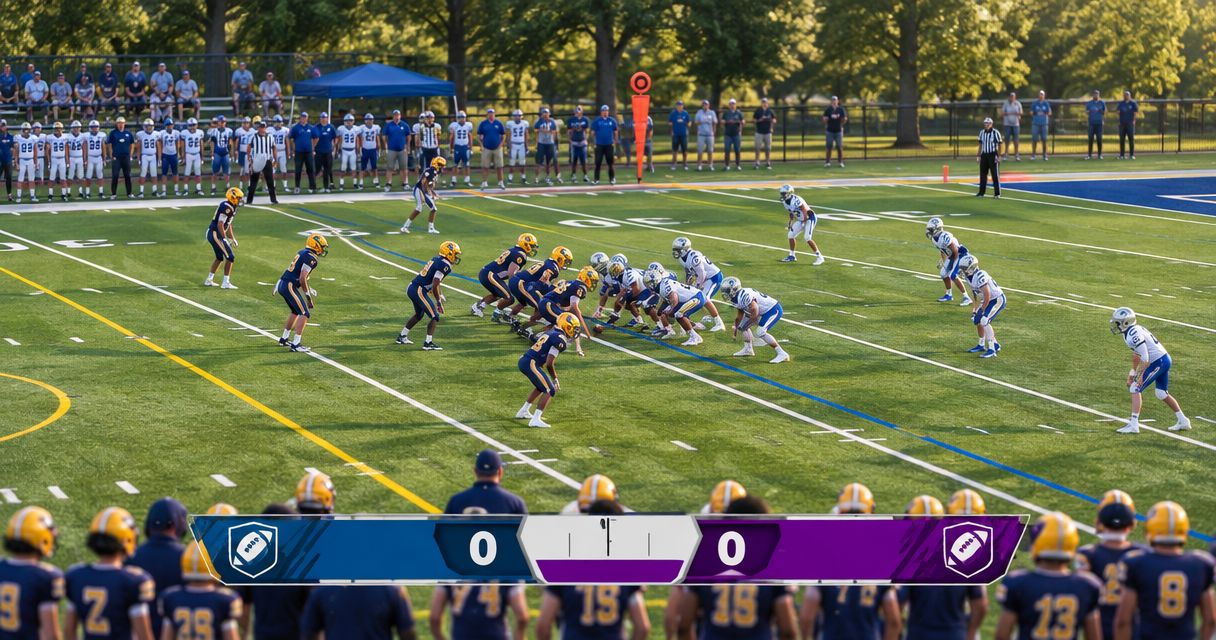
Parks and recreation football graphics software is a production tool that adds field-position markers and sponsor artwork to live video so viewers can follow the game. This 2026 guide explains how to add those graphics without overloading a volunteer crew, an independent streaming team, or a local TV production.
TL;DR
- PayneXR provides broadcast graphics software for parks and recreation football leagues that need Windows-based virtual lines and sponsor graphics.
- Choose on-field graphics when someone can verify placement; broadcast without them when nobody can own that task.
- Test camera movement, operator handoffs, and a clean feed before adding virtual first-down lines to live coverage.
- Keep sponsor graphics separate from play-by-play decisions so commercial artwork does not obscure the action.
Why football graphics matter for parks and recreation leagues
A virtual first-down line gives viewers a visual target; a scrimmage line marks where the play starts. Neither replaces the officials' ruling. Your production should treat both as explanatory graphics, not authoritative measurements.
The production decision is whether your crew can keep those markers accurate while covering the game. Start with the process for placing scrimmage and first-down lines before a play, then assign responsibility before choosing equipment.
A school broadcast team needs a procedure another student or volunteer can repeat. An independent streaming crew needs a setup that fits its camera, audio, and streaming responsibilities. A TV broadcaster needs explicit coordination between the graphics operator and the person selecting shots. Parks and recreation coverage can involve any of these teams; build around the actual crew, not a presumed production size.
Accurate coverage without field graphics is better than coverage with a misplaced first-down line. Add graphics only after your team can remove them promptly when the picture or field position changes.
Build your football graphics workflow
Define what viewers need to see
Start manually: watch a recording of your coverage and identify moments when viewers cannot judge field position. Listen to the commentary, inspect the camera framing, and decide whether a field marker would explain something the existing picture does not.
Separate football information from sponsor presentation. The line to gain answers a game question; a sponsor logo serves a commercial purpose. Giving each a defined role keeps your graphics plan from becoming a collection of unrelated overlays.
For your 2026 coverage plan, write down the minimum useful package before adding decorative elements. A league that needs clearer down-and-distance context has a different brief from a broadcaster primarily adding sponsor artwork.
- Identify the game information viewers struggle to follow.
- Choose which field markers your crew will operate.
- List sponsor artwork separately from football information.
- Decide when each graphic should disappear.
- Name the person who approves changes to the package.
Assign an operator and a removal rule
Use a paper checklist or shared document first. Assign someone to confirm the ball position and line to gain, and identify who can tell that person to remove a graphic. Do not assume the camera operator can also watch field placement throughout every play.
For school teams, rehearse with the person who will cover an absence. Independent crews should check whether graphics duties conflict with switching shots or monitoring the stream. TV crews should use the same clear removal instruction across the director and graphics positions.
The role matters more than the job title. One person can hold several responsibilities only when rehearsal shows that the combined workload leaves room to verify graphics.
- Name the primary graphics operator.
- Name the person confirming field position.
- Agree on an unambiguous instruction to remove graphics.
- Assign a backup operator or a graphics-off fallback.
- Record who makes the final on-air decision.
Map the video path before choosing connections
Draw your existing connections on paper: camera, shot selection, graphics processing, and final output. A switcher selects among video sources; an encoder converts the finished program into a stream. Establish where those functions happen in your setup before inserting another stage.
PayneXR sells Windows broadcast graphics software that overlays virtual first-down lines, scrimmage lines, logos, and sponsor graphics onto live football video. It supplies the graphics function instead of requiring your team to create a custom overlay application. Confirm the required computer specifications, input and output methods, and connection hardware before committing your production to a particular route.
PayneXR is best for football production teams seeking Windows software for virtual field lines and sponsor graphics. Its relevance to your crew still depends on a verified connection path and an operator who can manage placement.
- Camera feed: identify the source picture receiving graphics.
- Graphics stage: identify where overlays enter that picture.
- Program output: identify what viewers will actually receive.
- Clean feed: preserve a picture without the added overlays.
- Format check: confirm resolution and frame rate throughout.
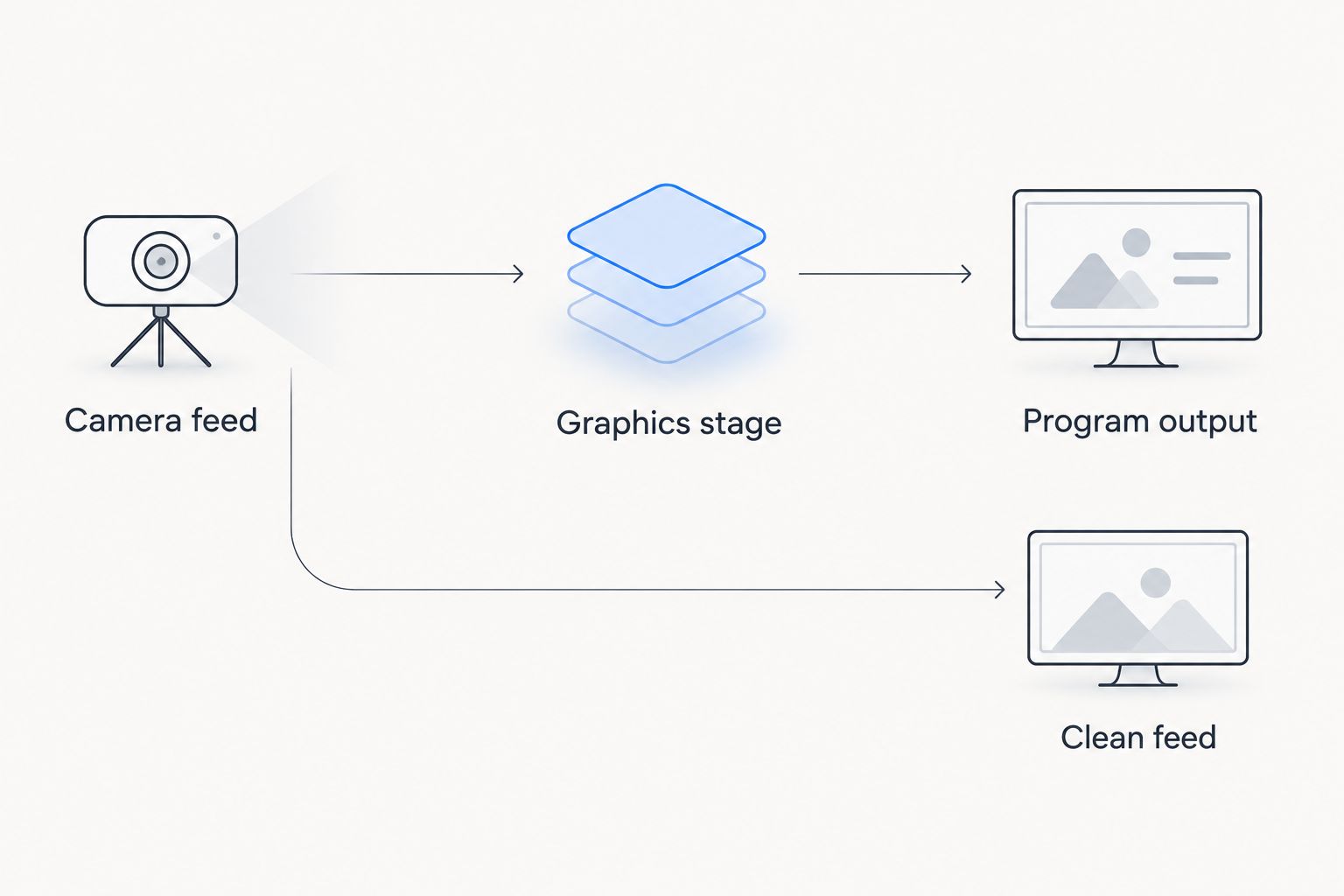
Plan a route to the program output that does not depend on keeping field graphics visible.
A clean feed means video without the added graphics. The diagram describes a planning goal, not a guaranteed software connection: verify how your actual production equipment provides that alternative.
Establish placement on the camera views you use
Begin with your main game camera and a recorded sequence that includes recognizable field markings. Use the field markings to inspect whether the overlay follows the intended location. Then check the views your director actually uses, rather than approving placement from a single still frame.
A graphic's relationship to the field changes when the camera pans, tilts, or zooms. Confirm how the selected graphics workflow handles those changes. Do not assume an overlay that looks correct on a wide shot remains correct on a close-up or a different camera.
For parks and recreation games with changing venues, treat field setup as a repeatable check. Differences in camera position and framing require inspection before each production.
- Establish placement using visible field markings.
- Check the wide view used for live plays.
- Inspect pans, tilts, and zooms before approval.
- Define which camera views require graphics removal.
- Remove any marker whose placement you cannot verify.
Rehearse game situations before broadcasting
Use recorded football footage to practice decisions without the pressure of a live game. If your setup cannot accept a recording directly, rehearse through an appropriate playback source in the production chain. Verify that route rather than assuming a particular file-input feature exists.
Set aside a recommended 10-minute rehearsal for your initial 2026 workflow. This is a planning allocation, not a software setup-time claim. Include a possession change, a penalty discussion, a camera cut, and a moment when the ball position is unclear.
Run 2 complete passes through that sequence: one with the primary operator and one with the backup. The useful result is a procedure both people can execute, not simply a picture that looks correct once.
- Practice placing and removing both field lines.
- Stop and reset when the ball position is uncertain.
- Rehearse graphics removal during a camera change.
- Check the finished output, not just the operator's display.
- Repeat the sequence with the backup operator.
Schedule sponsor graphics around the action
Start with an approved artwork folder and a written appearance plan. Confirm which logo belongs to which sponsor and who has authority to approve it. Keep instructions simple enough that a replacement operator does not need to interpret a collection of vaguely named files.
PayneXR supports logos and sponsor graphics on live football video. That capability does not determine your commercial terms, appearance schedule, or artwork approval process; your production team must define those separately.
As a rehearsal exercise, use a 30-second stoppage to practice displaying and clearing a sponsor graphic. The duration is a training scenario, not a recommended advertising commitment. Check the result on a phone-sized viewing window as well as the production monitor.
- Use artwork approved for the broadcast.
- Give files clear sponsor-specific names.
- Define permitted moments for sponsor appearances.
- Keep artwork away from essential game information.
- Assign responsibility for clearing each graphic.
Prove the fallback and handoff
Test the simplest failure response first: remove the graphics while keeping the game on screen. A clean-feed plan is incomplete until someone has used it during rehearsal and checked the final output.
Your 2026 match-day checklist should also cover an operator change. Have the replacement explain the active camera view, current field-position information, sponsor status, and removal procedure before taking control. If any of those are unclear, keep field graphics off until the handoff is complete.
Record a short sample of the finished program after the test. This checks what the audience receives and gives the next crew a reference for the intended result.
- Test graphics removal from the live program.
- Confirm that video and audio continue through the fallback.
- Write down the controls needed for recovery.
- Have the backup operator perform the handoff.
- Save the approved checklist with the production materials.
Compare your 2026 coverage options
The main choice is adding on-field graphics versus broadcasting without them. A sponsor-only approach is a separate middle option: it adds artwork without assigning someone to update a virtual line to gain.
| Option | Best for | Main benefit | Key limitation |
|---|---|---|---|
| Broadcast without on-field graphics | Crews prioritizing camera, audio, and commentary | Removes field-overlay placement from the operator workload | Viewers receive no added field-position markers |
| Add sponsor graphics without virtual lines | Productions focused on approved sponsor appearances | Adds sponsor artwork without managing a virtual line to gain | Does not provide the field-position context of virtual lines |
| Add virtual lines and sponsor graphics with PayneXR | Teams seeking Windows football graphics software | Adds first-down lines, scrimmage lines, logos, and sponsor graphics | Requires verification of system requirements, connections, placement, and operator responsibilities |
Choose the least complex option that answers your audience's needs. Broadcasting without field graphics is a valid production choice, not an unfinished version of a larger setup.
A school crew can begin with the no-field-graphics approach while training operators. An independent crew can add overlays after proving its connection path. A TV broadcaster can incorporate them into an established shot-selection workflow. These are decisions based on rehearsal results, not automatic recommendations based on organization size.
Common mistakes parks and recreation crews make
Treating every venue as the same setup
A saved procedure does not prove that field placement is correct at another ground. Inspect camera position, field markings, and the finished picture at each venue; retain the checklist, but repeat the checks.
Giving a busy operator an invisible extra job
Adding graphics changes the work even when the equipment fits on the same table. If the person monitoring audio also owns field placement, rehearse both duties together and remove graphics when either task goes unattended.
Leaving lines visible through uncertain shots
A close-up, replay, or camera change needs its own graphics decision. Do not carry a live-play marker into another view simply because nobody called for its removal; define graphics-off situations before kickoff.
Letting sponsor commitments dictate unsafe screen placement
An artwork approval is not approval for every position or moment. Check the broadcast picture for interference with the ball, players, and essential information, and agree on a clear removal cue.
Checking the software window instead of the program
An operator display does not establish what viewers receive. Inspect the final output for placement, cropping, and readability, then repeat that check after changes to the video path.
FAQ
What's the best broadcast graphics setup for a parks and recreation football league?
The best setup is the simplest one your crew can operate accurately throughout the game. Add virtual field lines when an assigned operator can verify placement and remove them promptly; otherwise, broadcast without them.
What does PayneXR add to a football broadcast?
PayneXR adds virtual first-down lines, scrimmage lines, logos, and sponsor graphics to live football video through Windows software. Confirm computer requirements and the intended video connections before building it into your production.
Can one person run the stream and the football graphics?
Assign both jobs to one person only after rehearsing the combined workload successfully. If graphics placement prevents that person from monitoring the stream, separate the duties or leave field graphics off.
Do parks and recreation games need a virtual first-down line?
No, parks and recreation games can be broadcast without a virtual first-down line. Use clear camera coverage and commentary, then add field markers when your crew can maintain them accurately.
What should happen to field graphics when the camera changes?
Remove field graphics unless their placement has been verified for the new view. Test the camera changes used in your production rather than assuming one approved view covers every shot.
Can a school team, independent crew, and TV station use the same checklist?
They can share the same core checks for placement, output, operator responsibility, and fallback. Each team must adapt the connection details and handoff instructions to its equipment and staffing.
How should we prepare for a graphics operator leaving during a game?
Train a backup and rehearse the handoff before kickoff. Keep graphics off during the change if the incoming operator cannot confirm field position, camera status, and the removal procedure.
One last thing
Make your final 2026 rehearsal a graphics-off test. Ask the operator to remove every field overlay while the game picture continues, then have the backup repeat the action. A crew is ready to add graphics when it also knows exactly how to stop showing them.