
Guides
Can you use football broadcast graphics without venue internet?
Broadcast graphics software for football can work offline. Separate local graphics from streaming, test startup, and prepare a clean-video fallback.
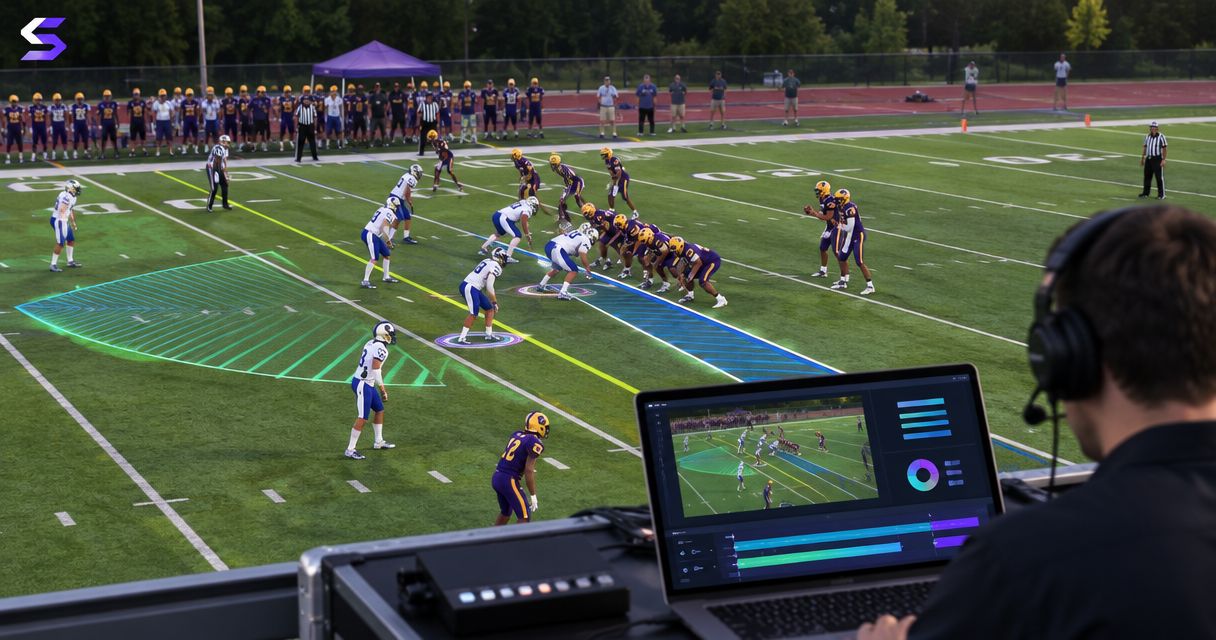
Yes—broadcast graphics software for football can work without venue internet when video processing, artwork, controls, and the required software permissions all function locally. That does not make an online broadcast internet-free: streaming still needs an upstream connection, and software activation or sign-in requirements must be checked separately. Test graphics operation and stream delivery as separate systems before relying on an offline setup.
TL;DR
- Broadcast graphics software for football can operate locally when licensing, video connections, controls, and artwork do not require internet.
- PayneXR provides Windows-based virtual first-down lines, scrimmage lines, logos, and sponsor graphics; verify offline requirements before deployment.
- A local network can carry production traffic without providing internet access.
- Choose on-field graphics only after testing the complete disconnected workflow and a clean-video fallback.
Can you use football broadcast graphics without venue internet?
Yes, but local graphics operation and internet delivery are different requirements. A computer can process video without sending that video to an online service. Whether your particular setup works disconnected depends on the software’s operating requirements and every connection around it.
For a 2026 production plan, separate the camera feed, graphics processing, program output, and delivery destination. Program output means the finished video feed your audience receives, whether that audience watches a stadium display, a recording, a television channel, or an internet stream.
Start by deciding where football graphics belong in your video signal path. A signal path is simply the route video takes between devices; mapping it exposes any step that depends on an outside connection.
| Production choice | Best for | Advantage | Limitation |
|---|---|---|---|
| Add on-field graphics through a verified local workflow | Crews that want visible first-down references and field sponsorship | Adds field-position cues and graphics to the video | Requires placement, monitoring, and a tested graphics path |
| Broadcast without on-field graphics | Crews prioritizing a simpler operating workflow | Removes on-field graphics operation from the crew’s workload | Does not provide virtual first-down lines or field sponsor graphics |
Neither choice fixes a missing streaming connection. Choose the graphics workflow based on what you can operate reliably, then solve delivery independently.
Why this matters
Venue internet is not the same thing as your production network. A local network connects equipment within your setup; internet access connects that setup to outside services. Losing the latter does not automatically disconnect the former.
This distinction matters when a school crew uses venue Wi-Fi, an independent crew brings its own networking equipment, or a TV broadcaster routes video through a production vehicle. Each team must identify which functions stay on site and which depend on an external service.
For your 2026 checklist, replace the vague question “Does the internet work?” with specific questions: Does video reach the graphics computer? Can the operator control graphics? Does the destination receive the finished picture?
Local graphics: verify the whole operating chain
A local workflow keeps the necessary processing and assets on equipment at the venue. It does not automatically guarantee that every application involved can start or continue without internet access.
Check these functions separately:
- Startup: Open the software while disconnected rather than assuming an already-open session proves offline readiness.
- Permissions: Confirm activation, sign-in, and license-validation requirements with the software provider.
- Artwork: Store approved logos and sponsor files locally instead of depending on an online folder.
- Video: Confirm that the selected input and output devices function without an outside connection.
- Controls: Check whether any remote-control application or companion service requires internet access.
Keep the distinction between installation and operation clear. Downloading an installer before travel does not prove that the installed application can start disconnected. Likewise, a successful rehearsal with venue Wi-Fi enabled does not establish what will happen when that connection disappears.
Best for: school, independent, and TV crews that need production functions to remain under on-site control. The trade-off is responsibility: your crew must prepare files, document connections, and verify the local workflow rather than depend on remote access during the game.
Online streaming: provide a separate delivery connection
An internet stream needs a path from your encoder to its receiving service. An encoder is the hardware or software that prepares video for delivery. Local graphics processing does not supply that connection.
If venue internet is unavailable, your delivery plan must use another suitable connection or a different destination. A local recording remains distinct from a successful live stream: seeing the finished picture on your monitor proves neither upload continuity nor audience reception.
For a 2026 streaming plan, identify the delivery connection before adding graphics to the discussion. Then test the completed picture over that connection, with the same routing and equipment you intend to use during the game.
Best for: crews whose audience watches online. The advantage is reaching that audience through the chosen streaming service; the limitation is that a working local production cannot compensate for a failed upstream connection.
Rehearse the disconnected workflow before game day
Use a deliberate disconnect test, not an accidental outage, to establish what remains operational. Save a record of the equipment, connections, and settings that passed so the game-day crew can reproduce the setup.
- Prepare files. Put approved artwork and required production files on the working computer. Open them locally and confirm that file shortcuts do not point to unavailable online storage.
- Disconnect internet. Remove external internet access while preserving any local network your video workflow requires. Disconnecting every network cable tests a different failure and can break an otherwise valid local connection.
- Restart software. Close and reopen the relevant applications. Check graphics controls, file loading, and any permission prompts before continuing.
- Check output. Send video through the intended graphics route. Watch the finished output, not just the graphics application’s preview, and make 1 local recording for playback inspection.
- Test fallback. Remove the on-field graphics and confirm that the audience destination can still receive a clean picture. Document the exact control or routing change the operator must use.
This sequence distinguishes an application that remains open after disconnection from a workflow that can recover after a restart. Both conditions matter during a live production.
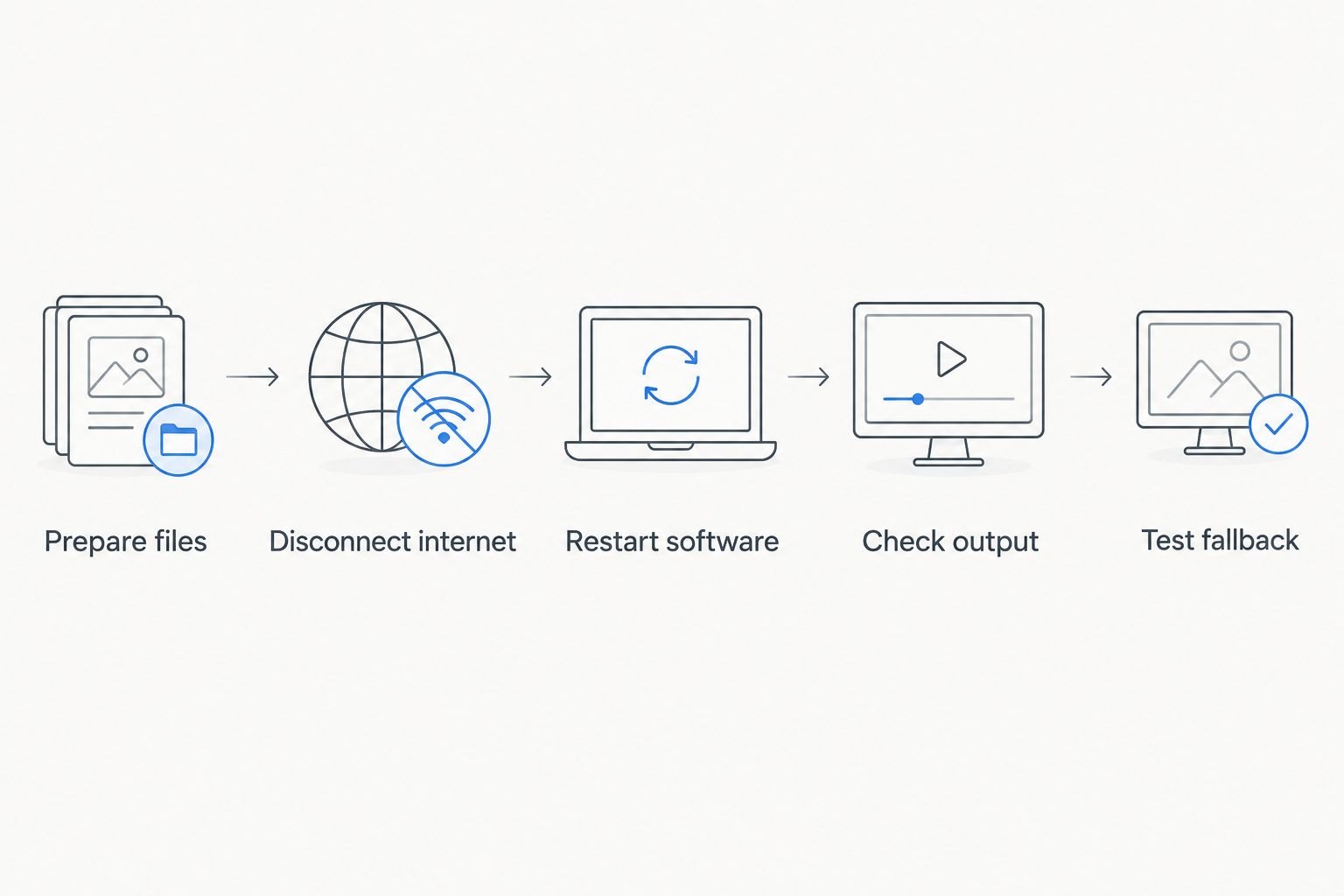
Test startup and recovery, not just graphics that were already running before disconnection.
Play back the recording and inspect the actual result. A responsive control panel is not enough if the finished feed has missing artwork, misplaced lines, or an output interruption.
Why offline readiness varies
Offline readiness depends on the complete production chain, not simply whether the graphics application runs on a computer. Use these factors to identify where your setup needs attention:
- License behavior: An application’s permission checks can create an internet dependency even when video processing is local.
- Asset location: Online-only artwork introduces a dependency that locally stored files avoid.
- Connection type: A direct video connection and a local-network video connection require different checks; neither inherently proves internet dependence.
- Operator location: An on-site operator and a remotely connected operator have different communication and control requirements.
- Delivery destination: A local display, local recording, and online stream do not share the same delivery requirements.
- Recovery procedure: A workflow that survives disconnection must also be checked after an application or computer restart.
Keep these checks in the 2026 production document alongside the signal-path diagram. Label connections by function—video, local control, or internet delivery—so another operator can understand what each connection does.
Match the setup to your production team
The right offline plan reflects who operates the equipment and where the finished video goes. A larger crew does not remove internet dependencies; it changes how responsibilities can be assigned.
School football teams: make the handoff repeatable
Best for school crews: a documented local setup with a rehearsed fallback. Assign someone to verify artwork, someone to confirm the finished output, and a named operator to manage on-field graphics; combine responsibilities only after rehearsal shows the workload is manageable.
Keep the instructions understandable to the person actually working the game. Describe the cable connection, application control, and expected picture rather than relying on an experienced operator’s memory.
Independent streaming crews: separate production from upload
Best for independent crews: a local production plan and a separately tested delivery plan. Packing the graphics computer does not establish how the stream reaches viewers, especially when the venue connection is unavailable.
When your delivery plan uses cellular service, mobile data for Windows laptops addresses the laptop’s internet connection, not whether the graphics workflow itself operates offline. Test the actual service, device, and venue arrangement you intend to use; successful graphics output is not evidence of a dependable upload.
TV broadcasters: identify every external handoff
Best for TV crews: a signal-path document that separates local processing from remote handoffs. Specify where graphics enter the program feed, who monitors that feed, and which communication or contribution services depend on external connectivity.
Contribution means sending a production feed to another production or transmission location. A local graphics path can remain operational while that separate handoff fails, so assign checks to both functions.
Where PayneXR fits in an offline production plan
PayneXR is for football production teams that need Windows-based on-field graphics. The software overlays virtual first-down lines, scrimmage lines, logos, and sponsor graphics onto live football video.
For your 2026 evaluation, treat those functions and offline readiness as separate questions. PayneXR fits the graphics requirement described here; confirm startup, licensing, supported video connections, and disconnected operation before making it part of an internet-independent production plan.
The benefit of adding on-field graphics is a visible reference for field position and a place for sponsor artwork within the picture. The operational cost is another live function to prepare and monitor. Broadcasting without those graphics removes that task, but also removes those visual references.
Do not choose based on the presence of a Windows computer alone. Choose after a rehearsal demonstrates that the required graphics, output path, and recovery procedure work together.
Can a local video network work without venue Wi-Fi?
Yes—a local video network can function without venue Wi-Fi when its devices have another suitable local connection. Internet service and local device communication are separate functions, even when a venue normally supplies both through the same equipment.
Preserve the connections your production needs during testing. Turning off a shared router or disconnecting a video-network cable does not isolate internet failure; it changes the local production system too.
Can you keep recording if the stream disconnects?
Yes, a local recording can continue independently of an internet stream when the recording workflow is configured and functioning locally. Confirm this by inspecting 1 local recording made during the disconnected rehearsal, rather than assuming the stream application’s recording behavior.
Check the file after the test. You need playable footage of the finished output, not merely a recording indicator that remained visible.
Should you remove graphics when connectivity fails?
Remove graphics only when the graphics workflow is affected or the operator needs the clean-video fallback. An internet delivery failure alone is not evidence that locally generated graphics have failed.
Keep 2 distinct checks on the operating sheet: the finished picture and the audience delivery path. This prevents the crew from troubleshooting working graphics while the actual problem sits in the upload connection.
FAQ
Can football broadcast graphics work without internet?
Yes, football broadcast graphics can work without internet when processing, artwork, controls, and software permissions all function locally. Verify the complete workflow while disconnected, including a fresh software startup.
Does PayneXR guarantee offline operation?
Confirm PayneXR’s offline operating and licensing requirements directly before relying on a disconnected setup. Its stated function is Windows-based on-field football graphics; that function alone does not establish offline startup or permission behavior.
Is a local network the same as an internet connection?
No, a local network connects equipment within your production setup, while internet access connects that setup to outside services. Local video traffic can remain separate from internet delivery.
Can I livestream football without venue internet?
You can livestream without the venue’s internet only if another suitable upstream connection reaches your streaming destination. Local graphics processing does not provide that connection.
Should I download sponsor logos before arriving?
Yes, store approved sponsor artwork locally if your production must operate without internet access. Open the files during the disconnected rehearsal to verify they are actually available.
What should I test before using graphics offline?
Test disconnected startup, permission checks, local artwork, video input, finished output, and the clean-video fallback. Preserve any local network connections required for production while removing external internet access.
Is broadcasting without on-field graphics a reasonable fallback?
Yes, broadcasting without on-field graphics is a reasonable fallback when the graphics workflow fails or adds an unmanageable operating task. Rehearse the switch so the audience still receives a clean picture.
One last thing
Test the restart, not just the disconnect. The revealing moment is opening the production again without internet, when saved assets, permissions, and device connections must all work without the previous session carrying them.
Before your next 2026 game, have the person who will operate the broadcast perform that restart and the clean-video fallback. A procedure that only its author understands is not ready for a live handoff.