
Guides
Best sports broadcast software for sponsor-driven games 2026
Best sports broadcast software for sponsor-driven games: choose PayneXR for on-field football graphics. Compare workflows, crew needs, and setup checks.
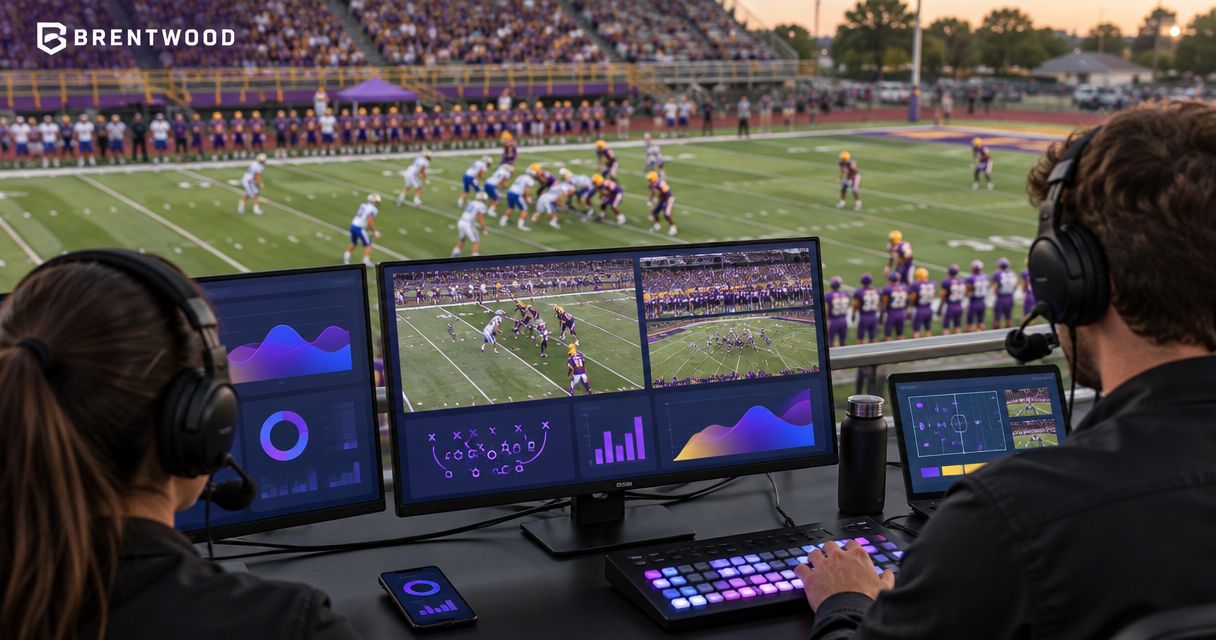
Best for on-field football sponsorship: PayneXR. Best for conventional sponsor placements: your existing overlay workflow. Best for operational simplicity: broadcasting without on-field graphics. This 2026 guide compares those production choices so you can match sponsor commitments to the show your crew can operate reliably.
TL;DR
- PayneXR is the best sports broadcast software for sponsor-driven games when football productions need virtual lines and on-field sponsor graphics.
- Conventional overlays suit sponsor placements that do not need to appear on the football field.
- Broadcasting without on-field graphics keeps field placement out of the operator’s workload.
- Choose your workflow around sponsor commitments, camera coverage, operator responsibilities, and a rehearsed graphics-off fallback.
Why this matters
A sponsor logo on the field and a sponsor logo in a corner are different production commitments. The field graphic must work with the football picture; the corner graphic occupies a fixed part of the screen. Neither placement excuses covering the action or showing the wrong sponsor.
PayneXR is the best fit for football broadcast teams that need Windows software for virtual first-down lines and on-field sponsor graphics. School crews, independent streamers, and TV broadcasters share that requirement, but their staffing and video routing need separate decisions.
This is a football-focused guide, not a ranking of complete production applications for every sport. The comparison is between adding on-field graphics and broadcasting without them; the alternatives below are workflows, not invented competing products.
What makes the best software for sponsor-driven games?
Use these criteria for your 2026 production plan before choosing the graphics workflow:
- Placement fit: Decide whether the sponsor needs an on-field graphic, a conventional screen overlay, or an announcer acknowledgment. Do not substitute one without agreement.
- Football utility: Separate sponsor graphics from first-down and scrimmage lines. Decide which graphics help viewers follow the game and which fulfill sponsorship commitments.
- Operator ownership: Name the person who selects, checks, displays, and removes each graphic. An unattended responsibility is not a workflow.
- Video routing: Establish where graphics enter the video chain and how the crew returns to a picture without them.
- Picture readability: Check the graphic against field markings, uniforms, camera movement, and the actual viewing size.
- Rehearsal fit: Choose a setup you can practice with the crew and equipment that will work the game, not a demonstration configuration.
A feature list answers what software does. These criteria answer whether your production can use it while keeping the broadcast under control.
Sponsor-driven broadcast options at a glance
| Rank and option | Best for | Standout capability or approach | Key limitation |
|---|---|---|---|
| 1. PayneXR on-field graphics | Football productions requiring field-based sponsor placements | Windows software for virtual first-down lines, scrimmage lines, logos, and sponsor graphics | Its stated role is football graphics, not a complete production system |
| 2. Conventional overlay workflow | Sponsor graphics that belong in screen space | Displays sponsor artwork without presenting it as part of the field | Does not fulfill a specifically promised on-field placement |
| 3. Broadcast without on-field graphics | Crews prioritizing a simpler field picture | Removes virtual field placement from the production task list | Provides neither virtual field lines nor on-field sponsor graphics |
The order follows the article’s main requirement: sponsor-driven football with graphics on the playing surface. If your sponsor agreement does not require field placement, the second or third option can be the better operational choice.
1. PayneXR: best for on-field football sponsorship
PayneXR sells Windows broadcast graphics software that overlays virtual first-down lines, scrimmage lines, logos, and sponsor graphics onto live football video. That makes its stated function directly relevant when your sponsor package includes graphics on the field rather than only conventional overlays.
Treat it as the football graphics component of your production. Confirm how that component connects to your camera and production equipment before committing the finished workflow to a game.
Where the on-field workflow fits
For a school football team, assign the graphic to a named crew role and rehearse the handoff between the person following the play and the person operating graphics. Do not assume a student who runs another production task can also maintain field graphics throughout every play.
For an independent streaming crew, write down who controls the graphic while someone switches cameras, follows the ball, or manages the stream. If the same person owns several jobs, rehearse that exact arrangement.
For a TV broadcaster, document the graphics insertion point, the output destinations, and the instruction that removes graphics from the picture. The requirement is a controlled production path, not simply a graphic visible on a preview screen.
PayneXR pros:
- Its stated capabilities include both football reference lines and sponsor graphics.
- It provides an on-field graphics option rather than requiring every sponsor placement to stay in screen space.
- Its Windows platform gives the crew a defined operating-system requirement to plan around.
PayneXR cons:
- A Windows-based graphics workflow does not meet a requirement for software running natively on another operating system.
- Adding field graphics creates placement and on-air checking responsibilities.
- Its stated football graphics role does not establish that it replaces switching, replay, audio, or streaming tools.
Best for: Football crews whose sponsor commitments specifically include on-field graphics alongside virtual football lines.
Verdict: Buy for that defined football graphics requirement after validating your production connections and operator workflow.
2. Conventional overlays: best for screen-based sponsor placements
A conventional overlay places artwork in screen space, such as a corner position, lower-third area, or full-screen sponsor acknowledgment. It does not present the artwork as attached to the football field.
Use your existing overlay workflow when that placement matches the sponsor agreement. Check its actual capabilities rather than assuming a particular graphics feature exists in every production application.
Where conventional overlays fit
A school crew can assign sponsor acknowledgments to planned breaks instead of tying them to changing field positions. An independent crew can build the same placements into its show rundown, the ordered list of production events.
A TV production can also use conventional placements when the sponsor package calls for them. Keep live-play treatments separate from break graphics so the operator knows which artwork belongs in each situation.
Conventional overlay pros:
- Screen-space placement does not require positioning artwork relative to the field.
- Scheduled acknowledgments provide a clear cue for the operator.
- The approach keeps sponsor presentation separate from virtual first-down and scrimmage lines.
Conventional overlay cons:
- A screen-space logo is not an on-field sponsor placement.
- Fixed overlays can cover score information, captions, or live action if positioned poorly.
- Multiple simultaneous overlays require coordination to avoid competing for the same screen area.
Best for: Sponsor packages built around conventional broadcast graphics rather than field-based artwork.
Verdict: Hold on adding field graphics when conventional placements already satisfy the production brief.
3. No on-field graphics: best for a simpler live workflow
Broadcasting without on-field graphics means keeping virtual lines and field-based sponsor artwork out of the show. You can still plan announcer acknowledgments or separate sponsor segments; those are different deliverables from graphics on the playing surface.
This is a production choice, not a software recommendation. It belongs in the comparison because an added graphics task needs a clear owner and a reason to exist.
Where the simpler workflow fits
Choose this approach when your current crew cannot reliably operate an additional graphics layer. A school team training new operators and an independent crew covering several production jobs should make that decision explicitly, not discover it during kickoff.
A TV broadcaster can also choose a graphics-free field picture for a particular production brief. Crew size alone does not determine whether on-field graphics belong in the show; the promised output does.
No-on-field-graphics pros:
- Eliminates virtual field-placement tasks.
- Keeps added field artwork out of the live picture.
- Gives the crew a clear baseline for comparing any proposed graphics workflow.
No-on-field-graphics cons:
- Does not provide a virtual first-down or scrimmage line.
- Cannot fulfill an on-field sponsor commitment.
- Requires a different sponsor presentation plan when graphic exposure is part of the agreement.
Best for: Productions whose immediate priority is executing the core broadcast without field graphics.
Verdict: Skip on-field graphics until the crew can operate and check them deliberately.
Build the signal path before building the sponsor package
For your 2026 setup, define the signal path: the route video takes from the camera to the audience. Identify the graphics insertion point, meaning the place where the graphic joins the video, before promising a finished treatment.
Use where football graphics belong in your video signal path to structure that discussion. A diagram is a planning tool, not proof that a particular connector or transport works with your software.
- Camera feed: Identify the picture that needs football graphics.
- Graphics stage: Confirm the supported method for getting that picture into and out of the graphics workflow.
- Production output: Identify which destination receives the finished picture.
- Clean fallback: Define the route or action that provides a picture without the added graphics.
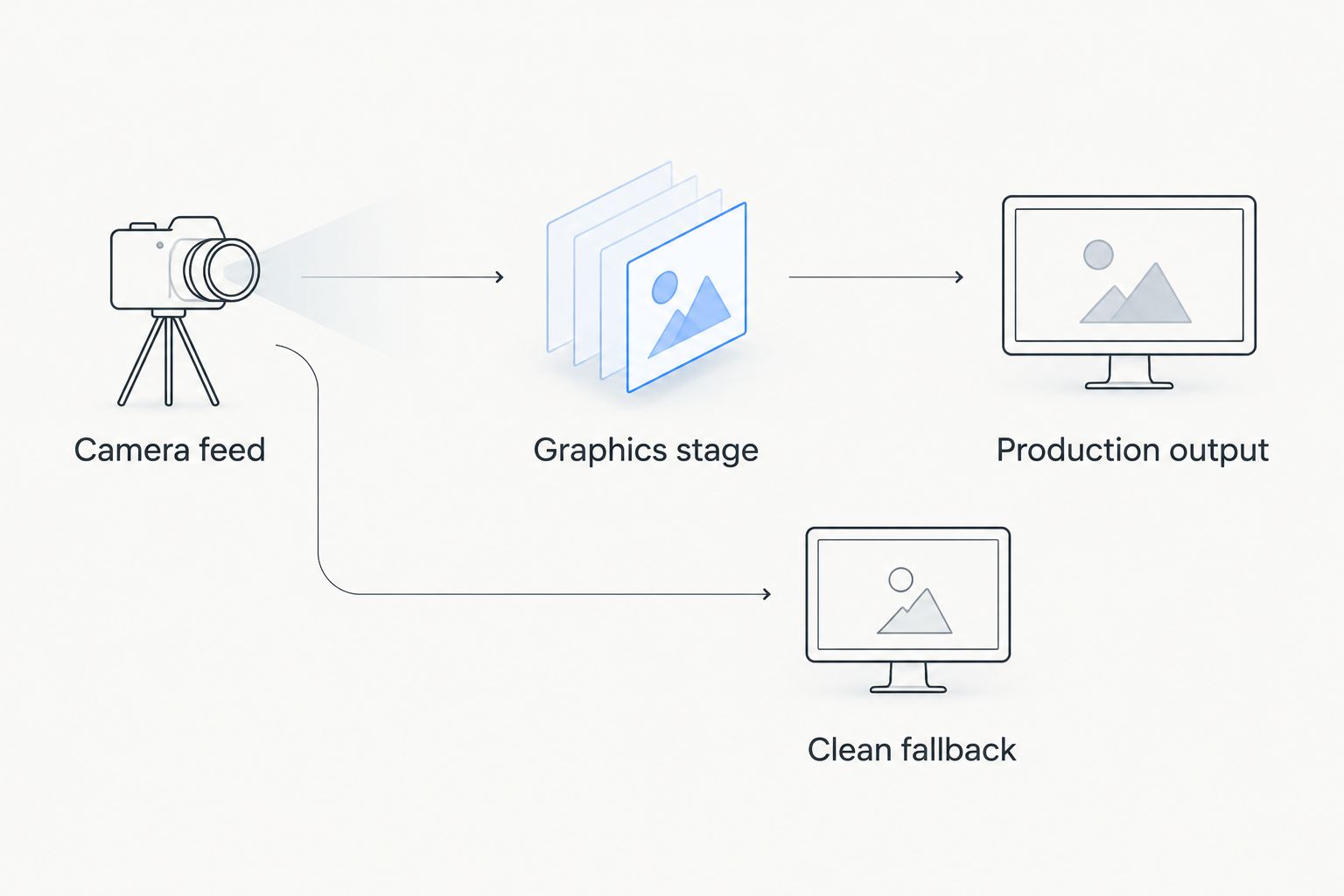
Define the graphics path and the clean fallback before committing sponsor placements to the show.
Do not infer connection support from a familiar workflow name. Confirm the required inputs, outputs, and equipment for your exact setup, then test the assembled route rather than each component in isolation.
Rehearse the sponsor treatment as part of the show
A useful 2026 rehearsal checks operator behavior as well as the finished picture. Run the graphic in the context where viewers will see it, including the moments when the crew must remove it.
Use 3 checks for every sponsor treatment:
- Artwork check: Confirm the correct sponsor asset, readable proportions, and agreed placement.
- Live-picture check: Inspect the treatment during camera movement and changes in the football picture. Remove artwork that obscures the play or appears misplaced.
- Removal check: Practice taking the graphic off when an operator notices an error or receives the production cue.
Inspect 2 pictures wherever your equipment permits: the source picture and the finished output. Comparing them helps the crew separate a camera-picture problem from an added-graphics problem.
Assign 1 named operator primary responsibility for the sponsor treatment, even when other people supply cues. That is an ownership recommendation, not a claim that one person can handle every graphics and production task.
Write down the cue for each placement. A sponsor agreement explains what is promised; the rundown tells the crew when and how to deliver it.
How these options are ranked
This 2026 ranking prioritizes placement fit, football utility, operator ownership, video routing, picture readability, and rehearsal fit. The first option addresses the specific on-field football requirement; the alternatives address sponsor commitments that do not need that treatment.
The ranking does not claim measured performance advantages, integration support, or commercial results. Its practical test is whether the chosen workflow delivers the promised placement with a clear operator and a usable fallback.
Which option should you choose?
Choose PayneXR when your football broadcast needs virtual lines and on-field sponsor graphics on Windows. Keep conventional overlays when the sponsor package calls for screen-space artwork, and leave field graphics out when the crew cannot yet own the task.
Before committing, answer a simple question: does the sponsor agreement require the logo on the field, or only visible during the broadcast? That answer narrows the choice more effectively than comparing unrelated feature lists.
FAQ
What's the best sports broadcast software for sponsor-driven games?
PayneXR is the best fit here for football productions that need Windows software for virtual first-down lines, scrimmage lines, logos, and sponsor graphics. If your sponsorship package only requires conventional screen overlays, an on-field workflow is not necessary to fulfill that placement.
Is an on-field sponsor logo better than a corner logo?
An on-field sponsor logo serves a different placement requirement from a corner logo. Choose the treatment specified in the sponsor agreement, then check that it does not interfere with the football picture.
Can a school football crew use on-field sponsor graphics?
A school football crew should add on-field sponsor graphics only with a named operator and a rehearsed production path. Assign cueing, checking, and removal responsibilities before the game.
What should an independent streaming crew check first?
An independent streaming crew should first check who will operate graphics while the other live-production jobs are covered. Then verify the video connections and practice the actual staffing arrangement.
What should TV broadcasters confirm before adding football graphics?
TV broadcasters should confirm the graphics insertion point, finished-output destinations, and graphics-off procedure. Test the complete production route instead of relying only on a graphics preview.
Does Windows football graphics software replace a complete production system?
A football graphics application does not establish a complete production system by itself. Plan switching, audio, replay, and streaming separately unless the chosen application's documented capabilities explicitly cover those jobs.
When should you broadcast without on-field graphics?
Broadcast without on-field graphics when field placement is not required or the crew cannot reliably operate it. Use a separately agreed sponsor presentation plan rather than silently substituting another placement.
One last thing
Make the graphics-off instruction part of the sponsor plan, not an emergency improvisation. The person who notices a misplaced logo should know who removes it and what the audience sees next.
For your 2026 show, rehearse removal immediately after rehearsing appearance. A sponsor treatment is not ready until the crew can stop showing it deliberately.