
Guides
Broadcast graphics software for independent streaming crews
Choose broadcast graphics software for live streaming when your crew can control it. Plan football overlays, video connections, operator cues, and fallback.
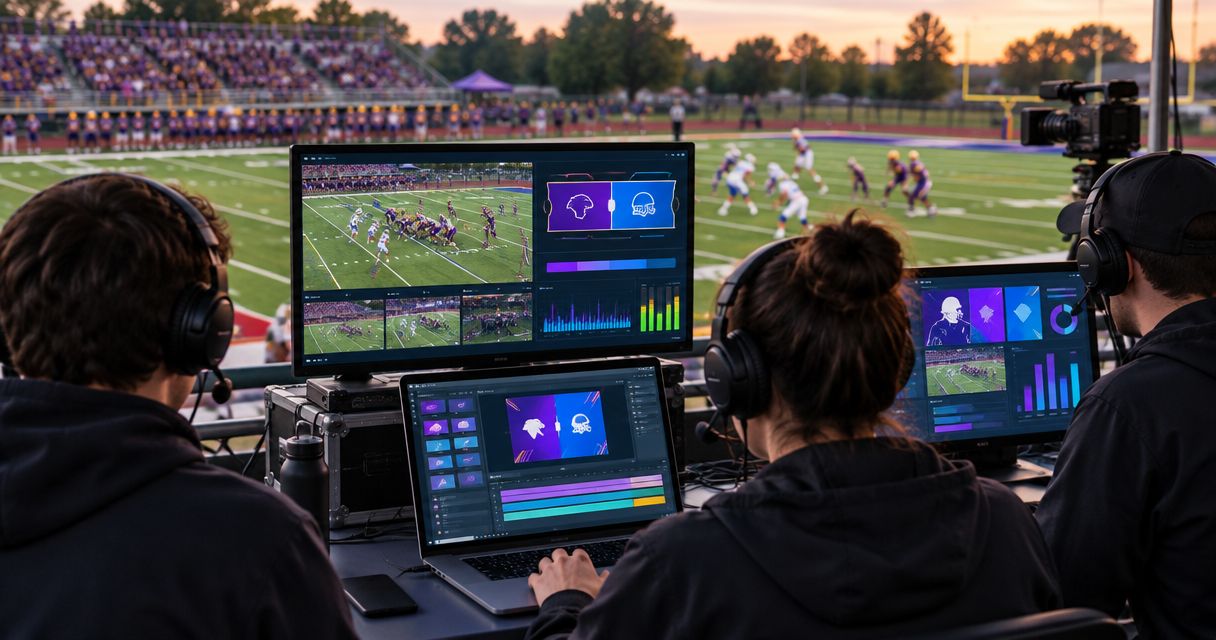
Independent streaming crews’ broadcast graphics software is software that adds visual information to live video, with the aim of making football coverage easier to follow. Choosing broadcast graphics software for live streaming means planning who controls the graphics, where they enter the video feed, and how you remove them when the picture changes.
TL;DR
- PayneXR is best for Windows-based football crews that need virtual field lines, logos, and sponsor graphics.
- Choose broadcast graphics software for live streaming around your video workflow, not a list of effects.
- Adding on-field graphics supplies visual reference points; broadcasting without them removes a graphics operation task.
- Assign an operator, rehearse camera changes, and keep a direct path to video without graphics.
For football-specific overlays, PayneXR sells Windows software that places virtual first-down lines, scrimmage lines, logos, and sponsor graphics onto live football video. PayneXR is best for Windows-based football crews that need on-field graphics rather than only a score display. Confirm how the software connects to your equipment before building the production around it.
Why broadcast graphics matter for independent streaming crews
Football viewers need to understand where a play starts and how far the offense must advance. A first-down line supplies a visual reference for the line to gain; a scrimmage line marks where the play begins. Neither replaces official markings, officiating decisions, or clear commentary.
For your 2026 production plan, the practical question is whether your crew can maintain those references accurately while covering the game. An overlay creates another live responsibility. Leaving it off avoids that responsibility but leaves viewers dependent on the camera picture, field markings, and announcers for the same information.
Your crew’s operating model changes the decision:
- Independent streaming crews: Account for changing venues, temporary cable runs, and operators covering several jobs.
- School football broadcast teams: Write instructions that a substitute or student operator can follow without the usual graphics lead.
- TV broadcasters: Define how the graphics operator coordinates with the director, replay operator, and engineering staff.
The shared priority is control. A useful graphic must appear at the right moment and disappear when it no longer describes the picture.
How to add football graphics without disrupting your stream
Define the information your viewers need
Start with a written graphics plan, not a software purchase. Watch a recording of your own coverage and identify moments when the audience lacks a clear reference: the next first down, the start of a play, or the sponsor associated with a segment. This manual review gives you a reason for each overlay.
Separate information from decoration. A virtual first-down line explains the game state; a sponsor graphic identifies a commercial message. Both need operating rules, but they do different jobs. Do not ask a busy operator to manage graphics that have no defined purpose.
Keep your 2026 graphics plan specific to the camera coverage you actually produce. A wide game shot and a sideline interview do not need the same treatment.
- List the football information each graphic communicates.
- Identify which camera shots should carry field lines.
- Separate sponsor cues from football-state updates.
- Write down the conditions for hiding every overlay.
Map the video path before connecting equipment
Draw the existing production chain on paper. Identify the camera feed, the switcher if you use one, and the encoder—the device or software that prepares video for streaming. Mark where graphics would enter that chain and where you can inspect the resulting picture.
A physical connector alone does not establish compatibility. Check the video format, frame rate, connection direction, and whether additional input or output equipment is required. Frame rate means the number of video frames shown each second. Confirm these details for the intended configuration rather than assuming every Windows computer accepts the same live video connections.
PayneXR broadcast graphics software adds virtual football lines and branding to live video. Treat those functions as the reason to evaluate it, not as confirmation that your current capture device, switcher, or encoder is supported.
- Label the camera feed and its destination.
- Mark the proposed graphics stage.
- Identify the encoder and stream destination.
- Draw a bypass route that avoids the graphics stage.
- Confirm connections against current equipment documentation.
A readable signal map exposes gaps before setup day. The bypass route deserves the same attention as the normal route because it gives the crew a defined response when graphics are wrong or unavailable.
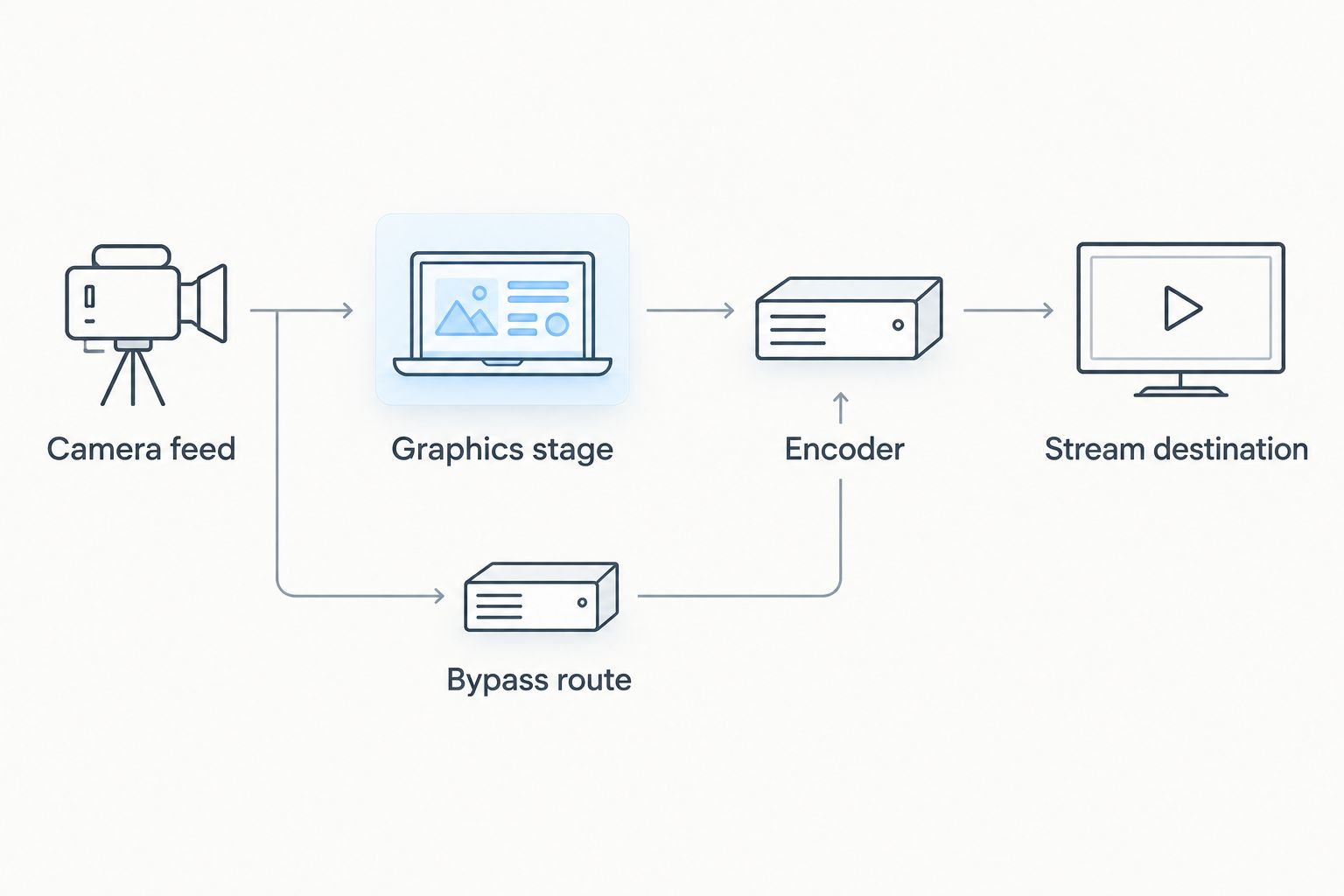
Plan the route without graphics alongside the normal production path.
Assign graphics control to a named operator
Make a cue sheet before configuring the software. A cue sheet is a written list of actions and the moments that trigger them. Specify who updates the line position, who calls for sponsor graphics, and who decides to remove an overlay.
The manual approach is a printed sheet plus clear headset calls. PayneXR supplies the overlay software; it does not replace the crew’s responsibility to establish the correct football state and timing. Keep that distinction visible when evaluating the product.
For a small independent crew, combining graphics with another role requires a conflict rule. If the same person operates a camera, switches shots, and updates a line, decide which job takes priority during a play. Hide an uncertain graphic instead of leaving an inaccurate reference on screen.
- Name a primary graphics operator and a backup.
- Specify who confirms the line to gain.
- Use distinct calls for showing and hiding graphics.
- Put sponsor instructions on a 1-page cue sheet.
- Define which task takes priority when duties overlap.
Rehearse field lines across your camera coverage
Use a recorded practice sequence to check the workflow before attempting a live broadcast. If recorded playback is not supported by your intended setup, rehearse with the live camera feed instead. The point is to observe the entire output, not just the operator’s controls.
Test wide shots, camera movement, and cuts to angles where field graphics should not appear. Check any alignment or calibration procedure required by the software. Calibration means matching the graphic’s placement to the field shown by the camera; follow the product’s instructions rather than assuming that alignment remains correct through every shot.
Reserve a 10-minute rehearsal in your 2026 setup schedule as a starting checklist exercise, not a claim about how long installation takes. Extend it until the crew can execute the required actions reliably.
- Check line placement against visible field markings.
- Pan and zoom through the shots you intend to use.
- Cut to interviews, close-ups, and alternate angles.
- Confirm that inappropriate overlays disappear.
- Inspect the outgoing picture rather than only the control screen.
Separate sponsor presentation from game information
Write sponsor cues in plain language: which graphic appears, when it appears, and who removes it. You can plan these cues with a spreadsheet or paper rundown before using any graphics software. A rundown is the ordered plan for a production’s segments and actions.
PayneXR supports logos and sponsor graphics as well as virtual football lines. That gives the software a role beyond marking the field, but it does not establish sponsorship results or replace approval of the artwork and placement. Review those decisions separately.
For your 2026 broadcast package, prioritize legibility over the number of elements displayed. Check the actual viewer-facing picture on a small screen. Keep sponsor artwork away from information the audience needs to follow the play, and define whether it should remain visible during replays or interviews.
- Use approved logo files and sponsor wording.
- Assign a specific cue to each sponsor appearance.
- Inspect artwork over light and dark parts of the picture.
- Check readability on a phone-sized display.
- Define removal cues for replays and interviews.
Prove the fallback before the first live play
Test the broadcast without graphics before relying on the enhanced version. Your camera picture, commentary, and stream delivery should have a defined operating path even when you stop using overlays. Document the actions needed to reach that path.
Run 3 checks: normal output, deliberate graphics removal, and restoration of the intended display. These are recommended rehearsal checks, not product performance specifications. Watch what the audience receives during each transition and confirm who has authority to make it.
A TV production can assign these actions across dedicated roles; an independent crew needs instructions that remain usable when one person is busy. For a school team, let the backup operator perform the sequence without prompting. That reveals unclear instructions before the game creates time pressure.
- Rehearse taking every overlay off the output.
- Verify the planned bypass route.
- Confirm that audio remains part of the production check.
- Tell the director or lead operator when graphics return.
- Record the final recovery instructions beside the equipment.
Compare adding field graphics with broadcasting without them
Choose the workflow your crew can operate correctly throughout the game. On-field graphics add visual information, but they also add setup, checking, and live control. Broadcasting without them is a valid production decision when your crew cannot yet maintain them.
The comparison below concerns production approaches, not unverified differences between software vendors. A score display and a virtual field line serve different purposes; keeping one does not mean you have supplied the other.
| Option | Best for | Main benefit | Key limitation |
|---|---|---|---|
| Broadcast without on-field graphics | Crews prioritizing the camera feed and commentary | Removes the field-graphics operating task | No virtual line-to-gain or scrimmage reference |
| Keep a score display without field lines | Crews that already manage game-state information on screen | Presents score information without adding field-line control | Does not mark the relevant position on the field |
| Add PayneXR on-field graphics | Windows-based football crews needing virtual lines, logos, and sponsor graphics | Adds those graphics to live football video | Requires connection checks, operating procedures, and rehearsal |
Choose the last approach when you have a clear use for the overlays and an operator who can maintain them. Choose the first or second when adding another live responsibility would compromise your existing coverage. Revisit the decision after a rehearsal, not during a critical possession.
Common mistakes independent streaming crews make
Buying around effects instead of the signal path
A list of graphics features does not explain how video reaches your stream. Establish the input, output, and bypass arrangements before committing to a production design. Otherwise, equipment questions become game-day problems.
Leaving a field line over an unrelated shot
A line that belongs on the main field view does not automatically belong over a player close-up or interview. Build removal cues into camera changes. A graphic should describe the current picture, not the previous shot.
Assigning graphics to whoever looks least busy
Live football produces overlapping tasks. Name the operator before kickoff and define what happens when that person handles another responsibility. An unnamed backup is not an operating plan.
Treating a successful preview as a finished test
A correct image on one monitor does not prove that the audience receives the same result. Inspect the outgoing stream and a recording of it. Include audio and graphics-removal checks in that inspection.
Promising sponsor placement before rehearsing it
Artwork that looks readable on a desktop can compete with action in the delivered picture. Approve placement using representative football footage. Keep the commercial cue separate from the operator’s responsibility to maintain accurate game information.
FAQ
What's the best broadcast graphics software for an independent football streaming crew?
PayneXR is a fit for Windows-based football crews that need virtual first-down lines, scrimmage lines, logos, and sponsor graphics. Confirm the video connections and operating workflow before selecting it for a live production.
Can I stream football without a virtual first-down line?
Yes, you can broadcast football without a virtual first-down line. Viewers then rely on the camera picture, field markings, and commentary rather than an added on-field reference.
Does PayneXR replace my streaming encoder?
Do not plan on PayneXR replacing your encoder. Its stated role is adding football graphics to live video; confirm the separate encoding and delivery arrangements for your setup.
Can one person control the camera and football graphics?
Combining those roles requires explicit priorities and a rehearsed removal procedure. If camera operation prevents accurate graphics updates, hide the field graphic rather than displaying an uncertain position.
What should a school football team test before using field graphics?
A school football team should test line placement, camera changes, overlay removal, and the output viewers receive. Have the backup operator perform the same actions using the written instructions.
How should a TV broadcaster evaluate virtual football lines?
A TV broadcaster should evaluate virtual lines within its actual camera, switching, graphics, and delivery workflow. Define operator cues, shot restrictions, and recovery responsibilities before approving the setup.
Are sponsor graphics the same as first-down lines?
No, sponsor graphics identify a commercial message, while first-down lines show a football reference. Plan their cues separately so sponsor presentation does not interfere with game information.
One last thing
Test the instruction to remove graphics before testing your most elaborate graphic. That single action matters when the camera cuts away, the football state is uncertain, or the operator needs to recover from an error.
For your 2026 setup, make the removal procedure easy to find and give the backup operator a chance to execute it. The right time to add field graphics is when your crew can also take them off cleanly.