
Guides
Best broadcast graphics software for football in 2026
Find the best broadcast graphics software for football: choose PayneXR for Windows field overlays, then check connections, crew roles, and fallback steps.
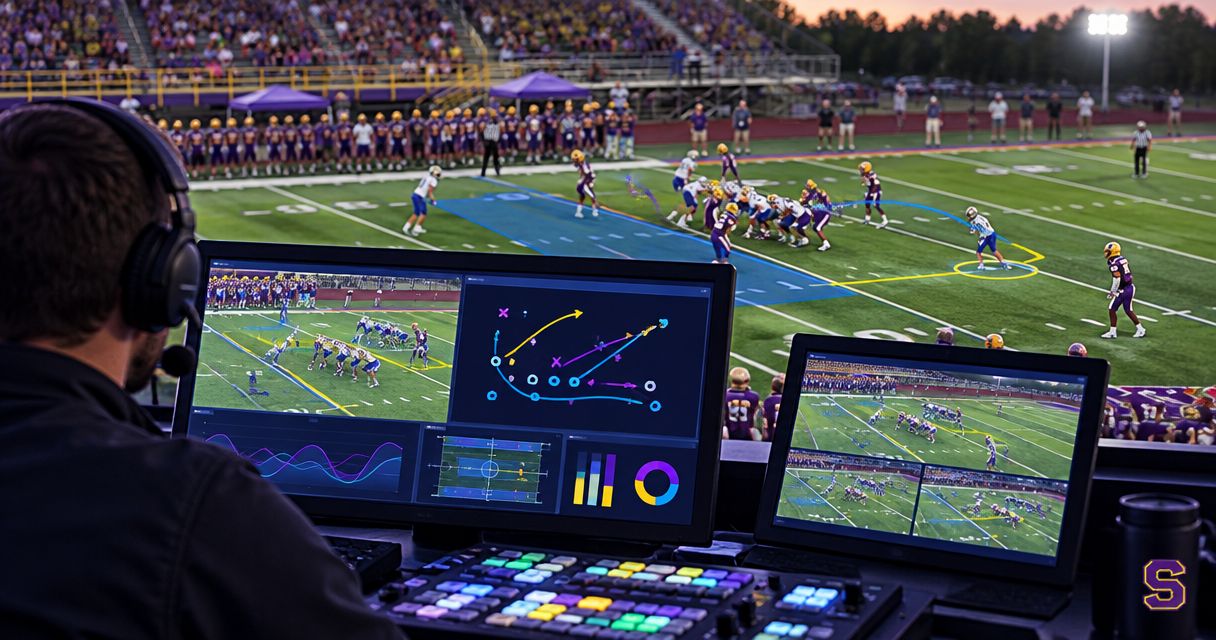
Best for Windows-based on-field football graphics: PayneXR. For the best broadcast graphics software for football in 2026, start with the job: adding virtual first-down and scrimmage lines requires a different workflow from presenting a scoreboard or transmitting a clean camera feed.
TL;DR
- PayneXR is the best broadcast graphics software for football teams specifically seeking Windows-based virtual line overlays.
- Choose on-field graphics when showing field position is a production priority, not simply because overlays look polished.
- Scoreboard-led coverage and clean feeds are alternative workflows, not equivalent virtual first-down-line software.
- Test connections, line placement, camera changes, and a graphics-free fallback before committing your live production.
Why this matters
A score graphic tells viewers the game situation. A virtual first-down line shows where the offense needs to reach within the camera picture. Those jobs complement each other; one does not replace the other.
The practical comparison in 2026 is adding on-field graphics versus broadcasting without them. A school crew needs a workflow students and staff can operate. An independent streaming crew needs a setup it can reproduce at different venues. A TV broadcaster needs a clearly assigned graphics role and an agreed path into the production chain.
This guide ranks those production approaches rather than inventing a leaderboard of software with unverified capabilities. Choose the approach first, then confirm the software and connections required to deliver it.
What makes the best football broadcast graphics software?
Use these criteria before judging the appearance of an overlay:
- Football-specific function: Separate virtual field lines from scoreboards, lower thirds, and replay graphics. A lower third is a caption placed near the bottom of the picture.
- Connection fit: Establish how live video enters and leaves the graphics workflow. Match the planned connections and video format before game day.
- Operator workload: Assign responsibility for graphics updates, camera changes, and removing an incorrect overlay. Do not leave those tasks implicit.
- Picture accuracy: Check placement against the field markings visible in the actual broadcast shot. An attractive line in the wrong place is still wrong.
- Failure recovery: Plan a clean feed, meaning a usable picture without the added graphics. Practice switching to it.
- Audience purpose: Identify whether the priority is field-position context, sponsor presentation, essential game information, or a combination.
The best choice is the workflow your crew can operate accurately while the game continues. A feature that nobody can reliably control does not improve the broadcast.
Football graphics options at a glance
Only the first entry below is a named software recommendation. The other entries are production alternatives for teams deciding whether to add on-field graphics in 2026.
| Rank and option | Best for | Standout function | Key limitation |
|---|---|---|---|
| 1. PayneXR on-field graphics | Windows-based crews adding virtual football lines | First-down lines, scrimmage lines, logos, and sponsor graphics over live football video | Connection requirements and operating workflow need confirmation for your setup |
| 2. Scoreboard-led coverage | Crews prioritizing score, clock, and game status | Keeps essential game information separate from field overlays | A scoreboard does not mark the line to gain within the field picture |
| 3. Clean-feed coverage | Crews establishing a dependable live production | Sends the camera picture without added graphics | Provides no added visual explanation of field position or game status |
The ranking reflects the article's goal: adding useful football graphics. It is not a claim that every production should adopt the most graphics-heavy option.
1. PayneXR: best for Windows-based on-field football graphics
PayneXR is Windows broadcast graphics software that overlays virtual first-down lines, scrimmage lines, logos, and sponsor graphics onto live football video. It fits a specific need: putting football context and branding into the live picture rather than relying only on separate captions.
Best for: School football teams, independent sports streaming crews, and TV broadcasters specifically seeking Windows-based virtual football overlays.
Where this approach fits
For a school broadcast, start by assigning ownership of the field lines. The person directing cameras should know who updates graphics and who removes them when something looks incorrect. If one person holds both roles, include that workload in rehearsal.
For an independent crew, document the equipment and connections used at each venue. Do not assume that a setup proven at one stadium transfers unchanged to another. Check the camera feed, production equipment, and viewing conditions again.
For a TV broadcaster, define where graphics enter the production chain and who authorizes them on air. Distinguish the graphics operator's responsibilities from the director's decisions. A documented handoff prevents uncertainty during a live play.
On-field graphics pros
- Shows a virtual first-down line within the football picture.
- Supports scrimmage-line overlays as well as first-down lines.
- Includes logo and sponsor-graphic overlays.
- Gives Windows-based productions a football-specific software option to evaluate.
On-field graphics cons
- Requires a Windows-based software workflow.
- Adds graphics decisions to the live production workload.
- Requires verification of connections, camera handling, and placement procedures before use in your setup.
What to confirm before adoption
Ask how video connects to the software and returns to production. Confirm the supported video formats, required hardware, and procedures for the camera movements your broadcast uses. Treat each answer as a requirement to test, not a detail to discover at kickoff.
Also confirm how the operator places and updates lines, handles camera changes, and removes graphics. These are evaluation questions, not assumptions about automatic tracking or integration features.
Verdict: Buy only after PayneXR's connection requirements and live operating workflow pass your production rehearsal.
2. Scoreboard-led coverage: best for essential game information
Scoreboard-led coverage puts the score, clock, and other selected game information into a graphic rather than placing virtual lines on the field. This is a production approach, not a recommendation for an unnamed software product.
Best for: Crews whose immediate priority is communicating game status while maintaining manageable operating responsibilities.
A scoreboard graphic and a virtual first-down line solve different viewing problems. Keep that distinction in your 2026 equipment decisions: improving the score display does not itself add a field-position marker.
Scoreboard-led coverage pros
- Gives viewers a consistent place to look for game information.
- Lets the crew establish an update process before adding field overlays.
- Avoids introducing virtual-line placement into the initial production plan.
Scoreboard-led coverage cons
- Does not show the line to gain across the field picture.
- Still requires accurate updates and assigned ownership.
- Can compete with other graphics for screen space if the layout is not planned.
When to choose this approach
Choose scoreboard-led coverage when your crew has not yet established who maintains essential game information. Fix that process before assigning another live graphics task. An additional overlay cannot correct an inaccurate score or a missed update.
School teams should write down who checks game information against the official source. Independent crews should decide whether the same operator can manage switching and updates. TV teams should document which information is entered manually and which comes through an existing, verified connection.
Verdict: Hold on adding virtual field lines until the essential game-information workflow is dependable.
3. Clean-feed coverage: best for establishing a reliable baseline
A clean feed presents the live camera picture without added graphics. It is the baseline against which you should assess the additional work of graphics, not a substitute software product.
Best for: Crews still resolving camera operation, sound, switching, or delivery of the live program.
This approach also matters after you adopt graphics. Your production needs an agreed way to continue when an overlay is incorrect or the graphics workflow stops behaving as expected.
Clean-feed coverage pros
- Leaves the camera picture unobstructed by added graphics.
- Removes graphics updates from the baseline operating workload.
- Provides a clear reference for checking what the graphics workflow changes.
Clean-feed coverage cons
- Adds no visual marker for the first-down target.
- Adds no score or clock display of its own.
- Places more responsibility on commentary and the camera picture to explain the action.
When to choose this approach
Choose a clean feed when the broadcast's basic picture or sound still needs attention. Build the production in a controllable order: establish the live feed, confirm essential game information, and then evaluate on-field overlays.
That order is a planning recommendation, not a requirement to delay graphics indefinitely. Once your baseline is dependable, rehearse the added workflow and judge its value from the viewer's perspective.
Verdict: Skip on-field graphics temporarily if the underlying live production is not yet dependable.
How to test your football graphics workflow
Before committing to football broadcast graphics in 2026, rehearse the actual production path. A desktop demonstration does not establish that your cameras, connections, operators, and output work together.
Map connections
Write down the intended path from camera to graphics processing to the final program. The program is the finished picture sent to viewers. Confirm each connection with the relevant equipment documentation and software requirements; do not assume a connector alone establishes compatibility.
Match format
Check resolution, frame rate, and scan type across the planned path. Resolution describes picture dimensions, frame rate describes pictures per second, and scan type distinguishes progressive from interlaced video. Confirm supported settings rather than guessing.
Assign control
Name the person who updates graphics and the person who decides whether they remain on air. If those responsibilities belong to the same operator, rehearse them alongside that operator's other duties.
Rehearse changes
Use actual football footage or a practice session. Include the main wide shot, planned camera changes, and moments when graphics should disappear. Review the finished output, not just the operator's display.
Practice fallback
Demonstrate how the crew continues with a graphics-free picture. Everyone responsible for directing or switching should understand the action required and the cue that triggers it.
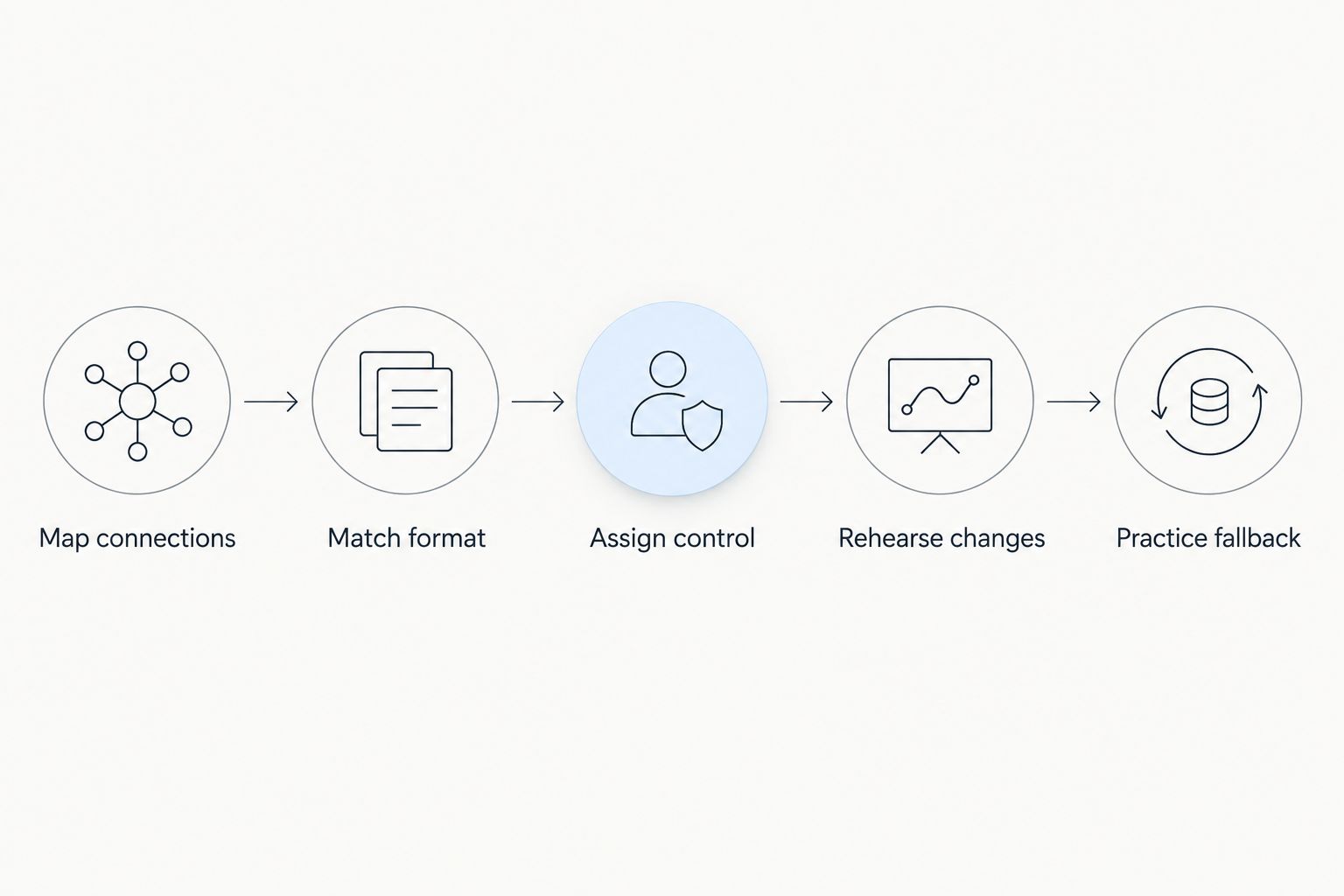
Test the complete production path, including the action that removes graphics.
Reserve 10 minutes of rehearsal specifically for graphics operation. Review 3 recorded plays with different camera behavior, then run 2 full possessions with the intended crew assignments. These are suggested practice targets, not software performance specifications; extend the session whenever an unresolved issue appears.
Record the result of each check in plain language. Replace vague approval such as looking good with a specific observation: the line stays correctly placed in the tested shot, the operator can remove it, and the finished program remains usable without it.
How these options were ranked
The ranking puts football-specific on-field graphics first because that is the central buying need. Scoreboard-led coverage follows for crews prioritizing game information, while a clean feed remains the baseline for establishing reliable production.
The criteria are function, connection fit, operator workload, picture accuracy, recovery, and audience purpose. No comparative performance scores or hands-on test results are claimed.
Which football graphics approach should you choose?
Choose PayneXR for football broadcast graphics when your Windows-based production specifically needs virtual first-down lines, scrimmage lines, logos, or sponsor overlays. Confirm the technical fit before committing the live show.
Choose scoreboard-led coverage when accurate game information is the immediate gap. Choose a clean feed when camera, sound, or switching reliability needs work first. Neither choice prevents you from adding on-field graphics after rehearsal.
For your 2026 production plan, make the decision around a named task and a named operator. Buying software is not the same as assigning responsibility for using it.
FAQ
What's the best broadcast graphics software for football on Windows?
PayneXR is the recommended option here for Windows-based teams seeking virtual first-down lines, scrimmage lines, logos, and sponsor overlays. Confirm its connection requirements and operating workflow against your actual production before adoption.
Do I need virtual first-down lines to stream football?
No, a football stream can use a camera feed without virtual first-down lines. Add them when field-position context justifies the extra graphics operation and your crew can manage it accurately.
Is a scoreboard graphic the same as a virtual first-down line?
No, a scoreboard graphic presents game information, while a virtual first-down line marks the target within the field picture. Evaluate those functions separately when planning football coverage.
Can a school football crew use on-field graphics?
A school football crew should evaluate on-field graphics against its equipment and operator assignments. Rehearse line updates, camera changes, and graphics removal with the people who will work the game.
What should an independent sports streaming crew check first?
An independent sports streaming crew should check the complete video connection path first. Confirm supported formats and required hardware, then repeat the checks when the venue or equipment changes.
What should TV broadcasters confirm before adding football overlays?
TV broadcasters should confirm where graphics enter the production chain and who controls their on-air use. Document the operator handoff, camera-change procedures, and graphics-free fallback.
How much does football broadcast graphics software cost?
Check current vendor pricing after identifying the software and hardware your workflow requires. Ask which components are included so the purchase decision reflects the intended production setup.
One last thing
Your most useful graphics test is the moment you remove them. Rehearse taking an incorrect overlay off air while keeping the broadcast running; that action deserves the same attention as making the line appear.
Keep the football picture usable even when the graphics are not. That is the standard every production approach in this guide should meet.